CMDB Status#
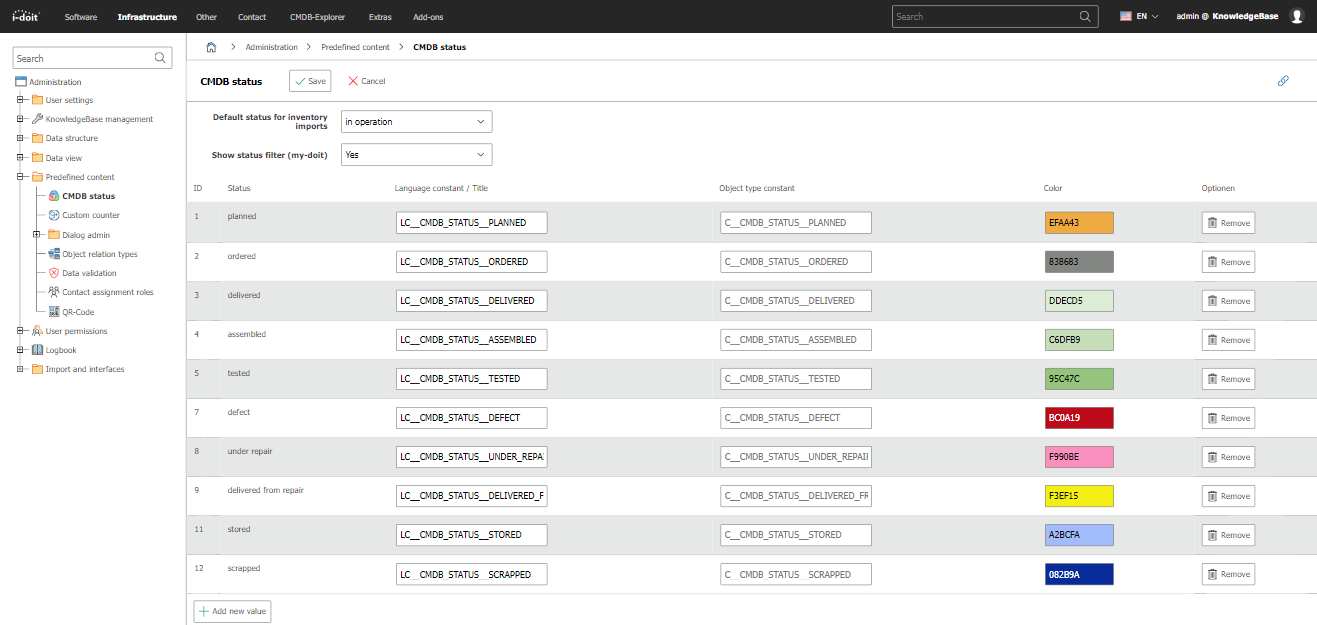
Under Administration → Predefined Content → CMDB Status, you manage the status values that describe the lifecycle of an object in the CMDB. You can organize and edit the existing statuses with the CMDB status function. In addition, you can specify which status is assigned to an imported object and whether the status filter should be displayed.
i-doit already comes with default values such as in operation, planned, defect, inoperative, and stored. You can add your own status values, rename existing ones, or assign them an individual color. Via the status filter in the object lists, objects can be filtered by their current CMDB status. The CMDB status is independent of the condition (normal, archived, deleted) of an object -- both values complement each other to fully represent the lifecycle.
IDs and constants#
Every CMDB status has a numeric ID and a unique constant. In contrast to the title, which is translated and can be renamed at any time, these two values remain stable. Use them whenever a status has to be referenced from outside the interface, for example in the API, in an import, or in another interface.
i-doit is delivered with the following statuses:
| ID | Constant | Default title |
|---|---|---|
| 1 | C__CMDB_STATUS__PLANNED | planned |
| 2 | C__CMDB_STATUS__ORDERED | ordered |
| 3 | C__CMDB_STATUS__DELIVERED | delivered |
| 4 | C__CMDB_STATUS__ASSEMBLED | assembled |
| 5 | C__CMDB_STATUS__TESTED | tested |
| 6 | C__CMDB_STATUS__IN_OPERATION | in operation |
| 7 | C__CMDB_STATUS__DEFECT | defect |
| 8 | C__CMDB_STATUS__UNDER_REPAIR | under repair |
| 9 | C__CMDB_STATUS__DELIVERED_FROM_REPAIR | delivered from repair |
| 10 | C__CMDB_STATUS__INOPERATIVE | inoperative |
| 11 | C__CMDB_STATUS__STORED | stored |
| 12 | C__CMDB_STATUS__SCRAPPED | scrapped |
| 13 | C__CMDB_STATUS__IDOIT_STATUS | i-doit Status |
| 14 | C__CMDB_STATUS__IDOIT_STATUS_TEMPLATE | Template |
Note
In operation, inoperative, i-doit Status and Template are reserved for internal use and cannot be edited. The API returns these four statuses with editable: false.
Statuses that you create yourself are assigned their own IDs, so the table above covers the delivered defaults only. To read the complete list of a specific installation, including your own statuses, use the API method cmdb.status.read. It returns the ID, title, constant and color of every status.
See also#
- Life and Documentation Cycle -- Explanation of condition and CMDB status
- cmdb.status -- Read all statuses of an installation via the API
- Contact Assignment Roles -- Manage additional predefined content