Expert Settings#
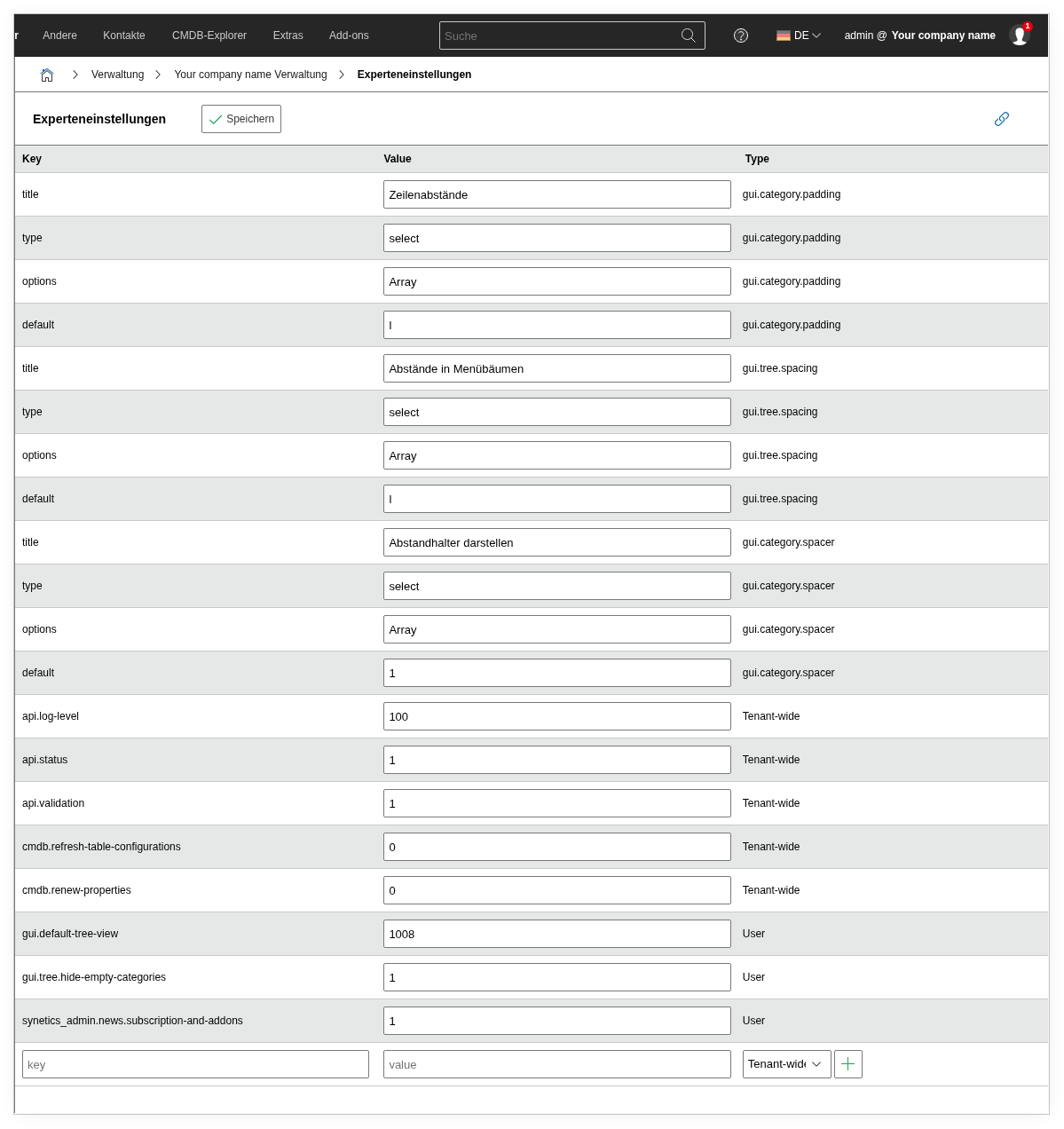
The expert settings under Administration → [Tenant Name] Administration → Expert Settings contain tenant-specific configuration keys. Each setting consists of a Key, a Value, and a Type (Tenant-wide or User).
Split since i-doit v25
Since version 25, the expert settings are split across two locations:
- Here (Administration → Expert Settings): Settings that affect only the current tenant — API behavior, GUI display, internal caches.
- Admin Center → System settings: Settings that affect the entire installation — Login, Proxy, SMTP, Security, permission system. There you can also find the system-wide expert settings via the "Expert settings" link at the top right.
If you are looking for a setting that is not listed here (e.g., auth.active, security.passwort.minlength, cmdb.quickpurge), you will find it in the Admin Center.
Before every change: Create a backup!
Always create a backup before changing values. At the bottom of the table, you can add new keys via the input field.
Tenant settings (Tenant-wide)#
These settings apply to all users of the current tenant.
API behavior#
| Key | Default | What happens when you change it? |
|---|---|---|
api.status | 1 | When set to 0, the JSON-RPC API is disabled for this tenant. All API requests will be answered with an error. External systems (JDisc, monitoring, ticket system) connected via the API will immediately lose connectivity. |
api.validation | 1 | When set to 0, API inputs are not validated. This speeds up mass imports but can lead to inconsistent data — e.g., text in a number field or invalid date formats. Only disable temporarily for migrations. |
api.log-level | 100 | Controls the verbosity of the API log. 100 = DEBUG (log everything), 400 = ERROR (only errors). In production, set to 200 (INFO) or 300 (WARNING) to reduce log volume. |
GUI display#
| Key | Default | What happens when you change it? |
|---|---|---|
gui.category.padding | Row spacing | Controls the vertical spacing between fields in categories. The four rows (title, type, options, default) belong together — only change the default value. |
gui.tree.spacing | Spacing in menu trees | Controls the spacing between entries in the left sidebar (location tree, category tree). Smaller values = more compact display, but harder to click. |
gui.category.spacer | Display spacers | When set to 1, separator lines are displayed between field groups in categories. When set to 0, the category appears more compact but less structured. |
gui.default-tree-view | 1008 | Determines which tree is displayed by default in the left sidebar. 1008 = Object view. Do not change this value unless you know which view ID you want to set. |
gui.tree.hide-empty-categories | 1 | When set to 1, categories without entries are hidden in the sidebar. When set to 0, all assigned categories are displayed — even empty ones. Helpful when users cannot find where to enter data because the category has "disappeared". |
Internal settings#
| Key | Default | What happens when you change it? |
|---|---|---|
cmdb.refresh-table-configurations | 0 | When set to 1, the table configurations (object list columns) are rebuilt on the next load. Useful after an update when columns are missing or incorrectly displayed. Automatically resets to 0 after execution. |
cmdb.renew-properties | 0 | When set to 1, the internal property definitions are regenerated. Like cmdb.refresh-table-configurations, a one-time repair mechanism that resets itself. |
synetics_admin.news.subscription-and-addons | 1 | When set to 0, news notifications about add-ons and subscriptions are hidden on the dashboard. |
CMDB export#
| Key | Default | What happens when you change it? |
|---|---|---|
cmdb.cmdb-export.allow-save-on-filesystem | not set (0) | When set to 1, the CMDB export offers the option Save export data as... again. The export file is then always saved as XML in the temp directory of the i-doit installation. While the key is not set or set to 0, the option is hidden and an export started with this option is downloaded instead. If the key does not exist yet, add it as a new key. Not available in i-doit Cloud. |
User settings (User)#
These settings apply only to the currently logged-in user.
| Key | Default | What happens when you change it? |
|---|---|---|
gui.leftcontent.width | 235 | Width of the left sidebar in pixels. Increase the value if long object names are truncated, e.g., to 300 or 350. Each user can have their own value. |
gui.login.display | user-name | How your name is displayed in the top right: user-name (lfischer), full-name (Dr. Leonard Fischer), full-name-plus (Dr. Leonard Fischer (lfischer)), first-last-name-abbreviation (L. Fischer). |
workflows.max-checklist-entries | 7 | Maximum entries in workflow checklists. |