Find or Reset License Token
To access the Add-on & Subscription Center and to keep your i-doit licensed, you need a valid license token. You receive it when you evaluate or purchase i-doit. The license token authenticates your i-doit instance against the license server and retrieves your license key. If you can no longer find your license token, use the instructions below or contact our sales team.
For questions about licensing or your contract, please contact the Sales Team via
Phone: +49 211 699 31-185
Email: sales@i-doit.com
Overview#
-
I want to retrieve my license token from my running i-doit instance
-
I cannot find my license token and would like to reset it
- How can I reset my token?
- !!! IMPORTANT !!!Apply the new token
Option A: Find the token in the Add-on & Subscription Center (i-doit version 33 and above)#
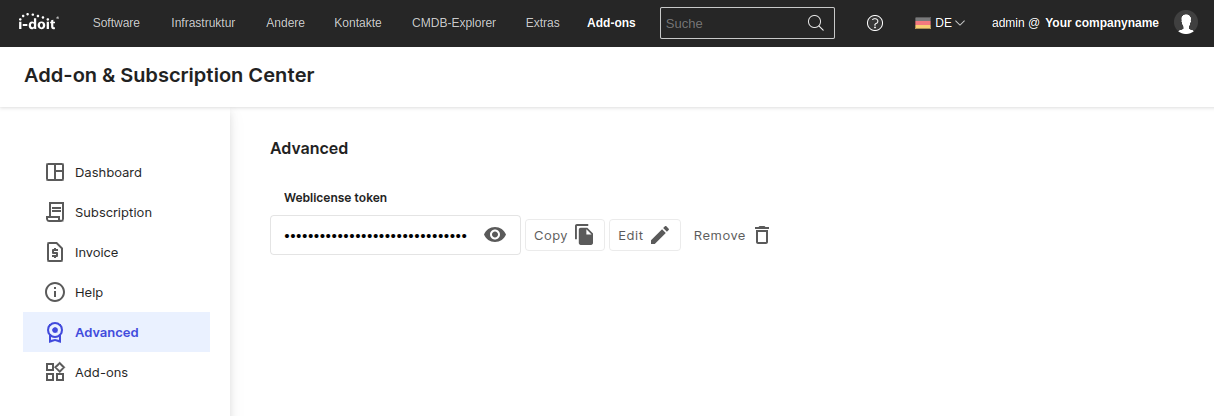
First, open the Add-on & Subscription Center in i-doit. The token is displayed in the Advanced tab under "Weblicense Token".
Option B: Find the token in the Admin Center (i-doit up to version 34)#
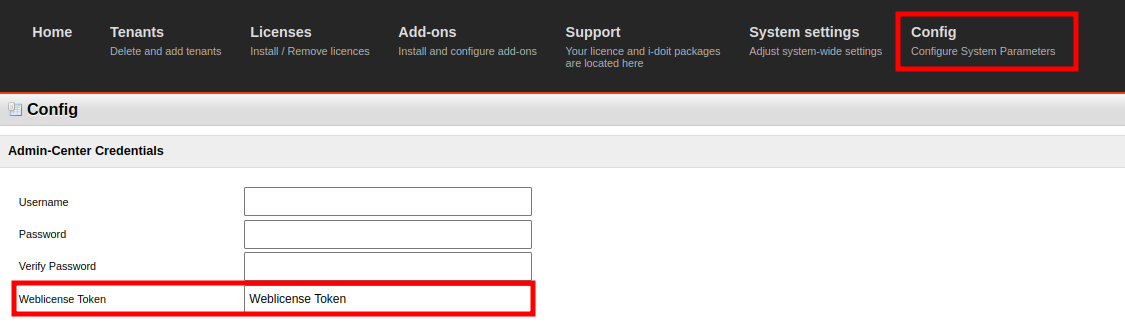
First, log in to the Admin Center. The token is displayed in the Config tab under "Weblicense Token".
Option C: Find the token with operating system access (all versions)#
The "Weblicense Token" is stored in the file .../src/config.inc.php. The token can be displayed directly if this command is adapted to your i-doit installation path:
1 | |
The output will look something like this:
1 2 | |
How can I reset my token?#
If you can no longer find the token, click the "Reset token" button below. You will be redirected to the "Reset token" page in the Customer Portal. There you can request a new token. Simply follow the instructions provided.
IMPORTANT: The old token becomes inactive as soon as a new token is generated. The new token must be activated.
Apply the new token#
To apply the new token, please use our Activate License guide.