Location Cannot Be Saved#
Problem#
When saving in the Location category, an error message appears:
1 2 3 | |
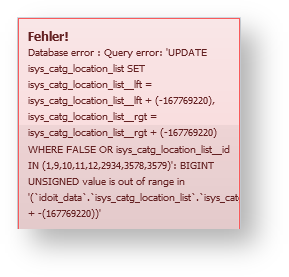
The exact wording of the error message may vary. However, the result is always the same: the location assignment is not saved.
Solution#
This problem frequently occurs when a large number of location assignments have been created by an automated process (e.g., a data import).
To fix the problem:
- Navigate to Administration → System Tools → Cache / Database → Database
- Click Location correction
Afterwards, you can create and modify location assignments without problems.