Category: Access#
The Access category documents the access paths to an object. It is a multi-value category -- multiple entries can be created per object, e.g. a web interface on port 443, an SSH access on port 22, and an iDRAC remote console for out-of-band management.
Clickable links directly in the CMDB
Every URL stored in this category is rendered by i-doit as a clickable link in the interface. A single click opens the device's web interface directly in the browser -- no copy-paste, no looking up addresses. Especially during incidents, when every second counts, this is invaluable. The URL marked as primary additionally appears in the object list, allowing you to jump directly to the device from the list view.
Usage#
Typical use cases:
- Quick access from the CMDB: Store the URL to the web interface of a server, firewall, or network switch. i-doit renders the entry as a clickable link -- one click is all it takes to jump directly to the device in your browser without having to look up the address first. The primary access even appears in the object list -- you don't even need to open the object to use the link.
- Emergency documentation: During an incident, every second counts. When SSH access, iLO console, and IPMI address are already recorded in the CMDB, the on-call team can find the right access path immediately -- even at night, even without prior knowledge of the system. Combine the Access category with the Contact assignment category to know not only how to reach a system, but also who is allowed to access it and who is responsible in case of an outage.
- Onboarding new employees: New colleagues receive a structured overview of all relevant entry points via the Access category: the ticket system via HTTPS, the monitoring server via SSH, the database via RDP to the jump host. This way, the CMDB becomes the central hub for getting started with the IT landscape.
- Overview of access methods: The Report Manager can evaluate which objects use which access types -- helpful for finding all systems that still use unencrypted HTTP or Telnet, for example. A report like "All objects with access type Telnet" uncovers security gaps before the auditor does.
- Integration with network documentation: In combination with Host address, a complete picture emerges: the host address documents the IP, the Access category documents the specific service and port. For a monitoring system, this could mean: Host address
10.10.1.50, Accesshttps://10.10.1.50:9090(Prometheus UI).
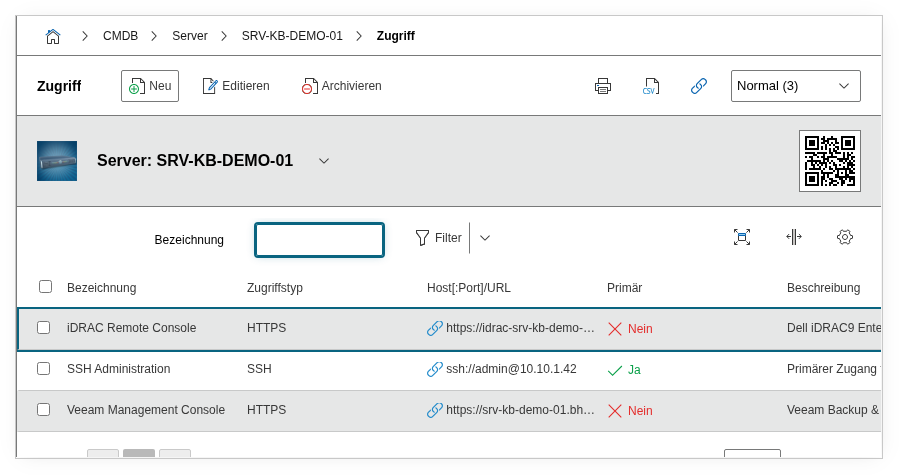
Fields#
Title#
A descriptive name for the access entry, e.g. Web Interface, SSH Access, iDRAC Remote Console, or Monitoring Dashboard. The title appears in the list view of the category and in reports. Choose a name that makes it immediately clear where the link leads and what it is used for.
Access type#
The type of access -- i.e. the protocol or technology used. Dialog+ field with predefined values such as HTTP, HTTPS, SSH, RDP, Telnet, iLO, or iDRAC. Custom values can be added as needed, e.g. VNC, IPMI, or WinRM. The access type determines how i-doit formats the URL in the view and which scheme is used when clicked.
Host[:Port]/URL#
The complete address of the access point. Enter the URL or connection string here, e.g. https://srv-web-01.bhb.local:8443, ssh://admin@10.10.1.100, or rdp://jumphost.intern.local. i-doit renders this value as a clickable link. Make sure to include the protocol prefix and, if applicable, the port so that the link works directly.
Variables and modifiers#
The URL can contain variables that i-doit replaces with values of the object when the link is displayed, for example %hostname%, %ipaddress%, %objectname%, %objid% or %sysid%. In edit mode, the help icon next to the field shows all available variables.
Since i-doit 39 you can change the value of a variable with modifiers. Append the modifier to the variable name with a pipe character. Several modifiers can be chained and are applied from left to right.
| Modifier | Effect |
|---|---|
encode | Applies URL encoding (spaces become +) |
raw-encode | Applies raw URL encoding according to RFC 3986 (spaces become %20) |
lower | Converts the value to lower case |
upper | Converts the value to upper case |
slug | Converts the value to a URL friendly form (slug), umlauts are transliterated |
Example for an object named Web Server 01:
| URL in the field | Result |
|---|---|
https://wiki.example.com/%objectname|lower|slug% | https://wiki.example.com/web-server-01 |
https://search.example.com/?q=%objectname|raw-encode% | https://search.example.com/?q=Web%20Server%2001 |
Unknown modifiers are ignored. The same modifiers can be used in the QR code configuration.
Primary access#
Indicates whether this entry is the preferred access path to the object. Dialog field with values Yes and No. Exactly one entry per object should be marked as primary -- this entry is displayed prominently in overviews and the object list. Typically, this is the web interface or the most frequently used access path.
Description#
Free text for additional notes: credential references (e.g. "Credentials in password manager under entry XY"), special requirements (VPN required, client certificate needed), or restrictions (only accessible from the management network, intended for emergencies only).
Technical reference#
| Property | Value |
|---|---|
| Category constant | C__CATG__ACCESS |
| Type | Global category |
| Multi-value | Yes |
| Assigned to | Server, Client, Blade Server, Router, Switch, Printer, Service, Virtual Server, etc. |
Fields (API reference)#
| Field | API key | Type |
|---|---|---|
| Title | title | Text |
| Access type | type | Dialog+ (extensible selection) |
| Host[:Port]/URL | url | Text |
| Primary access | primary | Dialog (selection) |
| Description | description | Text field (multi-line) |
API examples#
Create entry#
1 2 3 4 5 6 7 8 9 10 11 12 13 14 15 16 17 | |
Read entries#
1 2 3 4 5 6 7 8 9 10 | |
Update entry#
1 2 3 4 5 6 7 8 9 10 11 12 13 14 15 16 17 | |