Category: Address#
The Address category documents the physical mailing address of an object. It is a single-value category -- each object has exactly one address entry with street, house number, postal code, city, region, and country.
Location vs. Address
The Location category describes the hierarchical position of an object within the location structure (Country > City > Building > Room > Rack > Server). The Address category, on the other hand, stores the physical mailing address -- i.e. the information that a delivery service, a technician, or the fire department needs to find the building. Both categories complement each other: the location provides the context in the CMDB tree, the address provides real-world reachability.
Usage#
Typical use cases:
- Hardware shipping and on-site deployments: When a replacement part needs to be delivered to a location, the address provides the complete delivery address. Technicians can see at a glance where they need to go -- especially valuable with distributed locations that have similar building names.
- Compliance and data protection: For audits and data protection documentation, it is essential to know where data is physically stored. Using the Address category, reports can evaluate in which country and region the buildings are located that house servers -- relevant for GDPR and third-country transfers.
- Emergency planning: In a crisis (fire, flood, power outage), emergency responders need to be quickly navigated to the correct address. A report on all buildings with addresses immediately provides a complete location list for BCM.
- Facility management: The number of floors (
Storiesfield) provides a quick overview of the building size. In combination with the location hierarchy (Building > Floor > Room), a complete picture of the spatial structure emerges.
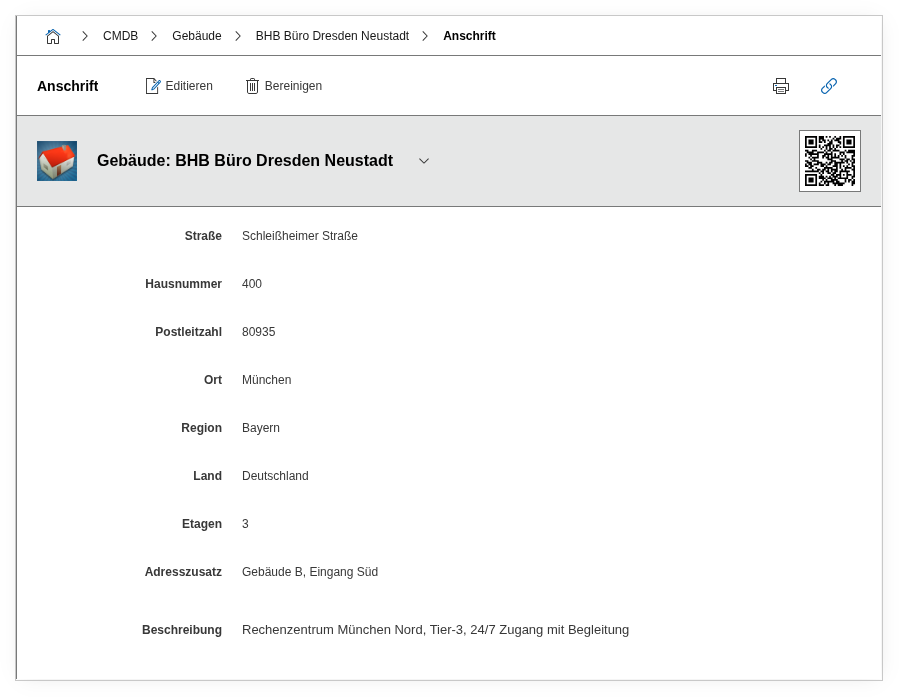
Fields#
Street#
The street of the location, e.g. Duesselberger Strasse. Together with the house number, this field forms the core address information. It is frequently displayed as the first address field in reports.
House number#
The house number, e.g. 1 or 12a. As a separate field, addresses can be searched and sorted more flexibly than with a combined street field.
Postal code#
The postal code, e.g. 40223. Particularly useful for regional evaluations: reports can identify all locations in a specific postal code range -- for example, to define service areas or assign service providers regionally.
City#
The city name, e.g. Duesseldorf. Together with postal code and country, a unique localization results.
Region#
State, canton, or province, e.g. North Rhine-Westphalia or Zurich. Free text field -- especially relevant for international organizations where legal requirements vary by region.
Country#
The country, e.g. Germany or DE. Free text field. For GDPR-relevant evaluations (third-country transfer), consistent spelling is crucial -- it is best to use ISO 3166 country codes so that reports can filter reliably.
Stories#
The number of floors of the building. This field provides a quick size indicator and is helpful when planning network cabling (backbone risers), fire protection zones, or elevator capacities.
Additional address information#
Free text field for anything that does not fit into the structured fields: rear entrance access, gate code, directions, reception contact, or special delivery instructions (e.g. "Loading dock available Mon-Fri 7am-4pm only").
Description#
General free text field for further notes about the location: remarks on renovations, planned location changes, or references to external documentation.
Technical reference#
| Property | Value |
|---|---|
| Category constant | C__CATG__ADDRESS |
| Type | Global category |
| Multi-value | No |
| Assigned to | Building, Organization |
Fields (API reference)#
| Field | API key | Type |
|---|---|---|
| Street | street | Text |
| House number | house_no | Text |
| Postal code | postcode | Text |
| City | city | Text |
| Region | region | Text |
| Country | country | Text |
| Stories | stories | Integer |
| Additional address information | address | Text field (multi-line) |
| Description | description | Text field (multi-line) |
API examples#
Create entry#
1 2 3 4 5 6 7 8 9 10 11 12 13 14 15 16 17 18 19 20 21 | |
Read entries#
1 2 3 4 5 6 7 8 9 10 | |
Update entry#
1 2 3 4 5 6 7 8 9 10 11 12 13 14 15 | |