Category: Software assignment#
The Software assignment category links software objects with the host on which they are installed. It is a multi-value category -- multiple assignments can be created per object, e.g. when a server has an operating system, a database, and several business applications installed.
Important to understand: Software is maintained in i-doit as an independent object of type Application -- with its own categories for variants, versions, and licenses. The Software assignment category does not document the software itself, but exclusively the relationship between a software and a specific host. This allows the same software to be assigned to multiple hosts without duplicating master data.
Software object must exist first
The most common support question about this category: "Why can't I assign software?" The answer: The software object must first exist as an independent object of type Application -- only then does it appear in the object browser of this category. The Software assignment does not create new software objects, it only links existing ones. So create an object "Apache HTTP Server" of type Application first, before assigning it to a server.
Usage#
Typical use cases:
- Software inventory: Record for each server, client, or switch which software is installed in which version. This produces a complete picture of the software landscape per device. In combination with the Operating system category -- which maps the operating system separately -- a seamless software profile emerges.
- License management: Via the "Assigned license" field, each installation is assigned to a specific license object. Each link counts as one consumed license. In conjunction with the License assignment category, you can evaluate how many licenses are consumed and where over- or under-licensing is imminent. If the license assignment is missing, the installation is reported as unlicensed in license reports -- an important signal for procurement.
- Version tracking and patch management: Through the documented version number per host, reports can determine which systems are still running an outdated version and need an update. A concrete example: The report "All servers with Java version < 17" provides the basis for a targeted update campaign -- and simultaneously documents the compliance status for auditors.
- Compliance audits: Reports on the Software assignment provide an auditable overview of all installed applications -- including installation date, version, and license assignment. Since each entry also includes the type (operating system, software, firmware, service), targeted evaluations can be created, e.g. "All hosts with firmware older than 2024".
- Mapping dependencies: Via the "Target database schema" and "Used databases" fields, dependencies between applications and databases can be documented. In case of a failure, a glance at this link immediately shows which applications are affected when a database instance goes down.
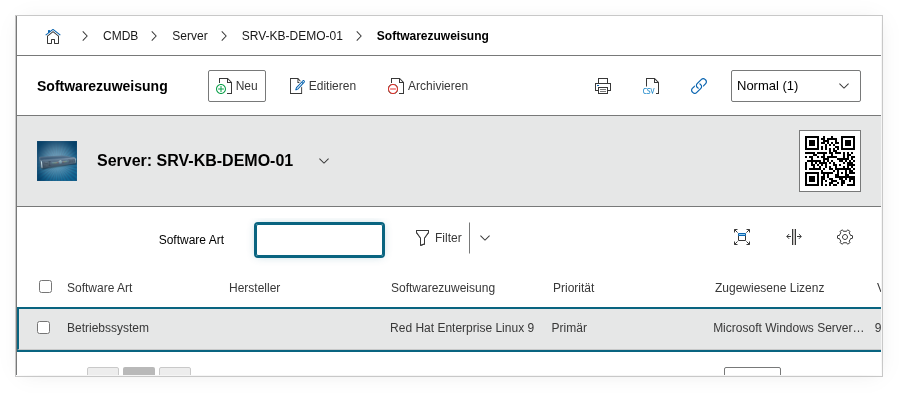
Fields#
Application#
The software object assigned to this host. It must exist as a separate object of type Application in i-doit before it can be linked here. Examples: Microsoft SQL Server, Apache HTTP Server, SAP ERP. The desired software object can be searched and selected via the object browser.
Type#
Classifies the type of assigned software. The available dialog values are:
- Operating system -- e.g. Windows Server 2022, Debian 12
- Software -- classic application software
- Firmware -- e.g. BIOS/UEFI versions, switch firmware
- Service -- background services
The distinction is important for reports: this allows filtering specifically for all hosts whose operating system falls below a certain version, for example.
Priority#
Indicates whether the software is considered a primary or secondary application on the host. Primary means that the host is mainly operated for this software -- such as a dedicated database server. Secondary identifies auxiliary or supplementary software such as monitoring agents or backup clients.
Assigned license#
Links the installation with a specific license object in i-doit. This license object contains the license details (license type, quantity, key). Through the link here, a license is counted as "consumed". If no license is assigned, the installation is reported as unlicensed in license reports.
Assigned IT service#
Assigns the software installation to an IT service. This is particularly useful for ITSM processes: when an IT service like "Email" is defined, all related software installations (Exchange Server, spam filter, antivirus on the mail server) can be assigned to this service. Outages can then be directly traced back to affected services.
Variant#
The product variant or edition of the software, e.g. Enterprise, default, Community, Professional. Dialog field -- the available variants are defined on the software object itself in the "Variants" category and are available for selection here.
Version number#
The specific installed version of the software on this host, e.g. 2024.1, 8.0.32, 22H2. Dialog+ field -- new versions can be entered directly or chosen from the version list stored on the software object. This field is central to patch management reports.
Target database schema#
Links the software installation with a database schema object. Relevant for applications that access a specific database schema -- e.g. an ERP application that uses the schema SAP_PROD on a SQL server.
Used databases#
Links the software installation with database objects used by this application. Unlike the target database schema, the database instance itself is referenced here. Useful for mapping dependencies between applications and databases.
installation date#
The date on which the software was installed on this host. Helpful for lifecycle tracking and compliance evidence -- e.g. to prove when a security update was applied.
Description#
Free text for additional details: installation notes, configuration specifics, ticket references to the change, or other remarks about the software assignment.
Technical reference#
| Property | Value |
|---|---|
| Category constant | C__CATG__APPLICATION |
| Type | Global category |
| Multi-value | Yes |
| Assigned to | Server, Client, Virtual Server, Switch, Router, Blade Server, etc. |
Fields (API reference)#
| Field | API key | Type |
|---|---|---|
| Application | application | Object browser (link) |
| Type | application_type | Dialog (selection) |
| Priority | application_priority | Dialog (selection) |
| Assigned license | assigned_license | Object browser (link) |
| Assigned IT service | assigned_it_service | Object browser (link) |
| Variant | assigned_variant | Dialog (selection) |
| Version number | assigned_version | Dialog+ (extensible selection) |
| Target database schema | assigned_database_schema | Object browser (link) |
| Used databases | assigned_databases | Object browser (link) |
| installation date | installDate | Date/Time |
| Description | description | Text field (multi-line) |
API examples#
Create entry#
1 2 3 4 5 6 7 8 9 10 11 12 13 14 15 16 17 18 19 20 | |
Read entries#
1 2 3 4 5 6 7 8 9 10 | |
Update entry#
1 2 3 4 5 6 7 8 9 10 11 12 13 14 15 | |