Category: Backup (assigned objects)#
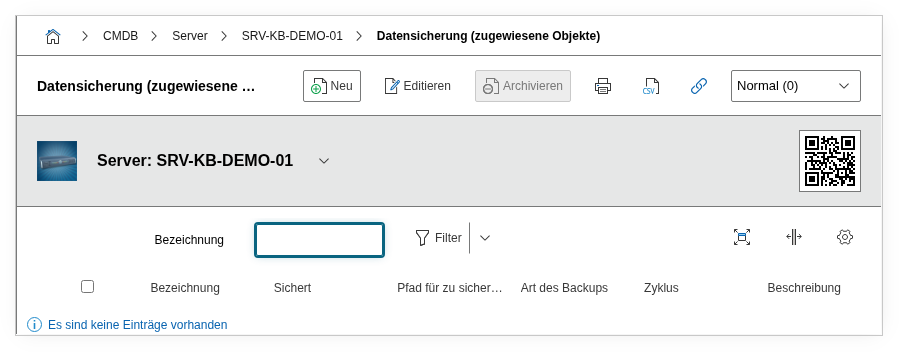
The Backup (assigned objects) category shows the reverse link of the Backup category. While the Backup category on a source object defines where it is backed up to, this category shows on the backup server (or storage) which objects are backed up by it. It is a multi-value category -- any number of backed-up objects can be listed per backup server.
Understanding the reverse link
You always maintain the backup relationship on the source object in the Backup category. There you enter: "Server X is backed up to Backup Server Y, type full backup, cycle daily." The Backup (assigned objects) category on Backup Server Y is then automatically populated -- it shows all objects that reference Y as a backup target. You do not need to (and cannot) manually create data here.
Usage#
Typical use cases:
- Backup server documentation: See at a glance which systems are backed up by a specific backup server. If the backup server fails, it is immediately clear which systems are affected and need to be backed up manually.
- Capacity planning: If a backup server is becoming too full, the list of all assigned objects shows which backups could be redistributed. In combination with the
Storage pathfield, an overview of the directory structure emerges. - Audit and compliance: Auditors frequently ask: "Which systems are protected by this backup server?" This category delivers the answer without manual effort -- provided the Backup category is properly maintained on the source objects.
- Impact analysis: During planned maintenance or decommissioning of a backup server, the list of assigned objects shows the full impact -- each system listed there needs an alternative backup target.
Fields#
Title#
The title of the backup entry as assigned on the source object in the Backup category. Serves for quick identification of the backup job, e.g. "Nightly full backup" or "DB dump daily".
Backups#
Link to the source object -- i.e. the system that is being backed up. Via this object browser link, you navigate directly to the backed-up server, client, or application.
Backup type#
The type of backup, e.g. Full backup, Incremental, or Differential. Dialog+ field whose values can be adapted to your own backup strategy.
Cycle#
The frequency of the backup, e.g. Daily, Weekly, or Hourly. Dialog+ field -- custom cycles can be added.
Storage path#
The path where the backup is stored on the backup server, e.g. /backup/veeam/srv-db-01/ or \\nas02\backups\exchange. Helpful for troubleshooting and capacity planning at the filesystem level.
Description#
Free text for additional details: retention period, encryption status, responsible team, or references to the backup policy.
Technical reference#
| Property | Value |
|---|---|
| Category constant | C__CATG__BACKUP__ASSIGNED_OBJECTS |
| Type | Global category |
| Multi-value | Yes |
| Assigned to | Server, Blade Server, etc. |
Reverse category
The data in this category comes from the Backup category of the assigned source objects. Changes must be made there. Write access via the API to C__CATG__BACKUP__ASSIGNED_OBJECTS technically affects the backup entries of the source objects.
Fields (API reference)#
| Field | API key | Type |
|---|---|---|
| Title | title | Text |
| Backups | backup | Object browser (link) |
| Backup type | backup_type | Dialog+ (extensible selection) |
| Cycle | cycle | Dialog+ (extensible selection) |
| Storage path | path_to_save | Text |
| Description | description | Text field (multi-line) |
API examples#
Read entries#
1 2 3 4 5 6 7 8 9 10 | |
Update entry#
1 2 3 4 5 6 7 8 9 10 11 12 13 14 15 16 17 | |