Category: Backup#
The Backup category documents the backup configuration of an object. It is a multi-value category -- multiple entries can be created per object, e.g. when a server is protected by multiple backup jobs with different cycles and backup types.
Interaction with the Backup (assigned objects) category
This category documents what an object is backed up by. The counterpart category Backup (assigned objects) shows the reverse direction: which objects are backed up to a specific backup server? Both categories together form the complete picture of data protection in the CMDB. If you want to check on the backup server which systems it backs up, you will find the answer there.
Usage#
Typical use cases:
- Backup documentation: Record for each object which backup jobs are configured, which backup server performs the backup, and where the data is written. Together with the counterpart category Backup (assigned objects) on the backup server, a seamless picture of data protection emerges.
- Preparing disaster recovery: The target path and backup type are crucial in an emergency. When a system needs to be restored, this category immediately shows where the backup data is located and how it was created -- without anyone having to search through backup logs first.
- Reminders and reports: The cycle value can be used in the Report Manager to identify systems whose backup is overdue or whose backup cycle does not meet the requirements. In combination with the notification system, automatic reminders can be generated.
- SLA tracking: Combine the Backup category with the Contract assignment to prove that the contractually agreed backup SLAs (RPO/RTO) are being met. A report can then show: "All systems with SLA Gold have a daily full backup."
- Audit and compliance: In audits, it can be demonstrated that critical systems are regularly backed up and that the backup strategy meets the requirements. Backup type, cycle, and target path provide the necessary evidence.
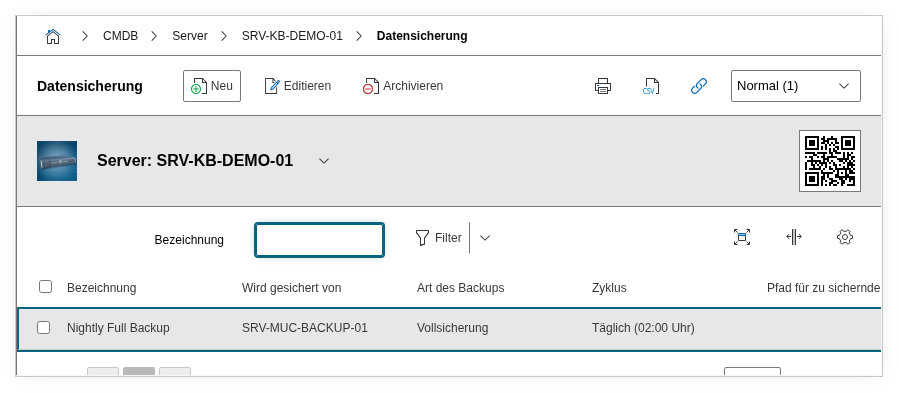
Fields#
Title#
The name of the backup job, e.g. Daily Full Backup or Weekly Incremental DB. This value appears in the list view of the category and in reports.
Backed up by#
The object that performs the backup -- typically a backup server or a backup appliance. A link to the corresponding object in the CMDB is established via the object browser. This link is bidirectional: on the linked backup server, the current object automatically appears in the Backup (assigned objects) category. This allows tracing who backs up whom from both the backed-up system and the backup server.
Backup type#
The type of backup. Dialog+ field with predefined values such as Full backup, Incremental, or Differential. Custom values can be added as needed.
Cycle#
The rhythm at which the backup is performed. Dialog+ field with values such as Daily, Weekly, or Monthly. Custom values can be added as needed. This field is particularly valuable for automated reports: a report on all objects with cycle Weekly or Monthly shows at a glance which systems are backed up less frequently and may need adjustment.
Target path#
The path where the backup data is stored, e.g. /backup/srv-web-01/ or \\backup\share. This field is critical in the disaster recovery case: when a system needs to be restored, the target path is the first piece of information the operations team needs. Document the path as precisely as possible -- including share name or mount point, so that no time is wasted searching during an emergency.
Description#
Free text for additional details: retention periods, encryption, responsible contacts, restore instructions, or specifics in the backup configuration.
Technical reference#
| Property | Value |
|---|---|
| Category constant | C__CATG__BACKUP |
| Type | Global category |
| Multi-value | Yes |
| Assigned to | Server, Client, Blade Server, Service, Virtual Server, etc. |
Fields (API reference)#
| Field | API key | Type |
|---|---|---|
| Title | title | Text |
| Backed up by | backup | Object browser (link) |
| Backup type | backup_type | Dialog+ (extensible selection) |
| Cycle | cycle | Dialog+ (extensible selection) |
| Target path | path_to_save | Text |
| Description | description | Text field (multi-line) |
API examples#
Create entry#
1 2 3 4 5 6 7 8 9 10 11 12 13 14 15 16 17 18 | |
Read entries#
1 2 3 4 5 6 7 8 9 10 | |
Update entry#
1 2 3 4 5 6 7 8 9 10 11 12 13 14 15 | |