Category: Cable connection#
The Cable connection category documents the physical properties of a cable object: type, color, length, and occupancy. It is a single-value category and is exclusively assigned to the Cable object type.
The cabling concept in i-doit
The cabling documentation in i-doit is based on three building blocks:
- Connector category (Connector) on the end devices -- defines the physical ports/sockets (e.g. RJ45, LC Duplex).
- Cable object with this category -- describes the physical cable itself (type, length, color).
- Connection between two connectors via a cable object -- the cable "connects" Connector A with Connector B.
A cable is therefore an independent object that mediates between two connectors. The Cable connection category describes the properties of this cable, while the Connector category on the end devices defines the endpoints.
Usage#
Typical use cases:
- Physical network documentation: Every patch cable, every fiber optic connection, and every power cable can be recorded as its own object. The Cable connection category records whether it is Cat6a, OM4 fiber optic, or a power cable -- important for bandwidth planning, attenuation calculations, and fire protection.
- Color coding and organization: The color field can document the color coding of patch cables. Many data centers use color schemes (red = management, blue = production, yellow = DMZ). A report on all cables in a specific rack including color helps identify cabling errors.
- Length planning: Cable length is critical when planning new connections. Cat6a cables may have a maximum of 90m fixed installation + 10m patch cable. Reports can evaluate which connections are at this limit.
- Fiber optic documentation: The
Maximum number of fibers/leadsfield documents the available fiber count for fiber optic cables. Together with the occupancy, it shows how many fibers are still available -- essential for capacity planning in fiber optic infrastructure. - Inventory: Reports can list all cables of a specific type or color -- helpful during retrofit projects (e.g. switching from Cat5e to Cat6a).
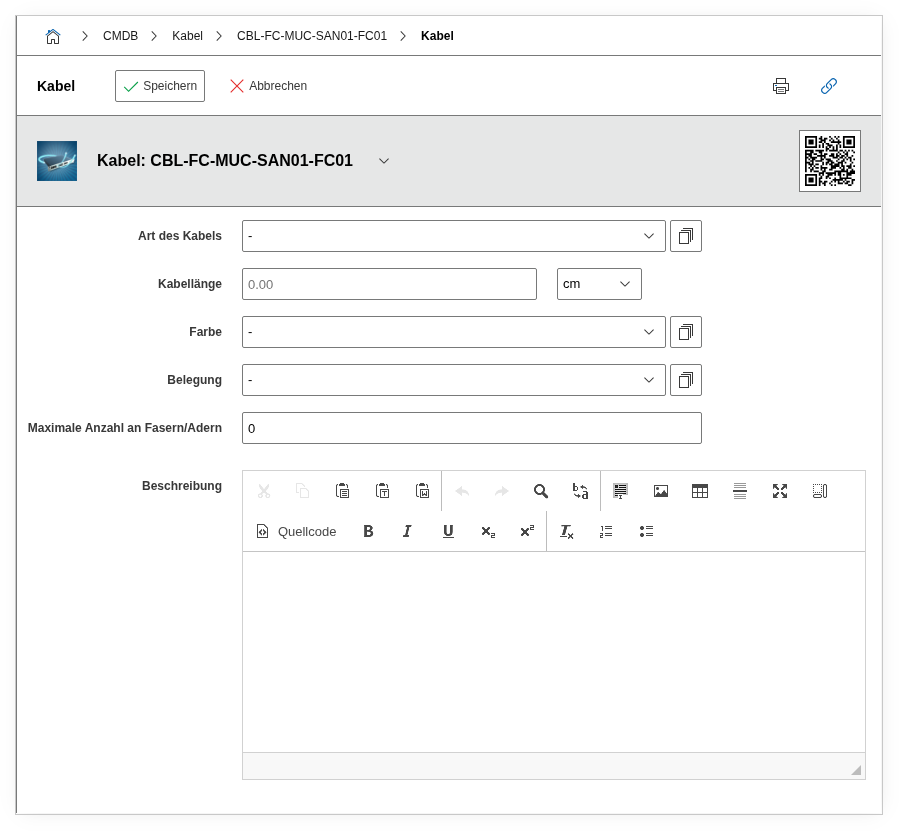
Fields#
Cable type#
The type of cable, e.g. Cat 6a, Cat 7, OM4 Fiber, Power cable, or USB. Dialog+ field -- custom cable types can be freely added. This value determines what performance characteristics (bandwidth, attenuation, current capacity) the cable has and is the most important information for network and infrastructure planning.
Color#
The physical color of the cable or cable sheath, e.g. Blue, Red, Yellow. Dialog+ field. Color coding in professional environments is not a cosmetic detail but an organizational system: production networks, management networks, and DMZ connections are often color-separated to identify mis-cabling at first glance.
Occupancy#
The occupancy type of the cable, e.g. Fully occupied, Partially occupied. Dialog+ field. Particularly relevant for fiber optic bundles: a 24-fiber cable may currently have only 12 fibers in use.
Cable length#
The physical length of the cable as a decimal number. In combination with the length unit, the exact value results. For copper cables in the LAN, the length is directly relevant for signal quality (max. 100m for Cat6a). For fiber optic, the length determines the attenuation budget.
Length unit#
The unit of measurement for the cable length, e.g. m (meters) or cm. For consistency in reports, it is recommended to use a uniform length unit throughout the entire CMDB.
Maximum number of fibers/leads#
The maximum number of fibers (for fiber optic) or leads (for copper bundles) in the cable. For an OM4 bundle with 24 fibers, this would be 24. In combination with the occupancy, the free capacity can be calculated.
Connection#
Shows the current connection of the cable -- i.e. which two connectors are connected by this cable. This field is a calculated display and is determined by the cabling in the Connector category of the end devices.
Description#
Free text for additional information: cable routing (e.g. "cable tray ceiling, north run"), installation date, responsible electrician, or reference to the cabling plan.
Technical reference#
| Property | Value |
|---|---|
| Category constant | C__CATG__CABLE |
| Type | Global category |
| Multi-value | No |
| Assigned to | Cable |
Fields (API reference)#
| Field | API key | Type |
|---|---|---|
| Cable type | cable_type | Dialog+ (extensible selection) |
| Color | cable_colour | Dialog+ (extensible selection) |
| Occupancy | cable_occupancy | Dialog+ (extensible selection) |
| Cable length | length | Decimal |
| Length unit | length_unit | Dialog (selection) |
| Maximum number of fibers/leads | max_amount_of_fibers_leads | Integer |
| Connection | connection | Text (calculated display) |
| Description | description | Text field (multi-line) |
API examples#
Create entry#
1 2 3 4 5 6 7 8 9 10 11 12 13 14 15 16 17 18 19 | |
Read entries#
1 2 3 4 5 6 7 8 9 10 | |
Update entry#
1 2 3 4 5 6 7 8 9 10 11 12 13 14 15 16 | |