Category: Cloud#
The Cloud category records where a resource runs in a public cloud: the provider, the account or subscription, the region and the current state. It is a single-value category, so each object has exactly one Cloud entry. The category is provider-agnostic: the same fields are used for AWS, Azure and Google Cloud resources.
New in i-doit 39
The Cloud category is available as of i-doit 39. During the update it is assigned automatically to the object types Server, Cluster, Virtual client, Virtual server and Database instance. The new object type Cloud Storage also uses it.
Usage#
Typical use cases:
- Cloud inventory: Document virtual machines, managed databases and storage buckets together with the provider and the account they are billed to.
- Region overview: Use the Report Manager to list all resources in a given region, for example before a data protection review or a planned region migration.
- Account assignment: The field Account / Subscription holds the AWS account ID, the Azure subscription or the Google Cloud project. This makes it easy to find all resources that belong to one account.
- State tracking: The field State shows whether a resource is running, stopped or already terminated. Combined with the CMDB status this helps to find objects that still exist in the CMDB but are no longer active in the cloud.
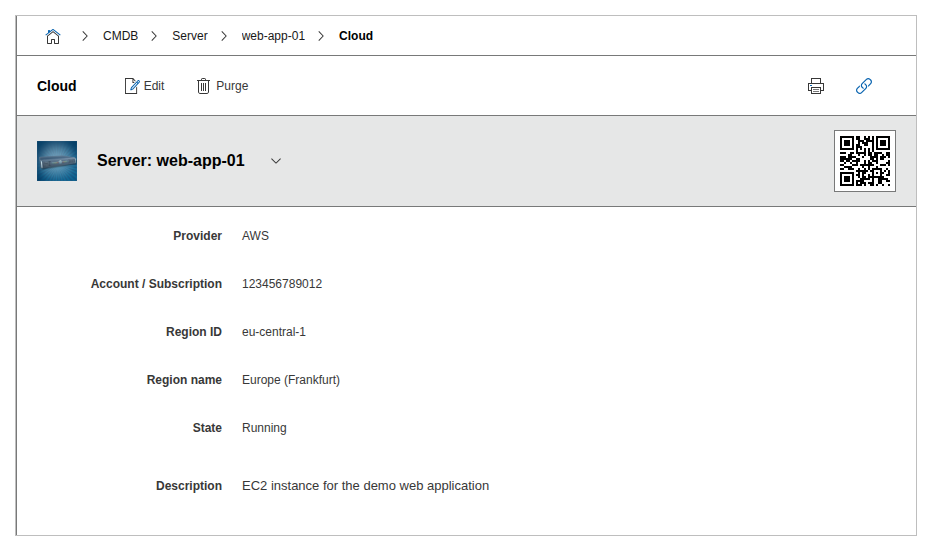
Fields#
Provider#
The cloud provider of the resource. Dialog+ field with the predefined values AWS, Azure and GCP. Further providers can be added directly in the field or via the Dialog-Admin.
Account / Subscription#
The account in which the resource is located, for example an AWS account ID (123456789012), an Azure subscription or a Google Cloud project ID.
Region ID#
The technical region identifier as used by the provider, for example eu-central-1 (AWS), westeurope (Azure) or europe-west3 (Google Cloud).
Region name#
The readable name of the region, for example Europe (Frankfurt).
State#
The current state of the resource. Dialog+ field with the predefined values Running, Stopped, Pending, Stopping and Terminated. Further values can be added.
Description#
Free text for additional information, for example the purpose of the resource or notes on the cloud contract.
Technical Reference#
| Property | Value |
|---|---|
| Category Constant | C__CATG__CLOUD |
| Type | Global category |
| Multi-Value | No |
| Assigned to | Server, Cluster, Virtual Client, Virtual Server, Database Instance, Cloud Storage |
Fields (API Reference)#
| Field | API Key | Type |
|---|---|---|
| Provider | provider | Dialog+ (extensible selection) |
| Account / Subscription | account | Text |
| Region ID | region_id | Text |
| Region name | region_name | Text |
| State | state | Dialog+ (extensible selection) |
| Description | description | Text field (multi-line) |
API Examples#
Create Entry#
1 2 3 4 5 6 7 8 9 10 11 12 13 14 15 16 17 18 | |
Read Entries#
1 2 3 4 5 6 7 8 9 10 | |
Update Entry#
1 2 3 4 5 6 7 8 9 10 11 12 13 | |