Category: Cluster members#
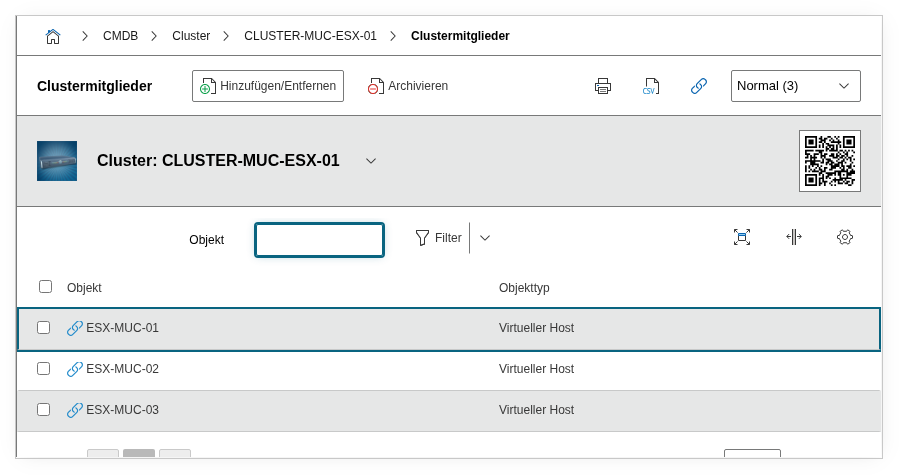
The Cluster members category lists the servers and hosts that belong to a cluster as nodes. It is maintained on the cluster object and is a multi-value category -- any number of members can be assigned per cluster.
Cluster members vs. Cluster memberships
This category is the host side of the cluster relationship: it is maintained on the cluster object and shows which servers belong to it. The counterpart is the Cluster memberships category, which is maintained on the individual servers and shows there which cluster the server belongs to. Both sides automatically create a relation -- an entry on one side automatically appears on the other.
Usage#
Typical use cases:
- Mapping cluster topology: Define which physical or virtual servers form the nodes of a cluster. For a VMware HA cluster, these are the ESXi hosts; for a Kubernetes cluster, the worker nodes; for a database cluster, the replication nodes.
- Failure analysis and impact assessment: When a server needs to be maintained or shut down, the member list immediately shows which clusters are affected. Together with the quorum field, you can assess whether the cluster can tolerate the loss of a node or whether an additional node must be provisioned first.
- Capacity planning: The number of cluster members determines the total available capacity. Reports can evaluate which clusters have only the minimum number of nodes and provide no room for failure.
- Lifecycle management: When replacing a server, the old member is archived and the new one assigned. The change history seamlessly documents when each node joined or left the cluster.
Fields#
Cluster member#
An object browser field through which servers, hosts, or other objects are linked as members of the cluster. It supports multiple selection -- you can assign multiple servers at once in one step. Each assignment automatically creates a relation and a corresponding entry in the Cluster memberships category on the linked server object.
Do not maintain members from both sides simultaneously
Since the assignment is bidirectional, it is sufficient to make it either here (on the cluster) or in the Cluster memberships (on the server). Changes on one side are automatically reflected on the other side.
Technical reference#
| Property | Value |
|---|---|
| Category constant | C__CATG__CLUSTER_MEMBERS |
| Type | Global category |
| Multi-value | Yes |
| Assigned to | Cluster |
Fields (API reference)#
| Field | API key | Type |
|---|---|---|
| Cluster member | member | Object browser (link) |
API examples#
Create entry#
1 2 3 4 5 6 7 8 9 10 11 12 13 | |
One member per API call
Although the interface supports multiple selection, the API expects one member value per call. To assign three servers, send three separate requests.
Read entries#
1 2 3 4 5 6 7 8 9 10 | |
Update entry#
1 2 3 4 5 6 7 8 9 10 11 12 13 14 | |