Category: Cluster (Overview)#
The Cluster (Overview) category is the global overview category for cluster objects. It shows a summary of the entire cluster configuration at a glance: quorum status, assigned administration services, members, and cluster services. It is a single-value category and serves primarily as an entry point -- the actual data maintenance takes place in the respective detail categories.
Overview vs. detail categories
This category (C__CATG__CLUSTER_ROOT) summarizes information that is maintained in several separate categories. The fields here are mostly read-only -- changes are made in the detail categories:
- Quorum and description: Cluster (specific) (
C__CATS__CLUSTER) - Administration services: Cluster service assignment (
C__CATG__CLUSTER_ADM_SERVICE) - Members: Cluster members (
C__CATG__CLUSTER_MEMBERS)
Usage#
Typical use cases:
- Quick overview in daily operations: Open a cluster object and see at a glance how many nodes are assigned, whether a quorum is active, and which management service controls the cluster. Without having to switch between multiple categories, you get the complete picture.
- Dashboard and report basis: Since the overview category bundles all essential cluster information, it is suitable as a data source for reports that present the cluster status of all systems on one page.
- Entry point for navigation: From here, you navigate to the detail categories with a click. The displayed members and services are linked -- a click leads directly to the respective server or service object.
- Incident management: In an emergency, the overview immediately provides answers to the most important questions: How many nodes does the cluster have? Is a quorum configured? Which management service is responsible?
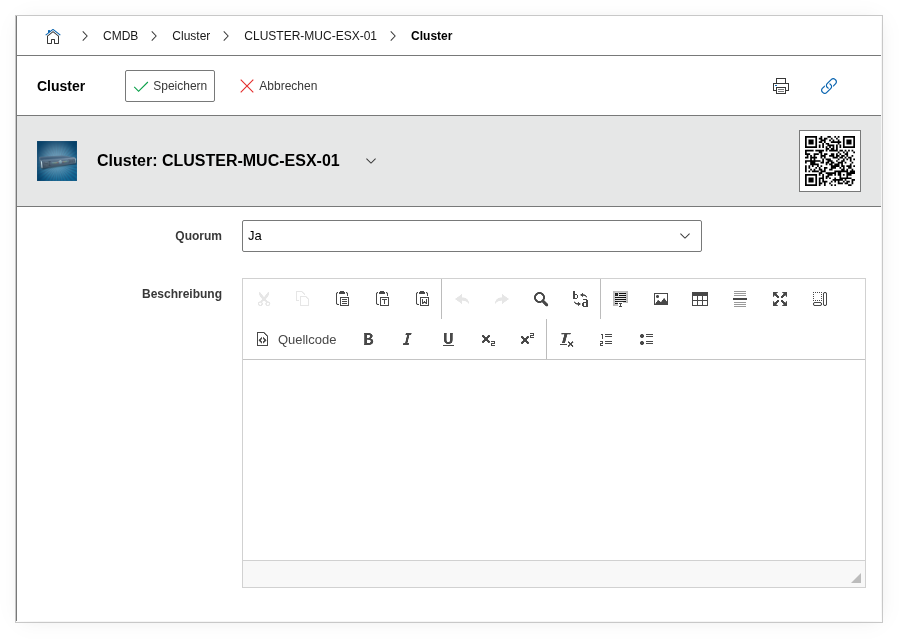
Fields#
Quorum#
Shows whether a quorum is configured for the cluster (Yes / No). The value is taken from the specific category Cluster. An active quorum means that the cluster only continues operating with the majority of nodes during a network partition -- a central protection mechanism against split-brain situations.
Administration service#
Lists the management services assigned to the cluster via the Cluster service assignment category. Typical examples: VMware vCenter, Microsoft Failover Cluster Manager, Pacemaker. The display is read-only -- changes are made in the service assignment category.
Cluster members#
Shows the servers and hosts registered as nodes in the cluster. Maintenance is done in the Cluster members category. Each entry is a link to the corresponding server object.
Number of cluster members#
The total number of assigned cluster members as a numeric value. Particularly useful for quick plausibility checks -- if a 3-node cluster suddenly shows only 2 members, action is needed.
Cluster service assignment#
Lists the services and applications assigned to the cluster. These assignments define which services run on the cluster (e.g. database service, web server service).
Description#
Free text with supplementary information about the cluster. Taken from the specific category Cluster.
Technical reference#
| Property | Value |
|---|---|
| Category constant | C__CATG__CLUSTER_ROOT |
| Type | Global category |
| Multi-value | No |
| Assigned to | Cluster |
Fields (API reference)#
| Field | API key | Type |
|---|---|---|
| Quorum | quorum | Dialog (selection: Yes/No) |
| Administration service | administration_service | Text (read-only) |
| Cluster members | cluster_members | Text (read-only) |
| Number of cluster members | cluster_member_count | Text (read-only) |
| Cluster service assignment | cluster_service | Text (read-only) |
| Description | description | Text field (multi-line) |
API examples#
Create entry#
1 2 3 4 5 6 7 8 9 10 11 12 13 14 | |
Read entries#
1 2 3 4 5 6 7 8 9 10 | |
Update entry#
1 2 3 4 5 6 7 8 9 10 11 12 13 14 15 | |