Category: Cluster service assignment#
The Cluster service assignment category links services, applications, and database schemas with a cluster object. It is a multi-value category -- any number of service assignments can be created per cluster, because a cluster typically provides multiple applications and services simultaneously.
While the Cluster category describes the cluster itself (members, quorum, management instance), the Cluster service assignment answers the crucial question: Which services run on this cluster, and on which nodes? This bridges the gap between the infrastructure level (hardware, nodes) and the service level (applications, databases).
Interaction with the Service assignment
The Cluster service assignment is the cluster counterpart to the Service assignment category for individual servers. When you migrate a service from a single server to a cluster, you move the assignment from the Service assignment to this category -- keeping the service documentation consistent.
Usage#
Typical use cases:
- Documenting high availability: Record which applications run on the cluster, on which nodes they are active, and which node is the default server. In a failover scenario, this documentation immediately shows which node can take over which service.
- Failover planning: The Runs on field shows on which cluster members a service runs. The Default server marks the preferred node. During a planned maintenance window, you can verify whether all services can switch to the remaining nodes.
- Storage and network assignment: Via the Volumes and Shares fields, the drives and shares used by the service are documented directly on the cluster service. This is especially indispensable for Cluster Shared Volumes (CSV) or NFS mounts, because storage paths must also be correct during a failover.
- Database clusters: The Database schema field links a database schema with the cluster service. This makes it traceable which database runs on which cluster -- helpful for DBA teams during maintenance and capacity planning.
- Service status tracking: The Service Status shows whether a cluster service is active (
Running) or deactivated (Disabled). Reports can filter which cluster services are currently productive.
Create cluster members first
The Runs on and Default server fields reference the cluster members. These must be assigned first in the Cluster category before they appear as options here. So first create the cluster object, assign the members, and then create the service assignments.
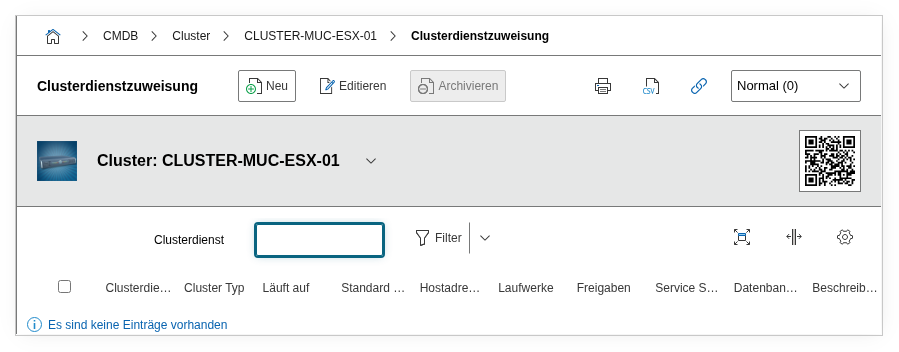
Fields#
Type#
The type of cluster service, e.g. Active/Active or Active/Passive. This dialog field classifies the failover model and is helpful in reports for distinguishing between active-active and active-passive configurations.
Cluster service#
The application or service object that runs on the cluster. Here, an object from the Application, Cluster Service, DBMS, Middleware, or Service categories is linked. A single cluster object can have multiple service assignments with different applications.
Host addresses#
The IP addresses through which the cluster service is reachable. Typically these are virtual or floating IPs that migrate to the active node during failover. These addresses come from the IP category of the cluster members.
Volumes#
The drives and volumes used by the cluster service. For Windows Failover Clusters, these are e.g. Cluster Shared Volumes; for Linux HA clusters, DRBD volumes or shared SAN LUNs.
Shares#
The network shares (SMB/NFS) linked to the cluster service. Relevant especially for file server clusters, where shares must migrate to the new active node during failover.
Runs on#
The cluster members on which this service runs or can run. For an Active/Active cluster, all active nodes are assigned here; for Active/Passive, the primary and standby nodes.
Default server#
The preferred node for this service. In normal operation, the service runs on this server; after a failover and subsequent failback, the service is ideally moved back here.
Database schema#
A linked database schema object. This documents which database instance is operated on the cluster -- helpful for DBA teams to understand dependencies between application, cluster, and database.
Service status#
The current status of the service assignment: Running (active, productive) or Disabled (deactivated). Enables distinguishing between active and decommissioned cluster services in reports.
Description#
Free text for additional information: failover sequence, special dependencies, maintenance window notes, or links to runbooks.
Technical reference#
| Property | Value |
|---|---|
| Category constant | C__CATG__CLUSTER_SERVICE |
| Type | Global category |
| Multi-value | Yes |
| Assigned to | Cluster |
Fields (API reference)#
| Field | API key | Type |
|---|---|---|
| Type | type | Dialog (selection) |
| Cluster service | cluster_service | Object browser (link) |
| Host addresses | hostaddresses | Object browser (link) |
| Volumes | drives | Object browser (link) |
| Shares | shares | Object browser (link) |
| Runs on | runs_on | Dialog list |
| Default server | default_server | Dialog (selection) |
| Database schema | assigned_database_schema | Object browser (link) |
| Service status | service_status | Dialog (selection) |
| Description | description | Text field (multi-line) |
API examples#
Create entry#
1 2 3 4 5 6 7 8 9 10 11 12 13 14 15 16 17 18 | |
Read entries#
1 2 3 4 5 6 7 8 9 10 | |
Update entry#
1 2 3 4 5 6 7 8 9 10 11 12 13 14 15 16 | |