Category: Cluster#
The Cluster category is a specific category of the Cluster object type. It defines the basic properties of a cluster object: which type the cluster has, whether a quorum is configured, and which administration service handles management. It is a single-value category -- each cluster object has exactly one entry.
Specific category vs. global cluster categories
This category (C__CATS__CLUSTER) is the specific category available only on objects of type Cluster. It differs from the global overview category Cluster (Overview) (C__CATG__CLUSTER_ROOT), which provides a summary view. Additionally, the global categories Cluster members and Cluster service assignment exist for detailed maintenance.
Usage#
Typical use cases:
- Documenting high availability: Record whether a cluster operates as Active/Passive HA, Active/Active load balancing, or HPC cluster. This information is indispensable when it must be quickly determined during an outage whether automatic failover kicks in or manual intervention is necessary.
- Proving quorum configuration: The quorum determines how many nodes must be available for the cluster to remain operational. Without documented quorum, a central piece of information is missing during audits and emergency planning -- especially in split-brain scenarios.
- Assigning administration service: Which management software (e.g. VMware vCenter, Microsoft Failover Cluster Manager, Pacemaker) controls this cluster? This link provides clarity about where configuration changes are made and who is the first point of contact in case of problems.
- Interaction with member categories: The specific Cluster category provides the "what and how" of the cluster, while Cluster members documents the "who" (which servers belong to it) and Cluster memberships documents the counterpart on the individual servers.
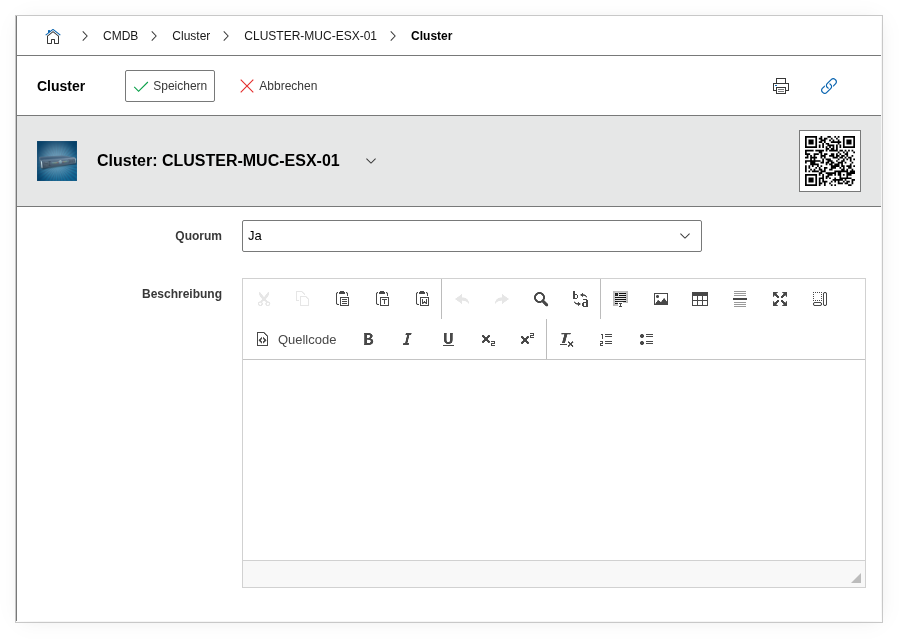
Fields#
Quorum#
Specifies whether a quorum is configured for this cluster. Possible values are Yes and No. A quorum ensures that during a network partition (split-brain), only the majority group of nodes continues operating. With an odd number of nodes, the quorum arises automatically; with an even number, a witness node or quorum disk is often required. Document here whether such a mechanism is active.
Administration service#
Shows the linked management services that control this cluster. The actual maintenance of this assignment takes place in the Cluster service assignment category. Only the summary is displayed here -- e.g. a vCenter Server object or a Pacemaker service.
Cluster members#
Shows the servers and hosts that are members of this cluster. The actual maintenance takes place in the Cluster members category. This field is a summary and is not directly editable.
Number of cluster members#
Shows the total number of assigned cluster members. Useful for a quick overview of whether all expected nodes are assigned -- if the number deviates from the target, a member may be missing.
Cluster service assignment#
Lists the services and applications assigned to the cluster. The maintenance of service assignments takes place in the corresponding sub-category.
Description#
Free text for supplementary details: cluster type (HA, load balancing, HPC), failover strategy, special dependencies, maintenance windows, or recovery notes.
Technical reference#
| Property | Value |
|---|---|
| Category constant | C__CATS__CLUSTER |
| Type | Specific category |
| Multi-value | No |
| Assigned to | Cluster |
Fields (API reference)#
| Field | API key | Type |
|---|---|---|
| Quorum | quorum | Dialog (selection: Yes/No) |
| Administration service | administration_service | Text (read-only) |
| Cluster members | cluster_members | Text (read-only) |
| Number of cluster members | cluster_member_count | Text (read-only) |
| Cluster service assignment | cluster_service | Text (read-only) |
| Description | description | Text field (multi-line) |
API examples#
Create entry#
1 2 3 4 5 6 7 8 9 10 11 12 13 14 | |
Read entries#
1 2 3 4 5 6 7 8 9 10 | |
Update entry#
1 2 3 4 5 6 7 8 9 10 11 12 13 14 15 | |