Category: Contact assignment#
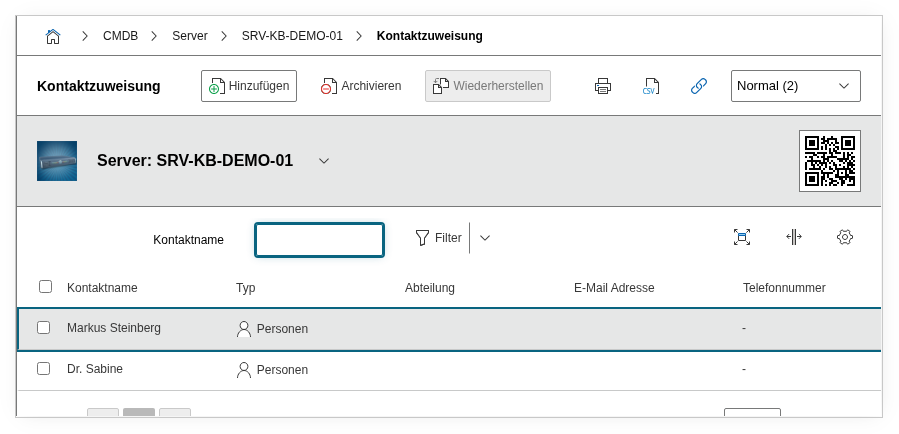
The Contact assignment category links persons or person groups with an object in a specific role. It is a multi-value category -- any number of contacts can be assigned per object, e.g. an administrator, a responsible person, and multiple users simultaneously.
One of the most important categories in i-doit
The Contact assignment is far more than an address list. It controls who receives notifications, who gets permissions, and who appears as the responsible person in reports. Without maintained contact assignments, notifications go nowhere, the permission system does not apply, and during outages nobody knows who to call. Invest in clean data here from the start -- it pays off in all other areas of i-doit.
Usage#
Typical use cases:
- Mapping responsibilities: Assign the responsible persons or teams to each object -- such as the administrator of a server, the owner of an application, or the person responsible for a location. In case of a failure, a glance at the contact assignment immediately shows who is responsible and needs to be contacted.
- Controlling notifications: The i-doit notification system uses the contact assignment as the recipient list. When e.g. a contract expires or an object is changed, the assigned contacts are automatically informed. Without a contact assignment, these notifications reach nobody -- this is one of the most common reasons why notifications "don't work".
- Role-based permissions: The roles in the contact assignment are directly linked to the permission system. You can configure permissions so that e.g. only contacts with the role
Administratormay edit an object, while contacts with the roleUserhave read-only access. The role is therefore not just a label but has operational implications. - Defining primary contact: Via the "Primary contact" field, you specify which person is the main point of contact for an object. This contact appears prominently in reports and is the first escalation level. For servers, this is typically the responsible administrator; for applications, the application owner.
- Reporting and evaluations: The Report Manager can create evaluations such as "All servers without an assigned administrator" or "All objects for which person X is responsible". This makes the contact assignment the foundation for responsibility reports and handovers during personnel changes.
Fields#
Contact object#
The person or person group assigned to the object. Existing persons, person groups, or organizations can be selected via the object browser. This value appears in the list view of the category and in reports. Tip: assign person groups instead of individual persons when the responsibility is tied to a team -- this way, only the group membership needs to be adjusted during personnel changes, not every individual contact assignment.
Role#
The role in which the contact is assigned to the object, e.g. Administrator, Responsible, or User. Dialog+ field -- custom roles can be added as needed to adapt the role structure to your own organization. The role is not just a descriptive label -- it is evaluated by the permission system. If you configure permissions based on contact roles, this field determines what rights the assigned contact receives on the object.
Primary contact#
Specifies whether this contact is the primary point of contact for the object. Only one contact per object should be marked as primary. The selection is made via Yes or No. The primary contact is the person who is contacted first during outages, inquiries, or escalations. In reports, this contact is displayed prominently -- maintain this field consistently so that in an emergency it is clear who the first point of contact is.
Description#
Free text for additional details: availability, backup arrangements, areas of responsibility, or other notes about the contact assignment.
Technical reference#
| Property | Value |
|---|---|
| Category constant | C__CATG__CONTACT |
| Type | Global category |
| Multi-value | Yes |
| Assigned to | Server, Client, Application, Building, License, etc. |
Fields (API reference)#
| Field | API key | Type |
|---|---|---|
| Contact object | contact_object | Object browser (link) |
| Role | role | Dialog+ (extensible selection) |
| Primary contact | primary | Dialog (selection) |
| Description | description | Text field (multi-line) |
Internal fields
The fields contact, primary_contact, contact_list, and contact_list_with_roles are read-only or internal fields. They are returned in the API response but are not relevant for creating and updating entries.
API examples#
Create entry#
1 2 3 4 5 6 7 8 9 10 11 12 13 14 15 16 | |
Read entries#
1 2 3 4 5 6 7 8 9 10 | |
Update entry#
1 2 3 4 5 6 7 8 9 10 11 12 13 14 15 | |