Category: Contract assignment#
The Contract assignment category links an object with one or more contracts. It is a multi-value category -- any number of contract assignments can be created per object, for example when a server is simultaneously under a maintenance contract, a support contract, and a lease contract.
Important to understand: the contract itself is an independent object of type Contract with its own categories for duration, costs, notice periods, and contract partners. In the Contract assignment category, only the link between the specific device and the contract object is established -- optionally supplemented by an individual duration and response time that may differ from the overall contract.
Individual durations per device
The Contract start and Contract end fields in the Contract assignment can differ from the overall contract. This is not a mistake but intentional: when a server is added to a maintenance contract three months after the contract start, it carries its own start date. Likewise, a device can fall out of the contract early, e.g. upon return or replacement. The report "Contracts expiring in 90 days" considers these individual dates and prevents contract gaps from going unnoticed.
Usage#
Typical use cases:
- Assigning maintenance contracts: Assign servers, switches, or storage systems their hardware maintenance contract. In the Report Manager, you can evaluate at a glance which devices are covered by an active maintenance contract -- and which are not. In combination with the Accounting category, a complete picture emerges: the manufacturer warranty (from Accounting) expires e.g. after 36 months, the maintenance contract (from Contract assignment) takes over afterwards.
- SLA tracking and incident management: Record the agreed response time per object in the Response rate field. When the help desk processes a disruption on a server, a glance at the Contract assignment reveals whether "4h on-site" or only "Next Business Day" is agreed. This field is what your support team looks at first during incidents -- it determines how quickly escalation is needed and whether an on-site technician is required.
- Planning lease returns: Enter the individual contract end for leased notebooks and printers. A report on all objects with expiring contract assignments provides the return list for the coming quarter in a timely manner. Particularly important: for leased devices, the procurement method in the Accounting category should be set to "Lease" -- this allows lease returns to be filtered specifically.
- Proactively managing contract expiration: The report "Contract assignments with contract end within the next 90 days" is one of the most important operational reports. It shows in a timely manner which contracts need to be extended, renegotiated, or cancelled -- before a contract gap arises and a critical server suddenly stands without maintenance.
- Audit and compliance: During certifications or internal audits, the Contract assignment seamlessly proves which asset was under which contract at which point in time -- also retrospectively through archived entries.
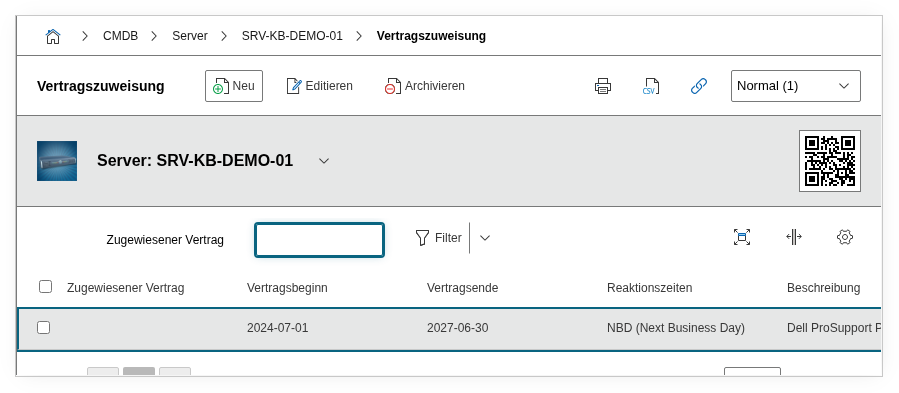
Fields#
Assigned contract#
The contract object to which this object is linked. A Contract type object is selected via the object browser. The contract must already exist as a separate object in i-doit -- it cannot be created from this category. The contract object itself then contains details such as total duration, costs, notice periods, and contract partners.
Contract start#
The start date of the contract for this specific object. This value can differ from the overall start of the contract -- for example when a server is added to the maintenance contract months after the contract start. If this field is left empty, the contract start from the contract object implicitly applies.
Contract end#
The end date of the contract for this object. Here too, a deviation from the overall contract end is possible -- for example when a device is returned early from leasing or replaced by a successor model. Particularly useful for reports that list expiring assignments.
Response rate#
The agreed response time for this object, e.g. 4h on-site, NBD (Next Business Day), or 24/7. Dialog+ field -- custom values can be added as needed. The response rate can differ from object to object within the same contract, for example when shorter times apply to business-critical servers than to peripheral devices.
Description#
Free text for additional details: special contract clauses for this object, contact person at the service provider, ticket references, or notes on the contract history.
Technical reference#
| Property | Value |
|---|---|
| Category constant | C__CATG__CONTRACT_ASSIGNMENT |
| Type | Global category |
| Multi-value | Yes |
| Assigned to | Server, Client, Switch, Router, etc. |
Fields (API reference)#
| Field | API key | Type |
|---|---|---|
| Assigned contract | connected_contract | Object browser (link) |
| Contract start | contract_start | Date |
| Contract end | contract_end | Date |
| Response rate | reaction_rate | Dialog+ (extensible selection) |
| Description | description | Text field (multi-line) |
API examples#
Create entry#
1 2 3 4 5 6 7 8 9 10 11 12 13 14 15 16 17 | |
Read entries#
1 2 3 4 5 6 7 8 9 10 | |
Update entry#
1 2 3 4 5 6 7 8 9 10 11 12 13 14 15 | |