Category: FC port#
The FC port category documents the Fibre Channel ports of a server or storage system. It is a multi-value category -- an HBA typically has two or four FC ports, and each is recorded as a separate entry.
Fibre Channel ports are the physical link between a server and the SAN (Storage Area Network). Each port possesses globally unique addresses (WWN/WWPN) through which SAN zoning is controlled. Without correctly documented FC ports, clean SAN documentation is impossible -- and without SAN documentation, every storage migration or zoning update becomes a shot in the dark.
Always link FC port with HBA
Every FC port physically belongs to a Host Bus Adapter (HBA). The Connected controller field establishes this assignment. First enter the HBA in the HBA category, then link the FC ports. This creates a complete chain: Server -> HBA -> FC port -> SAN zone -> Storage.
Usage#
Typical use cases:
- SAN zoning documentation: The WWPN of an FC port is used in the SAN switch configuration (zoning) to determine which server may access which storage LUNs. When the WWPN is documented in i-doit, the storage team can look up the correct address during zoning changes without having to log into the server.
- Fabric inventory: The Report Manager can list all FC ports with their WWPNs, speeds, and connections. This produces a complete fabric inventory that is indispensable during SAN audits or migrations.
- Multipath analysis: Modern SAN configurations use redundant paths (multipath I/O). Each path runs through its own FC port. The FC port category shows through which ports a server is connected to the SAN, and in combination with the Logical devices (Client) category, a complete multipath picture emerges.
- Troubleshooting SAN problems: When a server cannot access a LUN, the storage admin checks the WWPN in the zoning. Does the documented WWPN match the actual one? Is the port type correct? Is the speed correctly negotiated? All this information is stored in the FC port category.
- Migration and refresh: When replacing an HBA, the WWPNs change. The old WWPN must be removed from the zoning and the new one added. The FC port category documents both the old state (archived entry) and the new one.
Ensure WWPN consistency
The WWPN is the most critical information in this category. An incorrect WWPN in the zoning means either no access (harmless) or -- worse -- access to the wrong LUNs (data loss risk). Always verify WWPNs against the actual configuration on the server and the SAN switch.
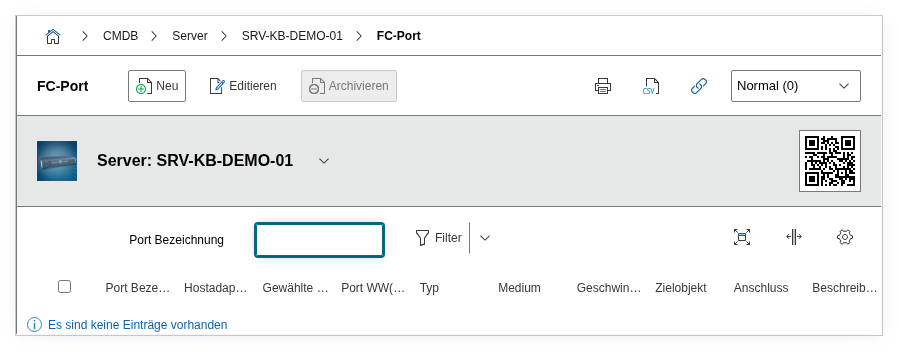
Fields#
Title#
The name of the FC port, e.g. FC0 or Port 1 - Fabric A. Use a unique naming convention that reveals the physical slot and fabric assignment.
Type#
The port type, e.g. N_Port (Node Port, standard case for server HBAs), F_Port (Fabric Port, on the SAN switch side), E_Port (Inter-Switch Link), or NL_Port (Arbitrated Loop). Dialog+ field -- custom types can be added.
Connected controller#
The HBA to which this FC port belongs. This field references an entry from the HBA category of the same object. The assignment is important because a server can have multiple HBAs and the FC ports must be correctly assigned.
Assigned input/output#
Reference to the associated physical connector of the object. Used for cabling documentation in i-doit.
Medium#
The physical media type of the FC connection, e.g. Multimode Fibre, Singlemode Fibre, or Copper (SFP+). Dialog+ field. Relevant for procuring the correct SFP modules and cables.
Speed and speed unit#
The link speed of the FC port, e.g. 16 with unit Gbit/s. Common values are 8, 16, 32, or 64 Gbit/s. The actually negotiated speed can be lower than the maximum speed -- document the configured or negotiated value.
Node WWN#
The World Wide Node Name (WWNN) of the HBA, e.g. 20:00:00:25:B5:01:00:0A. The WWNN identifies the HBA as a whole (not the individual port) and is used in some SAN configurations for zoning.
Port WW(P)N#
The World Wide Port Name (WWPN) of this specific FC port, e.g. 21:00:00:25:B5:01:00:0A. The WWPN is the most important address for SAN zoning because it uniquely identifies each individual port worldwide. Most SAN configurations use WWPN-based zoning.
SAN zone and connection type#
The SAN zone(s) to which this FC port is assigned. Links the port with the SAN zoning configurations documented in i-doit. In larger SAN environments, a port often belongs to multiple zones.
Target object#
The object to which this FC port is physically connected -- typically a SAN switch port or directly a storage port (in direct-attach configurations).
Connection#
The physical cable connection to another FC port. Here, the actual point-to-point connection is documented, including the connected port on the target object.
Description#
Free text for additional information: SFP module type, fabric assignment (A/B), VSAN membership, cabling specifics, or zoning notes.
Technical reference#
| Property | Value |
|---|---|
| Category constant | C__CATG__CONTROLLER_FC_PORT |
| Type | Global category |
| Multi-value | Yes |
| Assigned to | Server, Client, Blade Server, Virtual Server |
Fields (API reference)#
| Field | API key | Type |
|---|---|---|
| Title | title | Text |
| Type | type | Dialog+ (extensible selection) |
| Connected controller | connected_controller | Dialog (selection) |
| Assigned input/output | connector_sibling | Integer |
| Medium | medium | Dialog+ (extensible selection) |
| Speed | speed | Integer |
| Speed unit | speed_unit | Dialog (selection) |
| Node WWN | wwn | Text |
| Port WW(P)N | wwpn | Text |
| SAN zone and connection type | san_zones | Object browser (link) |
| Target object | target | Object browser (link) |
| Connection | connector | Integer |
| Connection | assigned_connector | Object browser (link) |
| Description | description | Text field (multi-line) |
| Relation direction | relation_direction | Integer |
API examples#
Create entry#
1 2 3 4 5 6 7 8 9 10 11 12 13 14 15 16 17 18 19 20 21 | |
Read entries#
1 2 3 4 5 6 7 8 9 10 | |
Update entry#
1 2 3 4 5 6 7 8 9 10 11 12 13 14 15 16 | |