Category: Controller#
The Controller category documents the storage and RAID controllers installed in a server or client. It is a multi-value category -- a server can have multiple controllers, e.g. an onboard RAID controller and an additional PCIe RAID card.
Controllers form the interface between the operating system and the physical drives. Without correctly documented controllers, a crucial link in the chain from application through filesystem and RAID array to individual hard drive is missing. Especially during storage troubleshooting, it is important to know which controller manages which drives and which firmware version is in use.
Controller vs. HBA
The Controller category is intended for local storage controllers -- RAID controllers, SATA/SAS controllers, NVMe controllers. For Fibre Channel adapters that connect servers to a SAN, there is the separate Host Bus Adapter (HBA) category. The distinction is important because HBAs bring additional FC-specific fields such as WWN and FC ports.
Usage#
Typical use cases:
- Storage troubleshooting: When a RAID array is degraded, the Controller category immediately shows which controller is affected, which manufacturer and model is installed, and which firmware is running. This significantly accelerates root cause analysis because the technician does not need to physically open the server or remotely connect to the controller management interface first.
- Firmware management: RAID controller firmware updates are critical maintenance operations. The Report Manager can evaluate which servers use which firmware version -- ensuring no controller is missed during a security patch rollout.
- Hardware lifecycle and spare parts planning: When a specific controller model is discontinued, a report immediately shows how many servers are affected. This helps with budget planning for replacement procurement.
- RAID documentation: In combination with the Drive category, a complete picture of the storage configuration emerges: which controller manages which RAID array, and which drives belong to it.
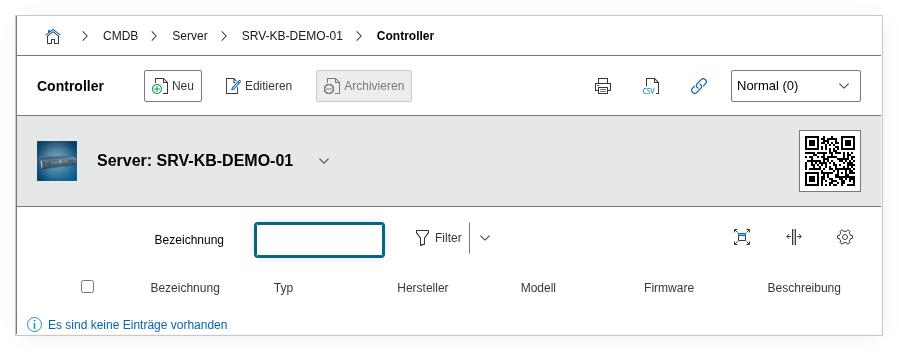
Fields#
Title#
The name or designation of the controller, e.g. PERC H755 or MegaRAID 9460-16i. This value appears in the list view and serves for quick identification.
Type#
The type of controller, e.g. RAID, SATA, SAS, NVMe, or SCSI. Dialog+ field -- custom types can be added. The type helps with filtering in reports, e.g. to find all servers with RAID controllers.
Manufacturer#
The manufacturer of the controller, e.g. Broadcom (LSI), Dell (PERC), HPE (Smart Array), or Microchip (Adaptec). Dialog+ field with extensible values. Important for assignment to support contracts and firmware download portals.
Model#
The exact model designation, e.g. MegaRAID 9460-16i or Smart Array P408i-a. Dialog+ field. Together with the manufacturer, a unique identification for spare parts orders and compatibility checks results.
Firmware#
The currently installed firmware version, e.g. 51.19.0-4296. Text field -- enter the exact version number here. This field is crucial for firmware audits: a report on all controllers with a specific firmware version immediately shows which servers need an update.
Keep firmware up to date
Outdated controller firmware can lead to data loss, performance problems, or security vulnerabilities. Use the firmware field consistently and regularly compare it with the manufacturer's release notes. A report that filters all controllers with firmware version < X is a simple but effective means of risk management.
Description#
Free text for additional details: RAID level configuration, cache size (e.g. "2 GB FBWC"), battery backup status, configuration specifics, or links to manufacturer documentation.
Technical reference#
| Property | Value |
|---|---|
| Category constant | C__CATG__CONTROLLER |
| Type | Global category |
| Multi-value | Yes |
| Assigned to | Server, Client, Blade Server, Virtual Server |
Fields (API reference)#
| Field | API key | Type |
|---|---|---|
| Title | title | Text |
| Type | type | Dialog+ (extensible selection) |
| Manufacturer | manufacturer | Dialog+ (extensible selection) |
| Model | model | Dialog+ (extensible selection) |
| Firmware | firmware | Text |
| Description | description | Text field (multi-line) |
API examples#
Create entry#
1 2 3 4 5 6 7 8 9 10 11 12 13 14 15 16 17 18 | |
Read entries#
1 2 3 4 5 6 7 8 9 10 | |
Update entry#
1 2 3 4 5 6 7 8 9 10 11 12 13 14 15 | |