Category: DBMS information#
The DBMS information category (in the English UI labeled "Databases") documents the individual databases within a DBMS instance on a server. It is a multi-value category -- any number of databases can be recorded per object, since a database server typically hosts multiple databases simultaneously.
Placement in the database documentation chain
This category forms the third level of the database chain: Server --> DBMS instance (Database hierarchy) --> Database (this category) --> Tables (Database tables). Before an entry can be created here, at least one instance must exist in the Database hierarchy category. The databases recorded here can then be linked with schemas and documented down to the table level in the Database tables category.
Usage#
Typical use cases:
- Building a database inventory: Record all databases on a server with name, associated DBMS, and instance. Together with Software assignment, a complete picture of the database landscape emerges.
- Capacity planning: The Size and Maximum Size fields show at a glance how much storage a database currently occupies and what limit is configured. Reports on these fields warn early of capacity bottlenecks.
- Schema assignment: Via the Schemas field, database schema objects (object type "Database schema") are assigned. This creates the connection to the specific Database schema category, where schema details such as storage engine are documented.
- Impact analysis: When a database is maintained or migrated, the chain Server --> Instance --> Database --> Tables immediately shows which applications and tables are affected.
- Compliance and data protection: In combination with the Database tables category, it is traceable in which database personal data is stored -- a frequent requirement from GDPR audits.
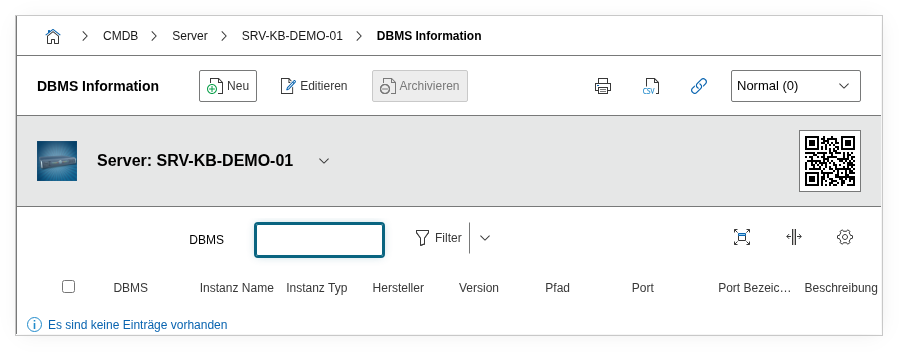
Fields#
Assigned DBMS#
Link to the DBMS that manages this database. Selection field -- the available values come from the DBMS entries installed on the current server via Software assignment. This tells i-doit which database management system is responsible for this database.
Instance#
The DBMS instance under which this database runs. Selection field -- the values come from the Database hierarchy category of the current object. On a server with multiple instances (e.g. a production and a test instance), the correct one is assigned here.
Schemas#
Link to one or more database schema objects (object type "Database schema"). Multi-select -- this allows all schemas of a database to be assigned. The schema objects are further documented in the specific Database schema category (storage engine, description, etc.).
Title#
The name of the database, e.g. idoit_data, wordpress_prod, or erp_main. This value appears in the list view and in reports.
Size and unit#
The current size of the database. The unit (MB, GB, TB) is specified separately. This value should be updated regularly -- ideally automated via the API or a JDisc import.
Maximum size and unit#
The configured size limit of the database. When the current size approaches this value, a capacity upgrade is required. Dialog+ field for the unit -- allowing unusual units to be added as well.
Description#
Free text for additional details: purpose of the database, associated application, backup strategy, replication status, or responsibilities.
Technical reference#
| Property | Value |
|---|---|
| Category constant | C__CATG__DATABASE_SA |
| Type | Global category |
| Multi-value | Yes |
| Assigned to | Server |
Fields (API reference)#
| Field | API key | Type |
|---|---|---|
| Assigned DBMS | assigned_database | Dialog (selection) |
| Instance | assigned_instance | Dialog (selection) |
| Schemas | assigned_schemas | Multi-select |
| Title | title | Text |
| Size | size | Decimal |
| Unit | size_unit | Dialog (selection) |
| Maximum size | max_size | Decimal |
| Max. unit | max_size_unit | Dialog+ (extensible selection) |
| Description | description | Text field (multi-line) |
API examples#
Create entry#
1 2 3 4 5 6 7 8 9 10 11 12 13 14 15 16 17 18 19 20 | |
Read entries#
1 2 3 4 5 6 7 8 9 10 | |
Update entry#
1 2 3 4 5 6 7 8 9 10 11 12 13 14 15 | |