Category: Database tables#
The Database tables category (in the English UI labeled "Database tables") documents the individual tables within a database. It is a multi-value category -- any number of tables can be recorded per object, since a database typically consists of dozens to hundreds of tables.
Last level of the database documentation chain
This category forms the lowest level of the four-tier chain: Server --> DBMS instance (Database hierarchy) --> Database (DBMS information) --> Tables (this category). Here, the granularity is reached that is needed for data protection documentation, capacity planning, and impact analyses at the table level.
Compliance use case: Personal data
For GDPR documentation or ISO 27001 audits, reports can evaluate which tables contain personal data. Record in the description field or via custom categories whether a table contains PII (Personally Identifiable Information) -- this creates a record of processing activities at the technical level.
Usage#
Typical use cases:
- Building a table inventory: Record all relevant tables of a database with name, row count, and size. Especially for business-critical databases, it is worthwhile to document at least the most important tables.
- Capacity planning at the table level: The Size and Maximum Size fields show which tables consume the most storage. Together with the row count, growth trends can be identified before disk space runs out.
- Impact analysis during migrations: When a database is migrated or a schema is restructured, the table list immediately shows which structures are affected. The assignment to database and schema provides the context.
- Data protection and compliance: Which tables contain customer data, payment information, or health data? This information belongs in the description or in custom fields and is invaluable during audits.
- Schema size comparison: The schema size fields aggregate the size at the schema level and enable a quick comparison between schemas.
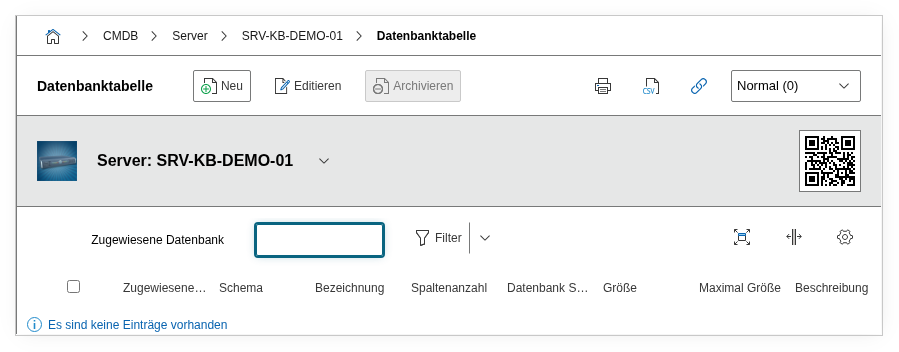
Fields#
Title#
The name of the table, e.g. isys_obj, customers, audit_log, or wp_posts. This value appears in the list view and in reports.
Row count#
The number of records in the table. This value provides an impression of the size and growth potential. For large tables (millions of rows), this can provide hints about needed archiving or partitioning.
Assigned database#
Link to the database to which this table belongs. Selection field -- the values come from the entries of the DBMS information category on the current object.
Instance#
Shows the instance under which the assigned database runs. This field is automatically derived from the database assignment and serves for overview purposes.
Schema#
The database schema to which this table is assigned. Selection field -- the values come from the schemas assigned in the DBMS information category. For databases with multiple schemas (e.g. PostgreSQL), this assignment is important to assign tables to the correct schema.
Schema size and unit#
The aggregated size of the schema to which the table belongs. Provides a quick overview of the total storage consumption at the schema level.
Size and unit#
The size of the individual table. The unit (KB, MB, GB) is specified separately. For large tables, this value is crucial for capacity planning.
Maximum size and unit#
The configured size limit of the table, if applicable (e.g. via tablespace limits or partitioning). Dialog+ field for the unit.
Description#
Free text for additional details: purpose of the table, contained data types (personal, financial, technical), dependencies on other tables, indexing, partitioning strategy, or archiving rules.
Technical reference#
| Property | Value |
|---|---|
| Category constant | C__CATG__DATABASE_TABLE |
| Type | Global category |
| Multi-value | Yes |
| Assigned to | Server |
Fields (API reference)#
| Field | API key | Type |
|---|---|---|
| Title | title | Text |
| Row count | row_count | Text |
| Assigned database | assigned_database | Dialog (selection) |
| Instance | instance | Text (read-only) |
| Schema | assigned_schema | Dialog (selection) |
| Schema size | schema_size | Decimal |
| Schema size unit | schema_size_unit | Dialog (selection) |
| Size | size | Decimal |
| Size unit | size_unit | Dialog (selection) |
| Maximum size | max_size | Decimal |
| Max. size unit | max_size_unit | Dialog+ (extensible selection) |
| Description | description | Text field (multi-line) |
API examples#
Create entry#
1 2 3 4 5 6 7 8 9 10 11 12 13 14 15 16 17 18 19 20 21 | |
Read entries#
1 2 3 4 5 6 7 8 9 10 | |
Update entry#
1 2 3 4 5 6 7 8 9 10 11 12 13 14 15 16 | |