Category: Emergency Plan Assignment#
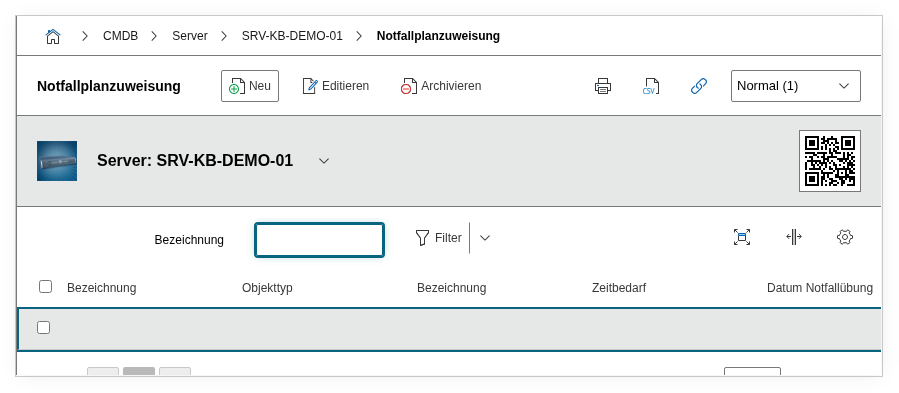
The Emergency Plan Assignment category links emergency plans to an object. It is a multi-value category -- multiple emergency plans can be assigned per object, e.g. a recovery plan and a communication plan for the same server.
Required for BSI IT-Grundschutz and ISO 27001
In the context of BSI IT-Grundschutz (module DER.4 Emergency Management) and ISO 22301 (Business Continuity Management), it must be documented for critical IT systems which emergency plans exist and when they were last exercised. The Emergency Plan Assignment category maps exactly this requirement in the CMDB, establishing the link between asset and emergency preparedness.
Usage#
Typical use cases:
- Business Continuity Management: Assign a recovery plan to each business-critical system. Using the Report Manager, you can evaluate at any time which systems have an assigned emergency plan -- and more importantly, which do not. Gaps in emergency preparedness become systematically visible this way.
- Documenting emergency exercises: The "Emergency exercise date" field shows when the plan was last tested in an exercise. A report on all objects whose last emergency exercise was more than 12 months ago is a typical tool for the emergency management team.
- Recovery time (RTO) planning: The time required indicates how long the system recovery is expected to take. This allows you to verify whether the planned recovery time meets the Recovery Time Objective (RTO) guaranteed in the SLA.
- Audit preparation: Auditors regularly ask about the assignment of emergency plans to critical assets. A report listing all servers with assigned emergency plans, last exercise dates, and time requirements answers this question at the push of a button.
Interaction with the ISMS Add-on
For a complete representation of information security management, i-doit offers the ISMS Add-on. It extends the CMDB with protection requirements assessment, risk analysis, and measure tracking. The Emergency Plan Assignment is an important building block: it documents the operational emergency preparedness, while the ISMS Add-on provides the overarching security framework.
Fields#
Title#
A freely selectable title for the assignment, e.g. Recovery Plan ERP Server or Emergency Communication Site Munich. The title appears in the list view and in reports and should be descriptive enough to understand the context without opening the entry.
Assigned Emergency Plan#
The link to an emergency plan object. Using the object browser, you select an object of type Emergency Plan or File. The emergency plan object itself contains the plan details (measures, responsible persons, contact lists). This way, the same emergency plan can be assigned to multiple systems without having to maintain it twice.
Time Required#
The estimated duration for system recovery according to this emergency plan. This value is taken from the specific category of the linked emergency plan object and shows e.g. 4 hours or 24 hours. It is a central value for assessing whether business continuity requirements are met.
Time Required (Unit)#
The unit for the time required, e.g. Hours, Minutes, or Days. Also taken from the emergency plan object.
Emergency Exercise Date#
The date on which the emergency plan was last tested in an exercise. Taken from the emergency plan object. Regular exercises are a core component of any emergency management -- a report on outdated exercise dates helps keep track.
Description#
Free text for additional information: specifics regarding the recovery of this particular object, dependencies on other systems, contacts, or deviations from the standard plan.
Technical Reference#
| Property | Value |
|---|---|
| Category constant | C__CATG__EMERGENCY_PLAN |
| Type | Global category |
| Multi-value | Yes |
| Assigned to | Server, Blade Server, Switch, Router, PDU, Building, Room, WAN, etc. |
Fields (API Reference)#
| Field | API key | Type |
|---|---|---|
| Title | title | Text |
| Assigned Emergency Plan | emergency_plan | Object browser (link) |
| Time Required | time_needed | Text |
| Time Required (Unit) | time_needed_unit | Text |
| Emergency Exercise Date | practice_date | Text |
| Description | description | Text field (multi-line) |
API Examples#
Create an entry#
1 2 3 4 5 6 7 8 9 10 11 12 13 14 15 | |
Read entries#
1 2 3 4 5 6 7 8 9 10 | |
Update an entry#
1 2 3 4 5 6 7 8 9 10 11 12 13 14 15 | |