Category: Fiber/Lead#
The Fiber/Lead category documents the individual fibers within a fiber optic or copper cable. It is a multi-value category -- as many entries are created per cable object as the cable has fibers or leads. A 24-fiber fiber optic cable therefore has 24 entries in this category.
Only available on cable objects
This category is exclusively assigned to objects of type Cable. It supplements the general cable wiring with the detail level of individual fibers -- essential for fiber optic documentation, but also for copper cables with multiple leads.
Color coding according to TIA-598
For fiber optic cables, the color coding of fibers typically follows the TIA-598 standard (in Europe often according to IEC 60304). The standard fiber color sequence is: Blue, Orange, Green, Brown, Gray, White, Red, Black, Yellow, Violet, Pink, Aqua. Enter the colors consistently -- this makes it immediately apparent which fiber has which position in the bundle, and mix-ups during splicing or patching are avoided.
Usage#
Typical use cases:
- Complete fiber optic documentation: Record each fiber of a fiber optic cable with designation, color, and category. In combination with cable wiring, a seamless documentation from the fiber to the patch panel is created.
- Capacity tracking: Using reports, you can evaluate how many fibers of a cable are already in use and how many are still available. This is crucial for planning new connections without unnecessarily pulling new cables.
- Documenting attenuation values: The Attenuation field records the measured signal loss per fiber (in dB). After splicing or during acceptance of a new link, these values are measured -- they must be within the permissible limits of the respective fiber category.
- Troubleshooting and maintenance: When a connection is disrupted, the fiber documentation immediately shows which fiber has which color, what attenuation was measured, and whether it is within specification. This significantly speeds up fault isolation.
- Copper cables with multiple leads: For structured copper cabling (e.g., Cat 6 cable with 4 wire pairs), the individual leads can also be documented here, including color coding and assignment.
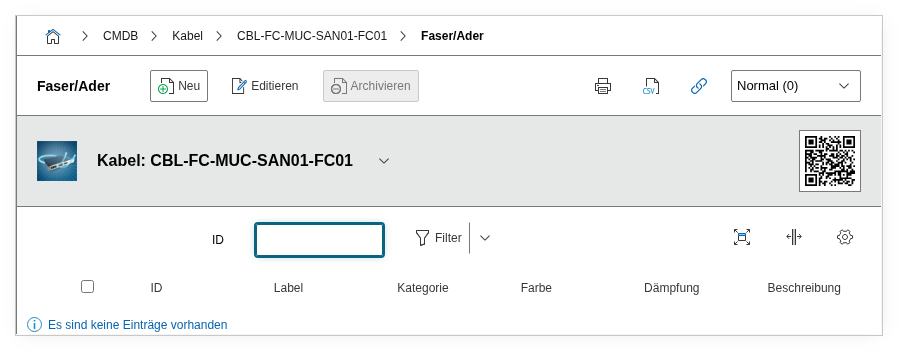
Fields#
Title#
The designation of the individual fiber or lead, e.g. Fiber 01, F1-A, or Lead 3/4. Choose a consistent naming convention for all cables -- this greatly simplifies assignment during splicing and patching.
Category#
The fiber category or fiber type, e.g. OS2 (singlemode), OM3, OM4, or OM5 (multimode). Dialog+ field -- custom values can be added as needed. The category determines the permissible transmission rates and maximum distances:
- OS2: Singlemode, up to 10 km and more, for long-distance links and data center connections
- OM3: Multimode 50/125 um, up to 300 m at 10 Gbit/s
- OM4: Multimode 50/125 um, up to 400 m at 10 Gbit/s, optimized for VCSEL lasers
- OM5: Multimode, additionally optimized for wavelength division multiplexing (SWDM)
Color#
The color of the fiber or lead. Dialog+ field -- the standard colors according to TIA-598 (Blue, Orange, Green, Brown, Gray, White, Red, Black, Yellow, Violet, Pink, Aqua) should be pre-populated. For bundled leads, tube colors are added as well. Correct color recording is the foundation for error-free splicing and patching.
Attenuation#
The measured signal loss of the fiber in decibels (dB). Typical values for singlemode fibers (OS2) are approximately 0.35 dB/km at 1310 nm and 0.22 dB/km at 1550 nm. For multimode fibers (OM3/OM4), the attenuation is approximately 3.5 dB/km at 850 nm. The actual measured value for the entire link should be entered here -- not the theoretical value per kilometer.
Observe limit values
If the measured attenuation exceeds the permissible limits of the fiber category, this indicates problems: poor splices, dirty connectors, bend radii that are too tight, or fiber damage. Document such deviations in the description field.
Description#
Free text for additional information: measurement wavelength, measurement date, measurement device used (OTDR), splice protocol reference, occupancy status (free/in use/reserved), or connection target.
Technical Reference#
| Property | Value |
|---|---|
| Category constant | C__CATG__FIBER_LEAD |
| Type | Global category |
| Multi-value | Yes |
| Assigned to | Cable |
Fields (API Reference)#
| Field | API key | Type |
|---|---|---|
| Title | label | Text |
| Category | category | Dialog+ (expandable selection) |
| Color | color | Dialog+ (expandable selection) |
| Attenuation | damping | Decimal |
| Description | description | Text field (multi-line) |
API Examples#
Create an entry#
1 2 3 4 5 6 7 8 9 10 11 12 13 14 15 16 17 | |
Read entries#
1 2 3 4 5 6 7 8 9 10 | |
Update an entry#
1 2 3 4 5 6 7 8 9 10 11 12 13 14 15 | |