Category: File Assignment#
The File Assignment category links files and documents to an object. It is a multi-value category -- any number of files can be assigned per object, e.g. a manual, a network diagram, and a configuration backup simultaneously.
Files are standalone objects
In i-doit, files are created as separate objects of type File. The File Assignment category merely creates a link between the current object and such a file object. The advantage is that the same file can be assigned to multiple objects -- for example, a network diagram attached to both the switch and the router.
Usage#
Typical use cases:
- Manuals and data sheets: Upload the PDF manual of a server or switch as a file object and assign it to the device. This way, every technician has the manual readily available directly in the CMDB object, without having to search through network drives.
- Network diagrams and drawings: Visio files, PNG topologies, or rack layout plans can be assigned to the affected rooms, cabinets, or sites. During a renovation, it is immediately apparent which plan applies.
- Configuration backups: Store the last exported configuration of a switch or router as a text file. In combination with the revision field, a simple version control can be established.
- Contracts and license documents: Attach scans of maintenance contracts or license certificates to the respective object. In combination with the Contract Assignment category, a complete contract documentation is created.
- External documents via link: Instead of uploading a file, an HTTP link to an external document can be set -- for example, to a Confluence wiki, a SharePoint document, or a manufacturer download.
Documents Add-on for advanced document management
The File Assignment category covers simple file attachments. For professional document management with templates, versioning, approval workflows, and automatic population from CMDB data, i-doit offers the Documents Add-on. It does not replace the File Assignment but supplements it with a full-featured document management layer.
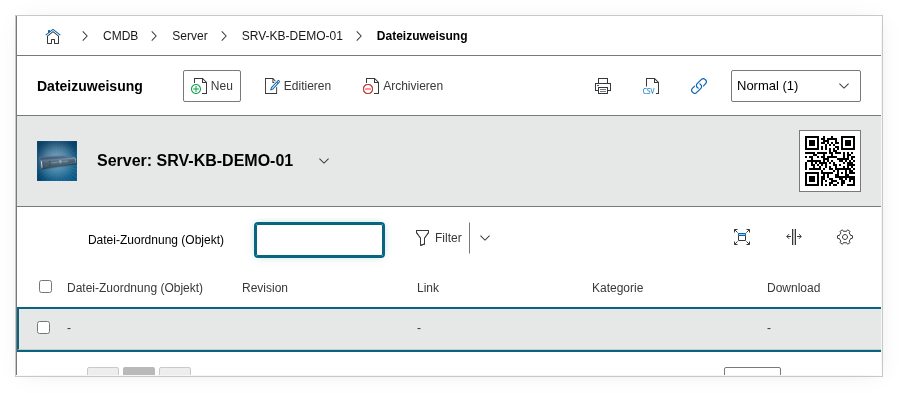
Fields#
File#
The link to a file object. Using the object browser, you select an existing file object or create a new one. The file object itself contains the actual file (upload) as well as metadata such as file name, version, and category.
Revision#
The revision number of the linked file. This field is taken from the file object and shows which version of the file is currently assigned. For an updated configuration file, this might show e.g. 3 for the third revision.
HTTP Link (external)#
An external link as an alternative or supplement to the file upload. Here you can enter the URL to a document in an external system, e.g. https://wiki.example.com/manual-core-switch. This is especially practical when documents are centrally maintained in a DMS and should not be uploaded to i-doit twice.
Description#
Free text for additional information about the file assignment: what the file is for, when it was last updated, who is the contact for the content, or which chapters of the manual are relevant for this specific device.
Technical Reference#
| Property | Value |
|---|---|
| Category constant | C__CATG__FILE |
| Type | Global category |
| Multi-value | Yes |
| Assigned to | Server, Client, Switch, Router, Building, Room, License, etc. |
Fields (API Reference)#
| Field | API key | Type |
|---|---|---|
| File | file | Object browser (link) |
| Revision | revision | Integer |
| HTTP Link (external) | link | Text |
| Description | description | Text field (multi-line) |
API Examples#
Create an entry#
1 2 3 4 5 6 7 8 9 10 11 12 13 14 15 | |
Read entries#
1 2 3 4 5 6 7 8 9 10 | |
Update an entry#
1 2 3 4 5 6 7 8 9 10 11 12 13 14 15 | |