Category: General#
The General category is the central base category of every object in i-doit. It is present in all object types and is automatically created as soon as an object is created. It contains the basic administrative information (name, purpose, CMDB status) and serves as the starting point for filtering and searching in the CMDB.
Usage#
Typical use cases:
- Maintain CMDB status: The CMDB status (
In operation,Planned,Out of operation, etc.) allows you to map the lifecycle of an object. Many evaluations and reports specifically filter by this status. - Document purpose of use: The
Purposefield (Production,Test,QA) makes it immediately visible in which environment an object is operated. - Use tags for grouping: Tags enable flexible cross-cutting grouping across all object types -- e.g. to tag all objects of a project or site.
- Description as free text: The description field is suitable for notes that do not fit in any other field -- such as configuration specifics or maintenance notes.
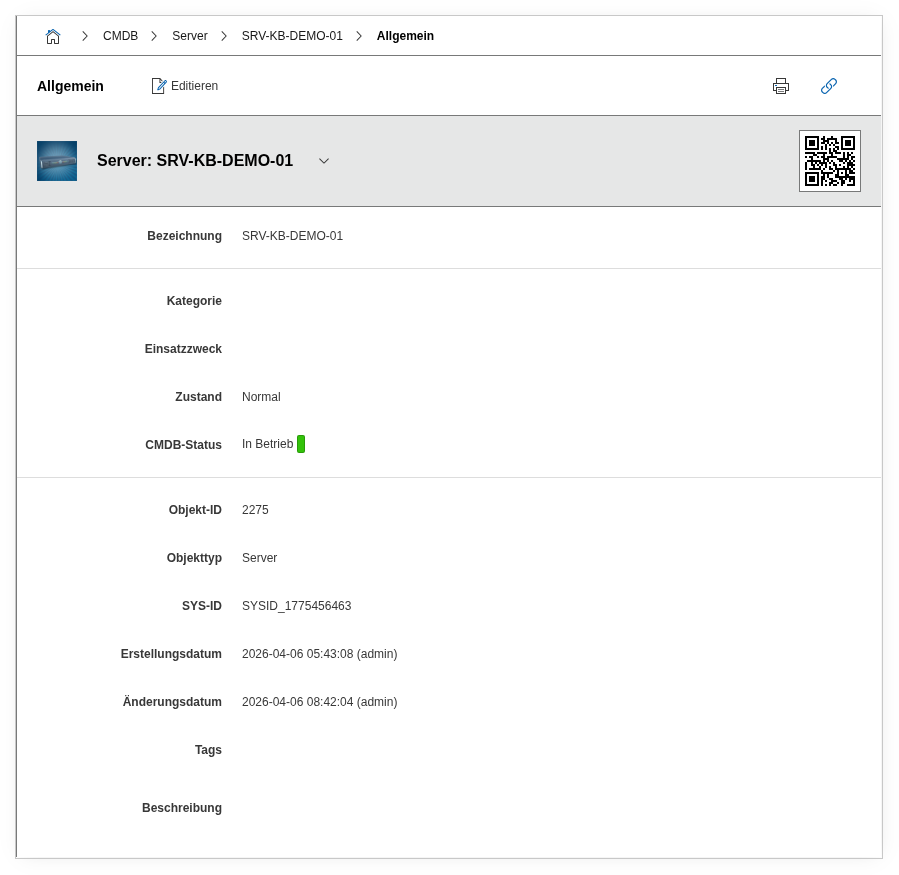
Fields#
Title#
The name of the object. It is used as the primary identifier throughout the entire CMDB -- in the object list, in relations, and in reports. The name should be unique and descriptive, e.g. srv-web-01 or Switch GF Room 1.12.
CMDB Status#
The most important mandatory field of the category. Maps the lifecycle of an object -- from planning to decommissioning. Default values: Planned, Ordered, Delivered, Assembled, In operation, Out of operation, Scrapped. Many filters, reports, and automated processes (e.g. notifications) rely on this status -- it should be consistently maintained.
Purpose#
Describes the operational context of the object. Typical values: Production, Test, QA, Development. The field is expandable -- custom values can be added at any time. Helpful for separating production and test environments in reports.
Tags#
Free-text tags for flexible cross-cutting grouping. An object can have any number of tags. Tags can be filtered in the object list and evaluated in reports. Example: project-migration-2025, datacenter-fra01.
Description#
A free text field with no length limitation. Information that does not fit in any structured field belongs here: configuration specifics, maintenance history, operational notes.
Category#
A free classification of the object, independent of the object type. Can be used, for example, to group objects by department or project -- supplementary to tags.
SYSID#
A system-wide unique identifier that is automatically assigned by i-doit (e.g. SYSID_1680000001). Useful for integration with external systems when the internal object ID is not suitable. The SYSID is immutable after creation.
Automatically set fields
Created and Created by are set automatically when the object is created. Changed and Last changed by are updated with each save. Object type is set when the object is created and cannot be changed. All three field pairs are not manually editable and serve traceability during audits.
Technical Reference#
| Property | Value |
|---|---|
| Category constant | C__CATG__GLOBAL |
| Type | Global category |
| Multi-value | No |
| Assigned to | All object types |
Fields (API Reference)#
| Field | API key | Type |
|---|---|---|
| Title | title | Text |
| Status | status | Dialog (selection) |
| Created | created | Date/Time |
| Created by | created_by | Text |
| Changed | changed | Date/Time |
| Last changed by | changed_by | Text |
| Purpose | purpose | Dialog+ (expandable selection) |
| Category | category | Dialog+ (expandable selection) |
| SYSID | sysid | Text |
| CMDB Status | cmdb_status | Dialog (selection) |
| Object type | type | Dialog (selection) |
| Tags | tag | Multi-selection |
| Description | description | Text field (multi-line) |
API Examples#
Create an entry#
1 2 3 4 5 6 7 8 9 10 11 12 13 14 15 16 | |
Read entries#
1 2 3 4 5 6 7 8 9 10 | |
Update an entry#
1 2 3 4 5 6 7 8 9 10 11 12 13 14 15 | |