Category: Graphic Card#
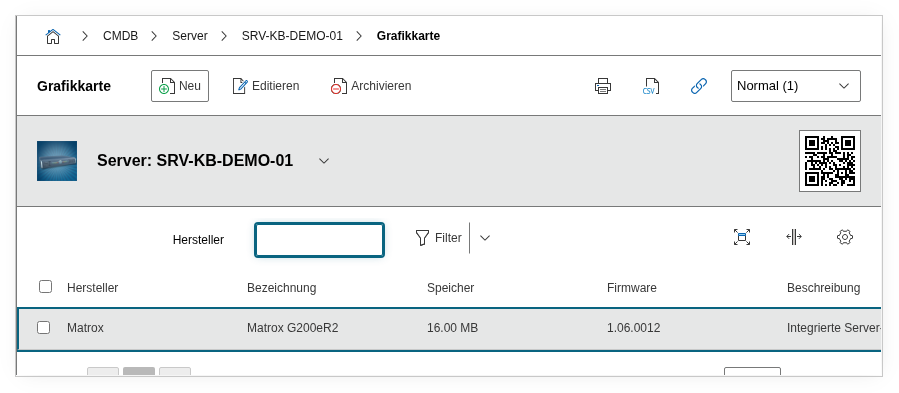
The Graphic Card category documents the installed graphics adapters of an object. It is a multi-value category -- any number of entries can be created per object, e.g. for workstations with multiple GPUs or servers with a dedicated compute card. This category is particularly relevant for CAD workstations, VDI hosts, and GPU computing servers, where the graphics card is not just providing display output but is a performance-critical component.
Automatic detection with JDisc
JDisc can automatically detect installed graphics cards and import them into i-doit -- including manufacturer, model, and memory size. This saves considerable maintenance effort during large rollouts. Driver versions and firmware should be manually verified and supplemented after the import, as these are not always reliably detected.
Usage#
Typical use cases:
- CAD and design workstations: Record the manufacturer, model, memory, and driver version of each installed graphics card. Together with the CPU and memory categories, a complete hardware profile is created. For CAD workstations, the GPU is often the most expensive single component -- its documentation is indispensable for procurement, warranty, and lifecycle planning.
- GPU computing and AI: In HPC clusters and AI environments, the Report Manager can be used to evaluate which servers use which GPU models and VRAM sizes. A report like "All servers with less than 24 GB VRAM" helps with capacity planning when new ML workloads require more memory.
- VDI environments: In virtual desktop infrastructures, the category documents the physical GPUs of the hosts that are passed through to virtual desktops via GPU passthrough or vGPU. The memory size determines how many vGPU profiles can run simultaneously on a host.
- Driver compatibility and patch management: The driver version is crucial for stability and security. A report on all systems with a specific driver version immediately shows which machines are affected by a known bug or security vulnerability and need an update.
Fields#
Title#
The name or model designation of the graphics card, e.g. NVIDIA RTX A4000 or AMD Radeon Pro W6800. This value appears in the category list view and in reports.
Manufacturer#
The manufacturer of the graphics card, typically NVIDIA, AMD, or Intel. Dialog+ field -- custom values can be added as needed.
Memory and Unit#
The available graphics memory (VRAM) of the card. The unit is specified separately as MB or GB. For documentation, the value from the manufacturer data sheet is recommended. VRAM is often the limiting factor -- for CAD software it determines the maximum model complexity, for AI workloads the batch size and model size. A report on GPU memory helps identify systems that are no longer sufficient for certain requirements.
Driver/Firmware#
The installed driver version or firmware version of the graphics card, e.g. 535.129.03 (NVIDIA) or 23.20.1 (AMD). This field is critical for compatibility tracking: Certain applications require minimum GPU driver versions, and security updates frequently affect specific version ranges. Maintain this field with every driver update so that the current status is traceable at all times -- especially in regulated environments or for certified CAD workstations.
Description#
Free text for additional information: GPU architecture, TDP, interface (PCIe x16), number of display outputs, CUDA cores, or configuration specifics.
Technical Reference#
| Property | Value |
|---|---|
| Category constant | C__CATG__GRAPHIC |
| Type | Global category |
| Multi-value | Yes |
| Assigned to | Server, Client, Blade Server, Virtual Server |
Fields (API Reference)#
| Field | API key | Type |
|---|---|---|
| Title | title | Text |
| Manufacturer | manufacturer | Dialog+ (expandable selection) |
| Memory | memory | Decimal |
| Unit | unit | Dialog (selection) |
| Driver/Firmware | firmware | Text |
| Description | description | Text field (multi-line) |
API Examples#
Create an entry#
1 2 3 4 5 6 7 8 9 10 11 12 13 14 15 16 17 18 | |
Read entries#
1 2 3 4 5 6 7 8 9 10 | |
Update an entry#
1 2 3 4 5 6 7 8 9 10 11 12 13 14 15 | |