Category: Guest Systems#
The Guest Systems category shows the virtual machines running on a hypervisor or physical host. It is a multi-value category -- any number of guest systems are listed per object, i.e. all VMs that are executed on this specific host.
The category represents the host side of the virtualization relationship: it is maintained on the server object (the hypervisor) and lists its guests. The counterpart is the Virtual Machine category, which shows the host assignment on the guest object itself. Both categories mirror the same relationship -- once from the host perspective, once from the guest perspective.
This category is the foundation for virtualization capacity planning: How many VMs are running per host? Which hosts are overloaded, which still have reserves? In combination with the CPU and memory categories on the same host object, a complete picture of resource utilization emerges -- not just the number of VMs, but also the physical resources available to them.
Identify hosts with too many VMs
A report "Hosts with more than X guest systems" is one of the most effective tools for virtualization planning. Overloaded hypervisors are a risk: in the event of a host failure, more VMs are affected, live migration takes longer, and the performance of all guests suffers. Define a threshold (e.g. 20 VMs per host) and monitor it regularly via reports.
Usage#
Typical use cases:
- Virtualization documentation: See at a glance which virtual machines are running on a specific ESXi host, Hyper-V server, or KVM hypervisor. Together with the CPU and memory categories on the host object, a complete picture of the physical resources available to the guests is created.
- Capacity planning: Using the Report Manager, you can evaluate how many VMs are operated per host. Hosts with an unusually high number of guest systems stand out immediately -- helpful when deciding whether an additional host is needed or VMs should be redistributed. A report that correlates guest system count with CPU cores and RAM of the host shows the actual resource density.
- Migration and maintenance: Before a host migration or maintenance window, the category immediately shows which VMs are affected and need to be moved. In combination with the "Runs on" field, the cluster assignment is also visible. Planning a maintenance window for an ESXi host with 15 VMs is different from one with 3 VMs -- the Guest Systems category provides this information at a glance.
- Compliance and audit: In regulated environments, it must be demonstrated which workloads run on which physical hardware -- for example, for data privacy requirements regarding data locality or for licensing requirements (e.g. Oracle licenses that are calculated per physical host).
- Failure analysis: If a hypervisor fails, the Guest Systems category shows within seconds which VMs are affected. In combination with the Service Assignment category on the VM objects, it can be immediately derived which IT services are impacted -- the foundation for rapid incident communication.
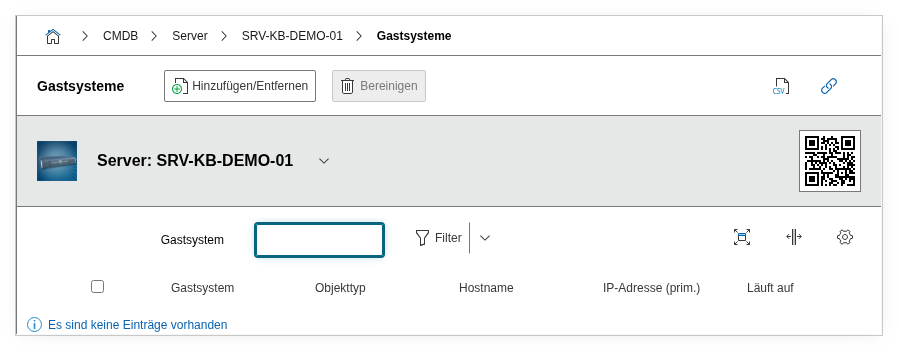
Fields#
Guest Systems#
The core element of the category: a link to the virtual machine object. Using the object browser, an existing VM object is selected and assigned to the host. Each entry corresponds to a VM running on this host. When creating via the API, this field is passed with the key object (not objID) in the data block -- the value is the object ID of the virtual machine.
Hostname#
The hostname of the guest system as it is known on the network. This field is typically automatically populated from the master data of the linked object and serves for quick identification in the list view without having to open the VM object.
Runs on#
Shows on which infrastructure layer the VM is executed -- for example, a cluster or a specific hypervisor node. This field provides the context to the parent virtualization layer and is particularly useful in cluster setups where VMs can be moved between multiple physical nodes.
Technical Reference#
| Property | Value |
|---|---|
| Category constant | C__CATG__GUEST_SYSTEMS |
| Type | Global category |
| Multi-value | Yes |
| Assigned to | Server, Blade Server, Cluster |
Fields (API Reference)#
| Field | API key | Type |
|---|---|---|
| Guest Systems | object | Object browser (link) |
| Hostname | hostname | Text |
| Runs on | runs_on | Text |
API Examples#
Create an entry#
1 2 3 4 5 6 7 8 9 10 11 12 13 | |
Read entries#
1 2 3 4 5 6 7 8 9 10 | |
Update an entry#
1 2 3 4 5 6 7 8 9 10 11 12 13 14 | |