Category: Host Bus Adapter (HBA)#
The Host Bus Adapter (HBA) category documents the Fibre Channel adapters that connect a server to a SAN (Storage Area Network). It is a multi-value category -- servers in SAN environments typically have two HBAs for redundant fabric connectivity.
An HBA is the physical expansion card (PCIe) that provides Fibre Channel ports. While the HBA category describes the adapter itself (manufacturer, model, firmware), the individual ports are documented in the FC Port category. Together, they form the complete SAN client side of a server.
HBA vs. Controller
HBAs are not the same as storage controllers. A controller manages local drives (RAID, SATA, SAS), while an HBA connects the server to external SAN storage. In i-doit, there are intentionally two separate categories, because the use cases and the relevant additional information (WWN, FC ports, SAN zoning) are fundamentally different.
Usage#
Typical use cases:
- SAN infrastructure documentation: The HBA is the starting point of the SAN connection on the server side. The documentation of manufacturer, model, and firmware, together with the FC Ports and SAN zoning, forms a seamless chain from server to storage.
- Firmware management: HBA firmware updates are critical -- an incompatible firmware can cause a server to lose its SAN LUNs. Using the Report Manager, all servers with a specific HBA firmware version can be identified before an update is rolled out.
- Compatibility verification: Storage vendors publish compatibility matrices that specify which HBA models and firmware versions work with their storage system. With the HBA category, you can quickly verify whether all servers are using compatible adapters.
- Spare parts planning: When an HBA model is discontinued or an adapter fails, a report immediately shows how many identical HBAs are installed in the environment. This simplifies spare parts procurement and budget planning.
- Dual-fabric verification: Best practice in SAN environments is connectivity via two separate fabrics. Using the HBA category, you can verify whether each server actually has two HBAs -- and whether their FC ports are distributed across different fabrics.
Complete SAN documentation
For complete SAN documentation on the server side, you need three categories: HBA (the adapter), FC Port (the ports with WWPNs), and Logical Devices (Client) (the assigned LUNs). Only when all three are maintained does a complete picture of the SAN connectivity emerge.
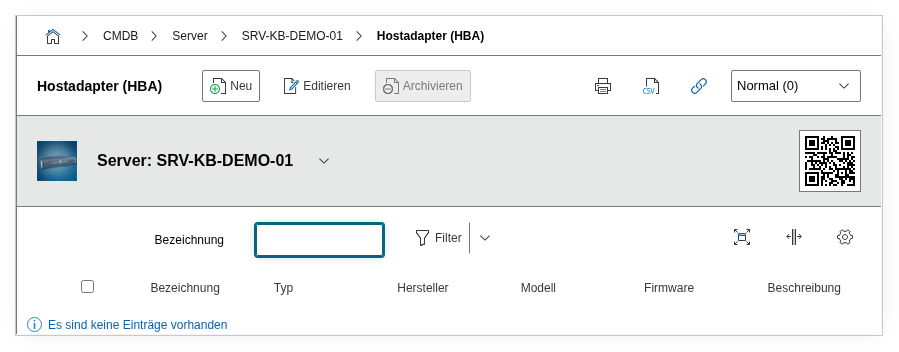
Fields#
Title#
The name or designation of the HBA, e.g. Emulex LPe36002 or QLogic QLE2772. Use a designation that uniquely identifies the adapter -- for multiple HBAs in the same server, adding the PCIe slot is recommended, e.g. QLE2772 (Slot 3).
Type#
The type of host bus adapter, e.g. FC-HBA, FCoE-HBA, or iSCSI-HBA. Dialog field. Relevant because different HBA types use different protocols and networks.
Manufacturer#
The manufacturer of the HBA, e.g. Broadcom (Emulex), Marvell (QLogic), or ATTO. Dialog+ field with expandable values. Important for support requests and firmware downloads.
Model#
The exact model designation, e.g. LPe36002-M64 or QLE2772-DEL. Dialog+ field. The model determines the supported speeds, the number of ports, and compatibility with the storage system.
Firmware#
The currently installed firmware version, e.g. 14.2.537.16. Text field. HBA firmware updates can be critical -- a wrong version can interrupt SAN access. Always document the actually installed version here and update it after every firmware update.
Verify firmware before storage migration
Before a storage migration (e.g. switching from an older to a new storage array), the HBA firmware must be compatible with the new storage. Check the storage vendor's compatibility matrix and compare it with the firmware versions documented in i-doit.
Description#
Free text for additional information: PCIe slot number, driver version, assigned fabric (A/B), configuration specifics (e.g. Boot from SAN enabled), or compatibility notes.
Technical Reference#
| Property | Value |
|---|---|
| Category constant | C__CATG__HBA |
| Type | Global category |
| Multi-value | Yes |
| Assigned to | Server, Client, Blade Server, Virtual Server |
Fields (API Reference)#
| Field | API key | Type |
|---|---|---|
| Title | title | Text |
| Type | type | Dialog (selection) |
| Manufacturer | manufacturer | Dialog+ (expandable selection) |
| Model | model | Dialog+ (expandable selection) |
| Firmware | firmware | Text |
| Description | description | Text field (multi-line) |
API Examples#
Create an entry#
1 2 3 4 5 6 7 8 9 10 11 12 13 14 15 16 17 18 | |
Read entries#
1 2 3 4 5 6 7 8 9 10 | |
Update an entry#
1 2 3 4 5 6 7 8 9 10 11 12 13 14 15 | |