Category: Object Image#
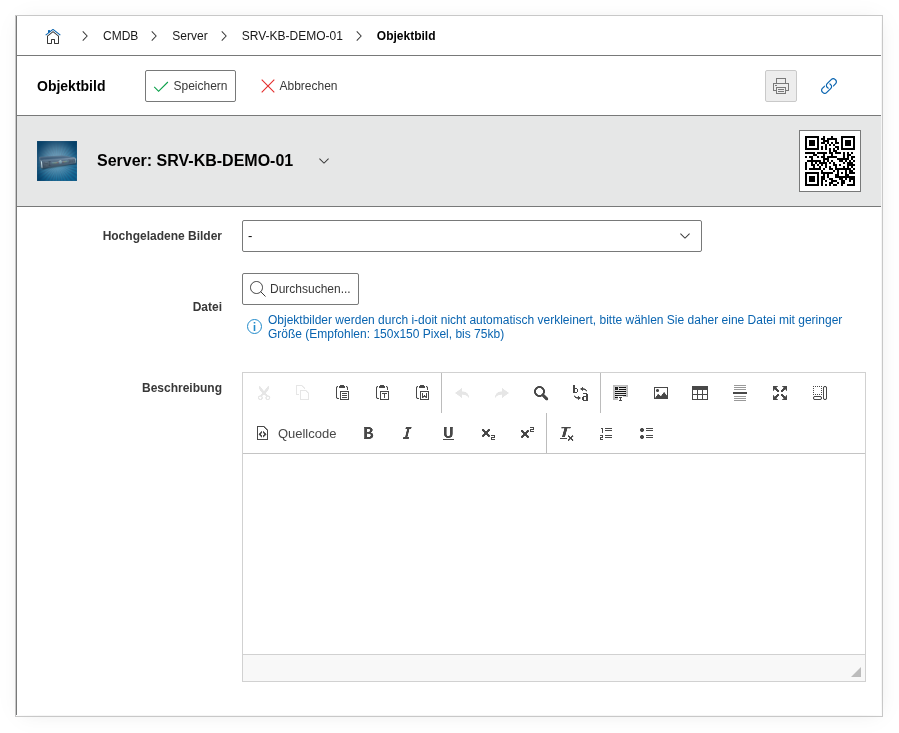
The Object Image category allows you to assign an individual photo or image to an object. It is a single-value category -- exactly one image can be stored per object, which is then prominently displayed in the object view.
Visual identification in everyday work
A picture is worth a thousand attributes. Especially during on-site work in the data center, a photo of the device is tremendously helpful: technicians immediately recognize which device in the rack is meant, without having to compare serial numbers first. In rack documentation, photos also supplement the schematic rack view with reality -- cable routing, labels, and physical condition become visible at a glance.
Usage#
Typical use cases:
- Rack photos and hardware documentation: Photograph servers, switches, or storage systems directly in the rack and store the images on the respective object. During maintenance work, the technician immediately sees in the CMDB what the device looks like and where it is located -- especially helpful for identical devices that differ only in position or labeling.
- Buildings and rooms: For location objects such as buildings, floors, or server rooms, floor plans, photos of access doors, or overview images are suitable. This facilitates orientation for new employees and external service providers.
- Workstations and clients: A photo of the workstation documents the actual equipment -- monitor setup, docking station, peripherals. During relocations or hardware replacements, it is immediately clear what is on site.
- Network components: Patch panel photos or switch front views help with assigning ports to physical connections, especially when on-site labeling is incomplete.
Fields#
Uploaded Images#
A selection of already uploaded images for this object. If multiple images have been uploaded, the active object image displayed in the object view can be chosen here.
File#
The actual image upload field. Supports common image formats such as PNG, JPG, and GIF. For rack photos, images with a resolution of approximately 1000-2000 pixels wide are recommended -- large enough for details, but not so large that loading times suffer. Use descriptive file names like srv-esxi-01-front.jpg instead of IMG_20260401.jpg.
Description#
Free text for context about the image: capture date, perspective (front/rear), specifics, or occasion (e.g., "Condition after renovation 2026-03", "Cable routing rear side Rack B07").
Technical Reference#
| Property | Value |
|---|---|
| Category constant | C__CATG__IMAGE |
| Type | Global category |
| Multi-value | No |
| Assigned to | Application, Blade Server, Building, Cable, Client, Enclosure, Monitor, etc. |
Fields (API Reference)#
| Field | API key | Type |
|---|---|---|
| Uploaded Images | image_selection | Dialog (selection) |
| File | image | File upload |
| Description | description | Text field (multi-line) |
API Examples#
Image upload via API
Uploading image files via the JSON-RPC API is limited. The image value expects a Base64-encoded file or an internal file path. For practical use, it is recommended to upload images via the web interface and use the API only for reading or selecting already uploaded images.
Read entries#
1 2 3 4 5 6 7 8 9 10 | |
Update an entry#
1 2 3 4 5 6 7 8 9 10 11 12 13 14 | |