Category: Invoice#
The Invoice category documents invoices and financial records assigned to an object. It is a multi-value category -- any number of invoices can be recorded per object, e.g. the purchase invoice, maintenance invoices, and upgrade costs.
Usage#
Typical use cases:
- Document acquisition costs: Store the purchase invoice directly on the server, switch, or client. In combination with the Accounting category -- which contains inventory number, cost center, and acquisition date -- a complete financial profile of the asset is created.
- Track maintenance and repair costs: Each maintenance invoice recorded as a separate entry provides a clear picture of the Total Cost of Ownership (TCO) over time. A report on all invoices of an object type shows which device models incur the highest ongoing costs.
- Budget planning and cost evaluation: Using the Report Manager, invoices can be evaluated by time period, amount, and object type. Typical questions: "How much did we spend on server hardware last quarter?" or "Which objects have invoices over EUR 10,000?"
- Tax documentation: The fields for invoice date, processing date, and handover to financial accounting support tax tracking and help maintain an overview of the billing status.
Invoice vs. Accounting
The Invoice category records individual invoice documents with amount and date. The Accounting category, on the other hand, contains the commercial master data of the object (inventory number, cost center, acquisition date, warranty period). Both categories complement each other: Accounting provides the framework, invoices provide the actual records.
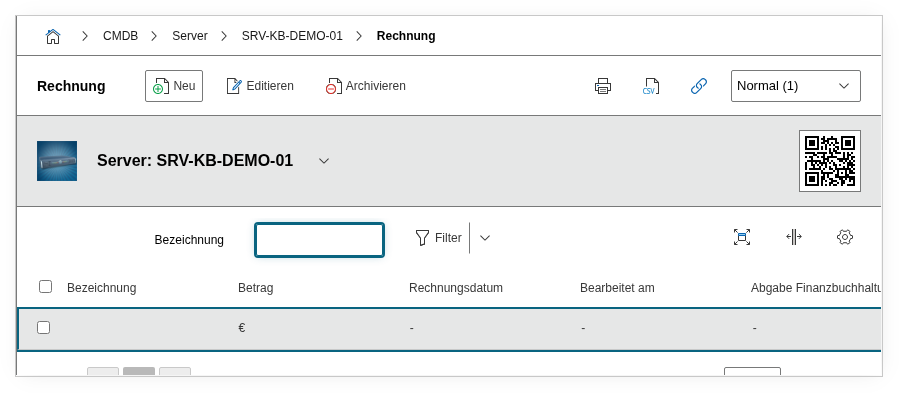
Fields#
Title#
The title or invoice number, e.g. INV-2026-04521 or Maintenance Invoice Q1/2026. This value appears in the list view and should be chosen so that the invoice is immediately identifiable -- ideally with the supplier's invoice number.
Invoice Date#
The date of invoicing. This field is the basis for time-based evaluations in the Report Manager, e.g. "all invoices from the last 12 months".
Amount#
The invoice amount as a decimal number. The currency is not recorded separately -- it is recommended to use a consistent currency within the CMDB and document it in the description if necessary. A consistent convention should also apply for net vs. gross amounts.
Processing Date#
The date on which the invoice was processed or approved for payment. This field enables tracking of the processing status: if there is a large time gap between the invoice date and the processing date, this indicates delays in the process.
Handover to Financial Accounting#
The date on which the invoice was handed over to financial accounting. In many organizations, IT is responsible for the factual review, while accounting initiates the payment. This field documents the transition.
Invoiced#
Indicates whether the invoice has already been paid (Yes or No). Using a report, all open invoices can be quickly identified -- helpful for the monthly reconciliation with accounting.
Description#
Free text for supplementary information: supplier, order number, payment terms, early payment discount deadlines, or notes on the factual review.
Technical Reference#
| Property | Value |
|---|---|
| Category constant | C__CATG__INVOICE |
| Type | Global category |
| Multi-value | Yes |
| Assigned to | Server, Blade Server, Switch, etc. |
Fields (API Reference)#
| Field | API key | Type |
|---|---|---|
| Title | denotation | Text |
| Invoice Date | date | Date |
| Amount | amount | Decimal (currency) |
| Processing Date | edited | Date |
| Handover to Financial Accounting | financial_accounting_delivery | Date |
| Invoiced | charged | Dialog (Yes/No) |
| Description | description | Text field (multi-line) |
API Examples#
Create an entry#
1 2 3 4 5 6 7 8 9 10 11 12 13 14 15 16 17 18 19 | |
Read entries#
1 2 3 4 5 6 7 8 9 10 | |
Update an entry#
1 2 3 4 5 6 7 8 9 10 11 12 13 14 15 | |