Category: Host Address#
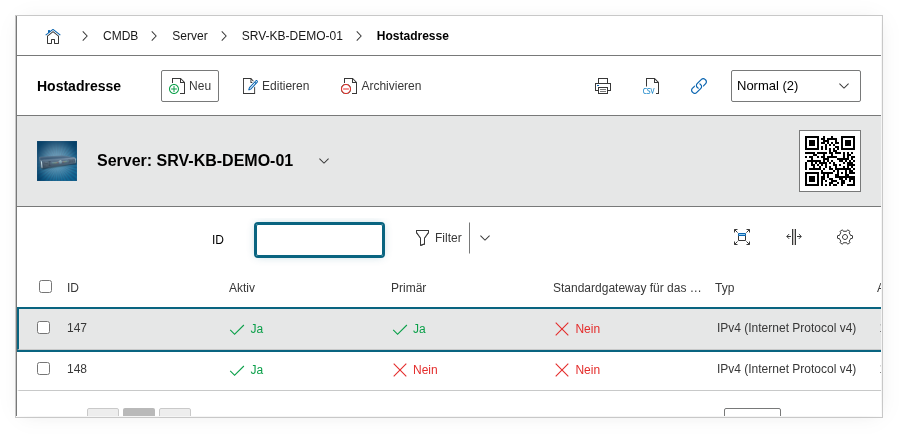
The Host Address category is the central category for IP address management in i-doit. It is a multi-value category -- any number of IP addresses can be recorded per object, for example when a server is reachable via multiple network interfaces in different networks or when an interface carries both an IPv4 and an IPv6 address.
The Host Address links three levels together: the IP address itself, the Layer 3 net object in which it resides, and the physical or logical port through which it is reachable. This interplay makes the category the hub of network documentation and is simultaneously the most common source of configuration errors.
Most common error: No net assigned
An IP address must be assigned to a Layer 3 net object. If this assignment is missing, the address ends up in the predefined catch-all net "Global v4" or "Global v6" and does not appear in the IPAM overview of the desired subnet. The consequence: the address appears as "not assigned", IP lists remain incomplete, and duplicate assignments are not detected. After creating a host address, always verify that the correct Layer 3 net object is selected in the Net field.
Usage#
Typical use cases:
- IP Address Management (IPAM): i-doit manages occupied and free addresses within Layer 3 nets. Each host address entry automatically occupies an address in the assigned net object. Through the net category, you can see at a glance which addresses are free, assigned, or reserved.
- DNS documentation: Hostname, domain, and DNS server are maintained directly on the object. i-doit constructs the FQDN (Fully Qualified Domain Name) from these, e.g.
srv-db-01.bhb-ag.local, and displays it as a calculated field. The FQDN appears in reports and exports -- a consistently maintained hostname and a correct domain are therefore prerequisites for meaningful evaluations. DNS aliases (CNAMEs) can be added via the Aliases field. - Network assignment: Through the link to a Layer 3 net and a port, a continuous documentation chain from the cable through the switch port to the IP address is created. The connection to the Port category links the logical IP address with the physical network interface -- so in the event of a network problem, you can immediately trace which switch port the affected device is connected to. Reports can query this chain, e.g. "Which servers are in VLAN 100?".
- Primary IP in lists and monitoring: The Primary IP address flag determines which address is used in the object list, in reports, and for monitoring exports (e.g. Nagios, Checkmk). Exactly one address per object should be marked as primary. If the flag is missing or two entries are accidentally marked as primary, unexpected behavior occurs in exports and reachability checks.
- Combination with Access and Contact Assignment: The Host Address provides the IP, the Access category the specific service URL, and the Contact Assignment the responsible person. Together, they create a complete picture: which address, how reachable, who is responsible.
Fields#
Type (IPv4/IPv6)#
Determines whether the entry contains an IPv4 or IPv6 address. Depending on the selection, i-doit displays the appropriate address and assignment fields. An object can have both IPv4 and IPv6 entries -- separate host address entries are created for each.
IPv4 Address / IPv6 Address#
The actual IP address of the object, e.g. 192.168.10.25 or fd00::1a2b:3c4d. IPv4 is entered in dotted decimal notation, IPv6 in the standard hex notation with colons.
When saving, i-doit checks whether the address falls within the address range of the assigned net. If it falls outside, a warning appears -- but the assignment can still be forced. The address is simultaneously marked as occupied in the net object.
Net (Layer 3 Net)#
The Layer 3 net object to which this address is assigned, e.g. an object "Server Network 192.168.10.0/24". This field is an object browser and links to an object of type Layer 3 Net.
Important: This field is the most common stumbling block. The assignment to the net does not happen automatically based on the IP -- it must be explicitly set. If no net is selected, the address ends up in the predefined net "Global v4" or "Global v6", which serves as a catch-all for unassigned addresses. For proper IPAM, every address should be assigned to a specific net object.
Conversely: when a net object is selected, i-doit offers the next free address from that net in the address field.
Hostname#
The hostname of the object without the domain part, e.g. srv-db-01. Together with the Domain field, i-doit forms the fully qualified hostname (FQDN). The hostname is also used in lists and reports and should therefore be consistently maintained.
Domain#
The DNS domain, e.g. bhb-ag.local or intern.example.com. From hostname and domain, i-doit calculates the FQDN, i.e. e.g. srv-db-01.bhb-ag.local. The domain is entered as free text -- there is no automatic validation against a DNS server.
DNS Server#
Link to an object that serves as the DNS server for this address. This is an object browser field -- an existing object in i-doit is selected, e.g. a server object "DNS-01". Multiple DNS servers can be assigned.
Search Domains#
Multi-selection of DNS search domains that apply to the name resolution of this entry. The available values are managed globally in the DNS configuration of i-doit and can be added there.
Primary IP Address#
Determines whether this entry is the primary host address of the object. Exactly one address per object should be marked as primary. The primary address is preferentially used in the object list, in reports, and by monitoring integrations. For an object with only one IP, it is automatically primary.
Active#
Indicates whether the address is currently active (in use). Inactive entries remain documented but are not considered in certain evaluations and exports. This is useful when an IP is temporarily not used but should remain reserved.
Address Assignment (IPv4/IPv6)#
The type of address assignment: Static, DHCP, or Not assigned. For IPv6, SLAAC and DHCPv6 are additionally available. This field serves documentation purposes -- i-doit does not configure a DHCP server. However, it helps in reports, e.g. "Which servers still have a DHCP address instead of a static one?".
IPv6 Scope#
Only visible for IPv6. Describes the scope of the address, e.g. Link-local, Site-local, or Global. Dialog+ field -- custom values can be added.
Default Gateway for this Net#
Marks this host address as the default gateway within the assigned net. At most one object per net should be designated as the gateway. i-doit then automatically displays this gateway in the net overview.
Assigned Port#
Links the IP address to a physical network port (from the "Port" category) or a logical port (from the "Logical Port" category) of the same object. This link completes the documentation chain: from the cable through the port to the IP address.
Practical tip: If the port has not yet been created, it must first be created in the Port category. Only then does it appear in the selection list of this field. Typical error: the IP is created but no port is assigned -- then the connection to the physical network infrastructure is missing.
Aliases#
DNS aliases or CNAME records that point to this host address. Multiple alternative hostnames can be documented via this field, e.g. mail.example.com as an alias for srv-mail-01.example.com. The aliases are stored as an n2m link.
Net Zone#
Optionally assignment to a net zone (dialog field). Net zones can be defined in the i-doit administration and allow segmentation of nets by security zones, e.g. DMZ, LAN-internal, or Management.
Description#
Free text for additional information: purpose of the IP, configuration specifics, contacts, or notes on the network connection.
Interplay of IP, Net, and Port#
The three fields IPv4/IPv6 Address, Net, and Assigned Port together form the backbone of network documentation. Only when all three are correctly set do reports and the network plan visualization deliver complete results.
Recommended sequence when creating:
- Create Layer 3 net object (e.g. "Server Network 192.168.10.0/24" of object type Layer 3 Net), including subnet mask and gateway.
- Create port in the Port category of the target object (e.g. "eth0").
- Create host address: select net, enter IP address (or accept the suggested free address), assign port.
Common errors:
- No net assigned: The IP ends up in the "Global v4" net and does not appear in the IPAM overview of the desired subnet.
- No port assigned: The IP is documented but not linked to the physical interface -- the connection is missing in network diagrams.
- Multiple primary IPs: If two entries are accidentally marked as primary, unexpected behavior can occur in monitoring exports.
Technical Reference#
| Property | Value |
|---|---|
| Category constant | C__CATG__IP |
| Type | Global category |
| Multi-value | Yes |
| Assigned to | Server, Client, Router, Switch, PDU, Blade Server, Virtual Server, etc. |
Fields (API Reference)#
| Field | API key | Type |
|---|---|---|
| Type (IPv4/IPv6) | net_type | Dialog (selection) |
| IPv4 Address | ipv4_address | Text |
| IPv6 Address | ipv6_address | Text |
| Net | net | Object browser (link) |
| Hostname | hostname | Text |
| Domain | domain | Text |
| DNS Server | dns_server | Object browser (link) |
| Search Domains | dns_domain | Multi-selection |
| Primary IP Address | primary | Dialog (selection) |
| Active | active | Dialog (selection) |
| Address Assignment IPv4 | ipv4_assignment | Dialog (selection) |
| Address Assignment IPv6 | ipv6_assignment | Dialog (selection) |
| IPv6 Scope | ipv6_scope | Dialog+ (expandable selection) |
| Default Gateway | use_standard_gateway | Dialog (selection) |
| Assigned Port | assigned_port | Dialog (selection) |
| Assigned Logical Port | assigned_logical_port | Dialog (selection) |
| Net Zone | zone | Dialog (selection) |
| Aliases | aliases | n2m |
| Description | description | Text field (multi-line) |
Additionally, there are calculated read-only fields that are returned in the API but cannot be written directly:
| Field | API key | Description |
|---|---|---|
| Primary Layer-3 Net | primary_layer3_net | Name of the primary net |
| Primary Host Address | primary_hostaddress | Primary IP as text |
| Primary Hostname | primary_hostname | Primary hostname as text |
| Host Address | hostaddress | IP address as text (regardless of IPv4/IPv6) |
| DNS Server Address | dns_server_address | IP of the DNS server as text |
| All IPs | all_ips | All IPs of the object as text |
| FQDN | primary_fqdn | Calculated fully qualified hostname |
API Examples#
Note: The Host Address category uses the parameter object instead of objID when saving. Both variants are accepted, but object is the correct designation according to the API documentation.
Create an entry#
1 2 3 4 5 6 7 8 9 10 11 12 13 14 15 16 17 18 19 20 21 22 | |
Read entries#
1 2 3 4 5 6 7 8 9 10 | |
Update an entry#
1 2 3 4 5 6 7 8 9 10 11 12 13 14 15 | |