Category: Service Assignment#
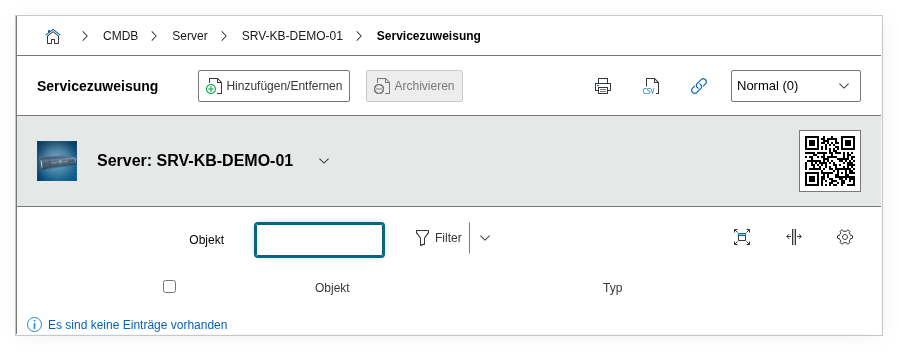
The Service Assignment category links an object with one or more IT services. It is a multi-value category -- any number of assignments can be created per object, so that, for example, a single server is simultaneously documented as a component of the email service, the monitoring system, and an ERP service.
This category is the decisive step that transforms a CMDB from a mere inventory into an ITSM tool. Without service assignments, i-doit only documents what exists -- with them, it documents what it is used for. Only through the link between infrastructure and service does the question become answerable: "If this server fails, which business processes are affected?" This is the foundation for Business Impact Analysis (BIA), incident prioritization, and informed change management.
Service tree in the CMDB Explorer
The service assignments of all objects together form the service tree, which is visually displayed in the CMDB Explorer. There you can see at a glance which servers, switches, applications, and clusters support a specific IT service -- and how deep the dependency chain reaches. If this tree is fully maintained, a single click on the service reveals the entire infrastructure behind it. If assignments are missing, the service appears as an isolated node without context.
Usage#
Typical use cases:
- Impact analysis and incident prioritization: Through the service assignment, i-doit recognizes which IT services will fail if a specific server, switch, or application becomes unavailable. A database server assigned to the services "SAP ERP" and "Business Intelligence" obviously has a higher priority than a test server without a service assignment. This knowledge is the foundation for Business Impact Analysis (BIA) and determines whether an incident is classified as "critical" or "low".
- SLA assignment: By assigning an object to a service that has a defined service level, it can be derived which availability requirements apply to the underlying infrastructure. A database server assigned to the "SAP ERP" service implicitly inherits its SLA requirements.
- CMDB Explorer: The service assignment creates relationships that are visualized as a tree structure in the CMDB Explorer. This makes it immediately visible which components belong to which service and how deep the dependency chain reaches.
- ITSM integration: When i-doit is connected as a CMDB to an ITSM tool like OTRS, Znuny, or Zammad, the service assignment forms the bridge between configuration items and the services referenced in tickets. An incident can thus be automatically assigned to the correct service.
- Change management: Before a planned change, the service assignment shows which services are affected by the maintenance. This allows maintenance windows to be scheduled at times when the affected services have the lowest usage -- and the stakeholders of the respective services can be proactively informed.
- Reporting and documentation gaps: Using the Report Manager, evaluations can be created that show which objects are not assigned to any service -- a common indicator of incomplete documentation. A report "Servers without service assignment" uncovers blind spots in the CMDB that could become an unpleasant surprise during an incident.
Fields#
Service#
The assigned IT service. Using an object browser, an object of type IT Service, System Service, or another service-like object type is selected. Each entry in this multi-value category represents exactly one service assignment. The selection automatically creates a bidirectional relationship -- the linked service in turn shows the assigned object as a service component.
SYSID#
The system ID of the assigned service object. This field is automatically taken from the linked object and is read-only. The SYSID serves as a unique technical identifier and can be used as a reference in exports or interface configurations.
Technical Reference#
| Property | Value |
|---|---|
| Category constant | C__CATG__IT_SERVICE |
| Type | Global category |
| Multi-value | Yes |
| Assigned to | Server, Client, Switch, Router, Cluster, Application, Building, etc. |
Fields (API Reference)#
| Field | API key | Type |
|---|---|---|
| Service | connected_object | Object browser (link) |
| SYSID | sysid | Text (read-only) |
API Examples#
Create an entry#
1 2 3 4 5 6 7 8 9 10 11 12 13 | |
Note
This category expects the parameter object instead of objID when saving. The value of connected_object is the object ID of the IT service to which the object should be assigned.
Read entries#
1 2 3 4 5 6 7 8 9 10 | |
Update an entry#
1 2 3 4 5 6 7 8 9 10 11 12 13 14 | |