Category: Logical Devices (Client)#
The Logical Devices (Client) category documents the logical storage devices (LUNs, volumes) assigned to a server from a SAN storage system. It is a multi-value category -- a server can use many LUNs from different storage systems simultaneously.
This category shows the consumer side of the SAN storage assignment: Which LUNs does this server see, through which paths does it reach them, and which multipath technology provides redundancy? The counterpart on the storage side is the Logical Devices (LDEV Server) category, in which the LUNs on the storage array itself are documented.
Client and Server belong together
The Logical Devices (Client) category on the server and the Logical Devices (LDEV Server) category on the storage system form a pair. The connection between both sides is established via the Logical Devices (LDEV Server) field. Only when both sides are maintained does a complete picture of the storage assignment emerge: which server uses which LUN from which storage array via which paths.
Usage#
Typical use cases:
- Document LUN assignments: In SAN environments, the question "Which LUNs are assigned to which server?" is one of the most frequent requests to the storage team. The Logical Devices (Client) category answers this question directly on the server object, without having to connect to the storage management console.
- Multipath documentation: The Multipath technology field documents which multipath framework is used -- e.g.
DM-Multipath(Linux),PowerPath(Dell EMC),RDAC, orWindows MPIO. This information is critical for troubleshooting during path failures, because each technology has its own diagnostic tools and configuration specifics. - Path analysis: The Path field shows through which FC ports and HBAs the LUN is reachable. In the event of an HBA failure, you can immediately identify which LUNs are affected and whether the remaining path is sufficient.
- Prepare storage migration: When migrating from an old to a new storage system, the category shows which servers use which LUNs. This is the foundation for the migration plan: which servers need to be switched over, which new LUNs are needed, and which paths need to be configured?
- Capacity planning: In combination with the storage-side LDEV Server entries, a complete overview of which servers use how much SAN storage emerges -- helpful for budget planning and procurement of additional capacity.
Keep paths up to date
When an HBA is replaced or an FC port is recabled, the paths to the LUNs change. In this case, update not only the HBA and FC Port categories, but also the path assignments in this category. Outdated path information can be misleading during troubleshooting.
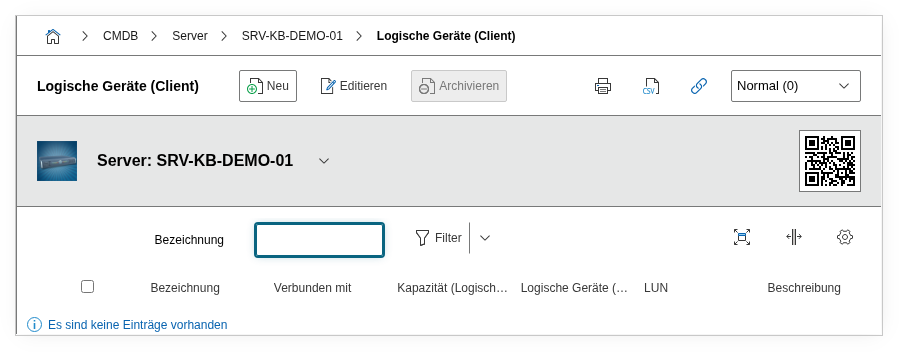
Fields#
Title#
The name of the logical device as the server sees it, e.g. sdb, dm-3, LUN 42, or the volume label. Use the designation that the operating system administrator also knows, so that the assignment is unambiguous.
Path#
The FC port paths through which the logical device is reachable. Here the FC ports are linked through which the server accesses the LUN. In a multipath configuration, a logical device typically has two or four paths -- ideally through different HBAs and fabrics.
Logical Devices (LDEV Server)#
The link to the storage-side LDEV Server entry. This field establishes the connection between the client view (server) and the server view (storage array). Through this link, navigation is possible: from the server to the LUN configuration on the storage system and vice versa.
Primary Path#
The preferred path for I/O operations. In active/passive configurations (e.g. ALUA with preferred path), this is the path through which data flows during normal operation. In active/active configurations, this value can be used to designate the optimized path.
Multipath Technology#
The multipath framework used, e.g. DM-Multipath, PowerPath, Windows MPIO, NativeMPIO, or RDAC. Dialog+ field -- custom values can be added. The multipath technology determines the diagnostic tools and failover behavior, making this information essential during disruptions.
Description#
Free text for additional information: LUN ID on the storage system, file system type (ext4, XFS, NTFS), mount point, capacity, performance tier (SSD/HDD), or usage notes (e.g. "Oracle Tablespace DATA").
Technical Reference#
| Property | Value |
|---|---|
| Category constant | C__CATG__LDEV_CLIENT |
| Type | Global category |
| Multi-value | Yes |
| Assigned to | Server, Client, Blade Server, Virtual Server |
Fields (API Reference)#
| Field | API key | Type |
|---|---|---|
| Title | title | Text |
| Path | paths | Object browser (link) |
| Logical Devices (LDEV Server) | assigned_ldevserver | Object browser (link) |
| Primary Path | primary_path | Integer |
| Multipath Technology | multipath | Dialog+ (expandable selection) |
| Description | description | Text field (multi-line) |
API Examples#
Create an entry#
1 2 3 4 5 6 7 8 9 10 11 12 13 14 15 16 | |
Read entries#
1 2 3 4 5 6 7 8 9 10 | |
Update an entry#
1 2 3 4 5 6 7 8 9 10 11 12 13 14 15 | |