Category: Logical Devices (LDEV Server)#
The Logical Devices (LDEV Server) category documents the logical volumes (LUNs) that a storage system provides. It is a multi-value category -- any number of LUNs can be created per storage array, mapping the actual division of physical storage into usable units.
LDEV Server vs. LDEV Client
This category describes the provider side (storage array). The counterpart is the Logical Devices (LDEV Client) category, which is maintained on the consuming server and shows which LUNs a server uses. Both sides are linked to each other via the Logical devices (Client) field or the path assignment.
Usage#
Typical use cases:
- SAN storage documentation: Record all LUNs that a storage array (e.g. NetApp FAS, Dell PowerStore, HPE 3PAR) provides. Together with the FC Port and HBA categories, a complete SAN documentation from storage to server is created.
- Capacity planning: Using the Report Manager, you can evaluate how much capacity is allocated per storage array and how much free storage remains. Tier classes help distinguish between SSD tiers and HDD tiers.
- Multipath documentation: The Paths and Primary Path fields map through which FC ports a LUN is reachable. This is critical for fault tolerance: if a path fails, the documentation immediately shows the redundant route.
- Storage lifecycle and migration: During a storage refresh, you can list all LUNs of an old array in the Report Manager, identify the assigned servers, and plan the migration systematically.
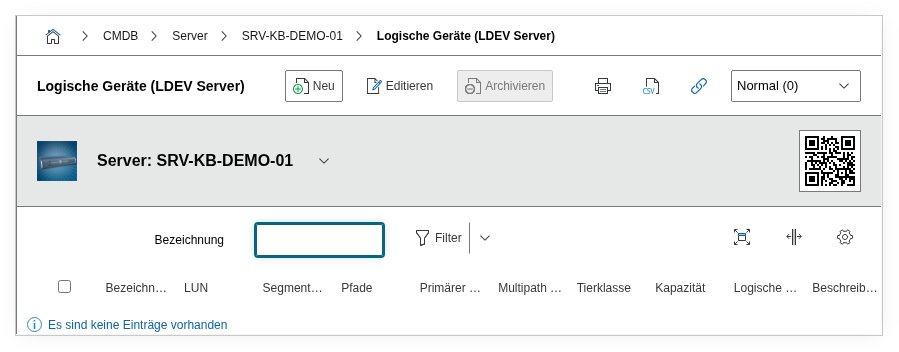
Fields#
Title#
The name of the LUN or logical volume, e.g. LUN_SQL_DATA_01 or vol_vmware_ds03. Choose a descriptive naming convention that allows conclusions about the intended use. This value appears in the list view and in reports.
LUN#
The LUN number or LUN identifier as configured on the storage array, e.g. 0 or 3A:2F. This value must match the actual configuration on the storage so that the mapping between CMDB and reality remains unambiguous.
Segment Size (kB)#
The segment size (stripe size) in kilobytes. This value is relevant for performance documentation: a typical segment size for OLTP workloads is 64 kB, for sequential workloads like backup streams often 256 kB or more. In practice, this value is rarely maintained manually but rather populated through automated imports from storage management.
Storage Unit#
The unit of measurement for the capacity field -- typically GB or TB. Make sure you remain consistent within your CMDB to avoid distorting comparisons in reports.
Capacity#
The size of the LUN in the selected storage unit. For a 500 GB volume, enter 500 here and select GB as the unit. This value is the basis for capacity reports and should reflect the usable (not raw) capacity.
Connected Devices#
Using the object browser, the devices that access this LUN are linked here -- typically servers or hypervisors. This link is the heart of SAN documentation: it shows at a glance which systems depend on this storage.
Paths#
The FC ports or iSCSI paths through which this LUN is reachable. In a typical dual-fabric setup, at least two paths are entered here. This information is indispensable for failure analysis: if a fabric fails, the documentation immediately shows which LUNs are affected.
Primary Path#
The index of the preferred path from the path list. The storage or the server's multipath framework uses this path primarily and switches to alternate paths only in the event of a failure.
Multipath Technology#
The multipath software or technology used, e.g. PowerPath, DM-Multipath, or MPIO. Dialog+ field -- custom values can be added as needed. This value helps the storage team understand which multipath solution is configured on the consuming servers.
Tier Class#
The storage class of the LUN, e.g. Tier 1 (SSD), Tier 2 (SAS), or Tier 3 (NL-SAS). Dialog+ field. The tier class is important for cost allocation and SLA documentation: business-critical databases should reside on Tier 1 storage, archive data on more cost-effective Tier 3 storage.
Logical Devices (Client)#
Link to the LDEV Client entries on the consuming servers. This back-link ensures that the assignment is navigable in both directions: from the storage array, you can see which servers use the LUN -- and from the server, which array provides the storage.
Description#
Free text for additional information: RAID level, deduplication, compression, replication status, snapshot policies, or special agreements with the storage team.
Technical Reference#
| Property | Value |
|---|---|
| Category constant | C__CATG__LDEV_SERVER |
| Type | Global category |
| Multi-value | Yes |
| Assigned to | Server, Blade Server, Client, Virtual Server |
Fields (API Reference)#
| Field | API key | Type |
|---|---|---|
| Title | title | Text |
| LUN | lun | Text |
| Segment Size (kB) | segment_size | Decimal |
| Storage Unit | unit | Dialog (selection) |
| Capacity | capacity | Decimal |
| Connected Devices | connected_devices | Object browser (link) |
| Paths | paths | Object browser (link) |
| Primary Path | primary_path | Integer |
| Multipath Technology | multipath | Dialog+ (expandable selection) |
| Tier Class | tierclass | Dialog+ (expandable selection) |
| Logical Devices (Client) | ldev_clients | Object browser (link) |
| Description | description | Text field (multi-line) |
API Examples#
Create an entry#
1 2 3 4 5 6 7 8 9 10 11 12 13 14 15 16 17 18 19 20 | |
Read entries#
1 2 3 4 5 6 7 8 9 10 | |
Update an entry#
1 2 3 4 5 6 7 8 9 10 11 12 13 14 15 | |