Category: Location#
The Location category is the central category for the physical placement of an object in i-doit -- and thus the foundation of the entire CMDB structure. It is a single-value category and is assigned to all object types. Through the Parent location field, the entire location hierarchy is built -- from the country level down to the individual slot in the rack. Without a properly maintained location hierarchy, the CMDB lacks the spatial dimension: rack views, the location browser, and location-based reports only work when the assignments are correct.
Prerequisite for rack positioning
For an object to be positioned in the rack, the number of rack units must be entered in the Form Factor category. Without this value, i-doit cannot assign the object to a slot -- the Position in rack field in this category will remain empty.
Usage#
Typical use cases:
- Build location hierarchy: The location hierarchy is the tree structure that maps the entire physical world in i-doit. Each object points to its parent object via the Parent location (
parent) field -- creating a chain, e.g.Germany > Berlin > Data Center North > Room 3.04 > Rack A12 > Server-01. This hierarchy is the backbone of the CMDB: it determines what is displayed in the location browser, in the physical view, and in location-based reports. When an object is moved, all subordinate objects automatically move with it. - Document rack installation: When an object is installed in a rack, the installation type (front/rear), insertion direction (horizontal/vertical), and the exact position (rack unit) can be documented. Prerequisite: the rack units must be maintained in the Form Factor category -- without this value, the position selection remains empty.
- GPS coordinates for mobile and external assets: For buildings, remote stations, cell towers, or outdoor equipment, GPS coordinates can be stored. This is especially useful for distributed infrastructures: map displays show at a glance where which equipment is located, and distance calculations help with planning service calls.
- SNMP sysLocation matching: The SNMP sysLocation string can be stored to compare the location returned in SNMP queries with the i-doit location. Network devices report their sysLocation automatically -- using a report, you can check whether the configured SNMP location matches the i-doit assignment. Discrepancies often indicate that a device was physically relocated but not updated in i-doit.
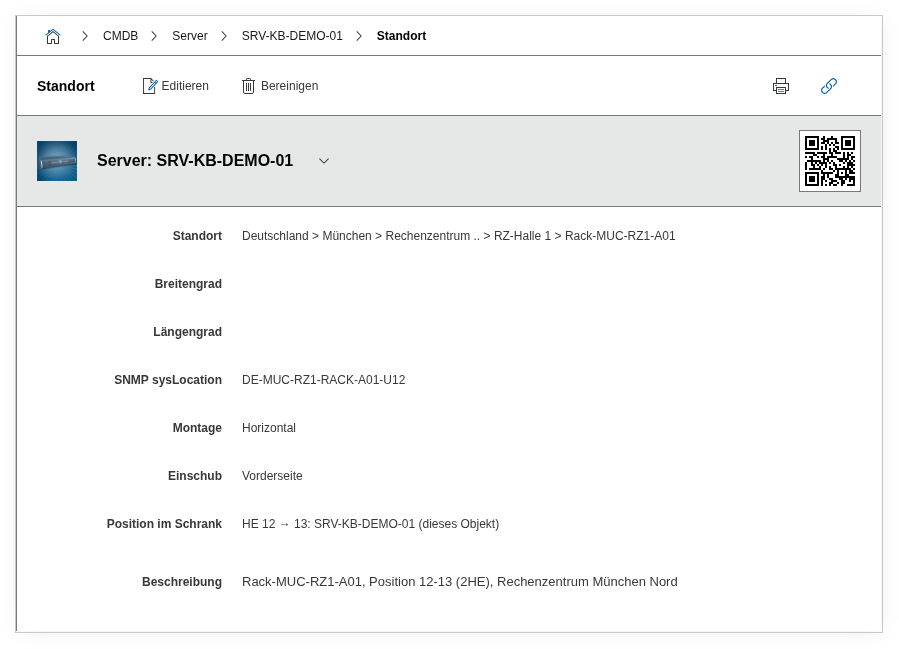
Fields#
Parent Location#
The most important field of the entire category -- and one of the most important fields in i-doit altogether. Using the object browser, the parent object in the location hierarchy is selected -- e.g. a room for a cabinet, a building for a room, or a rack for a server. Through the chaining of these assignments, the complete location path is automatically created. When this field is changed, the object moves along with all subordinate objects in the hierarchy. This means: if you move a rack from Room A to Room B, all servers, switches, and PDUs installed in it automatically move along -- the sub-hierarchy remains consistent.
installation Type#
Determines whether the object is installed from the front or rear side in a rack. This field is only relevant when the parent location is a rack or cabinet. The selection affects the display in the physical rack view: devices on the front appear on the left, devices on the rear on the right. Typically, servers are mounted at the front and PDUs or cable management at the rear.
Insertion#
Determines whether the object is installed horizontally or vertically. Default is horizontal -- vertical insertions are used e.g. for cable management panels, vertical PDUs, or blanking plates mounted on the side of the rack.
Position in Rack#
The rack unit (RU) in which the object is installed in the rack. The available positions are dynamically determined from the rack configuration and the already occupied rack units. This field only works if the rack units of the object are entered in the Form Factor category -- without this value, i-doit does not know how many slots the device occupies, and the position selection remains empty. Only relevant when the parent location is a rack.
GPS#
A free text field for GPS coordinates in any format, e.g. 52.520008, 13.404954. For structured recording, the separate Latitude and Longitude fields are available. Especially useful for mobile assets (vehicles, containers), outdoor equipment (antenna masts, distribution cabinets), or distributed sites without a fixed address.
Latitude#
The latitude as a decimal value, e.g. 52.520008 for Berlin. Used together with longitude for map displays and distance calculations. For buildings, a precision of 5-6 decimal places (approximately 1 meter) is sufficient; for outdoor equipment, higher precision may be appropriate.
Longitude#
The longitude as a decimal value, e.g. 13.404954 for Berlin. Together with latitude, the exact position for map views is determined.
SNMP sysLocation#
The SNMP sysLocation string of the device as returned by SNMP queries (OID 1.3.6.1.2.1.1.6). Can be automatically populated during SNMP import. This field enables comparison between the location reported by the device itself and the assignment in i-doit. A report that compares SNMP sysLocation with the parent location uncovers inconsistencies -- typically devices that were physically relocated but whose network configuration still contains the old location (or vice versa).
Description#
Free text for additional location information: access restrictions (e.g. "transponder Level 3 required only"), on-site contacts, reachability specifics (e.g. "access only through security gate, 24h advance notice"), or notes on air conditioning and power supply.
Technical Reference#
| Property | Value |
|---|---|
| Category constant | C__CATG__LOCATION |
| Type | Global category |
| Multi-value | No |
| Assigned to | All object types |
Fields (API Reference)#
| Field | API key | Type |
|---|---|---|
| Parent Location | parent | Object browser (link) |
| installation Type | option | Dialog (selection) |
| Insertion | insertion | Dialog (selection) |
| Position in Rack | pos | Dialog (selection) |
| GPS | gps | Text |
| Latitude | latitude | Text |
| Longitude | longitude | Text |
| SNMP sysLocation | snmp_syslocation | Text |
| Description | description | Text field (multi-line) |
API Examples#
Create an entry#
1 2 3 4 5 6 7 8 9 10 11 12 13 14 15 16 17 18 19 20 | |
Read entries#
1 2 3 4 5 6 7 8 9 10 | |
Update an entry#
1 2 3 4 5 6 7 8 9 10 11 12 13 14 15 16 | |