Category: Logbook#
The Logbook category shows the complete change history of an object. It is a multi-value category -- every change to any category of the object automatically generates a new entry. The entries are not manually created but are logged by i-doit in the background whenever a user or an API call modifies data.
Read-only category
The logbook is a pure logging category. You can read and filter entries, but not manually create or edit them. The data is written exclusively by the system and is thus tamper-proof in terms of an audit trail function.
Usage#
Typical use cases:
- Audit trail and compliance: The logbook answers the central question "Who changed what and when?". For audits according to ISO 27001 or BSI IT-Grundschutz, this seamless traceability is indispensable. Auditors can use the logbook entries to verify whether changes were authorized and documented.
- Troubleshooting: When a server is suddenly unreachable, the logbook shows whether IP addresses, ports, or configurations were changed shortly before. The combination of timestamp, user, and changed field often leads to the root cause faster than any monitoring.
- Traceability during personnel changes: When an administrator leaves the organization, the logbook retains visibility into which changes that person made to which objects. This is especially valuable during handover to successors.
- Automation control: API-driven changes (e.g. through JDisc Discovery, CSV import, or custom scripts) are also logged. This allows you to verify whether an automatic import wrote the expected values or whether unintended overwrites occurred.
Evaluate logbook with the Report Manager
Using the Report Manager, you can specifically evaluate logbook entries -- such as all changes in the last 7 days to servers with status "In operation" or all changes by a specific user. Such reports help with regular monitoring and can be sent as scheduled reports via email.
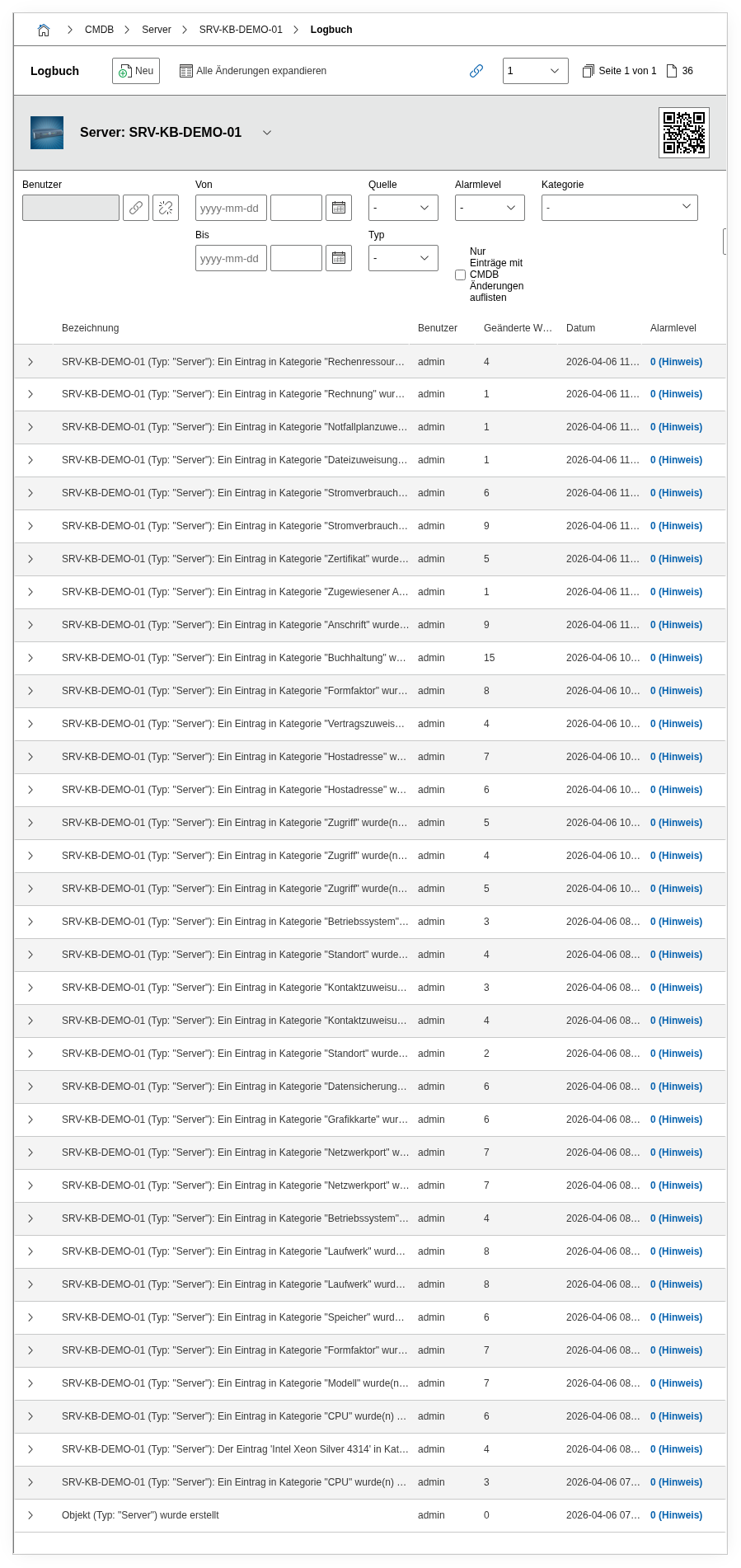
Fields#
Date#
The exact timestamp of the change, including time. This value is set automatically when saving and is not editable. The date allows changes to be chronologically classified and correlated with external events (maintenance windows, incidents).
Object#
The object on which the change was made. When viewed within an object, this is always the current object itself. In the global logbook (under Extras > CMDB > Logbook), you can search across all objects.
Event#
The type of change, e.g. Category changed, Object created, Object archived, or Object deleted. This field provides at a glance whether it is a content change, a status change, or a structural action.
Source#
The origin of the change: GUI (manually via the interface), API (via the JSON-RPC interface), Import (CSV, JDisc, OCS, etc.), or Internal (system-internal actions). This field is crucial for distinguishing manual changes from automated ones.
User#
The user object that triggered the change. For API access, the API user is shown here; for manual changes, the logged-in user. In combination with the rights management, you can verify whether the user had the necessary permission for the change.
Object Type#
The object type of the affected object at the time of the change, e.g. Server, Client, or Network. This value is stored statically and is retained even if the object type is subsequently renamed.
Category#
The category in which the change occurred, e.g. Host Address, Model, or Contact Assignment. This immediately identifies which area of the object was affected.
Alert Level#
The urgency level of the logbook entry: from informational messages (e.g. object opened) to critical changes (e.g. object irrevocably deleted). The alert level facilitates filtering during evaluation.
Username (static)#
The username as a static text value at the time of the change. Even if the user is later renamed or deleted, this value is retained -- important for long-term traceability.
Event (static)#
The event text as a static value. Analogous to the static username, this field ensures that the event description remains readable even when system texts are changed.
Comment#
An optionally free text that is automatically set for certain actions or can be manually added via the logbook interface. Often contains details such as the reason for a status change.
Changes#
The core of the logbook entry: the detailed field changes in before/after format. Shows e.g. IP Address: 10.0.0.1 > 10.0.0.2. This field makes the logbook an effective debugging tool.
Access Type#
The reason or context of the access. Dialog+ field -- custom values can be added as needed, e.g. Maintenance, Incident, Change Request.
Description#
Free text for additional explanations about the logbook entry.
Logbook entries cannot be deleted
During normal operation, logbook entries cannot be deleted. This is a deliberate design to ensure the integrity of the audit trail. Only through the logbook cleanup in the administration can old entries be archived or removed -- and even that should only be done after careful consideration.
Technical Reference#
| Property | Value |
|---|---|
| Category constant | C__CATG__LOGBOOK |
| Type | Global category |
| Multi-value | Yes |
| Assigned to | All object types |
Fields (API Reference)#
| Field | API key | Type |
|---|---|---|
| Date | date | Date/Time |
| Object | object | Integer |
| Event | event | Dialog (selection) |
| Source | source | Dialog (selection) |
| User | user | Integer |
| Object Type | object_type | Text |
| Category | category | Text |
| Alert Level | alert_level | Dialog (selection) |
| Username (static) | user_name_static | Text |
| Event (static) | event_static | Text |
| Comment | comment | Text field (multi-line) |
| Changes | changes | Text |
| Access Type | reason | Dialog+ (expandable selection) |
| Description | description | Text field (multi-line) |
API Examples#
Read entries#
1 2 3 4 5 6 7 8 9 10 | |
No creating or updating via the API
Logbook entries are created exclusively by the system. The API method cmdb.category.save is not intended for this category. Changes to other categories automatically generate the corresponding logbook entries.