Category: Manual Assignment#
The Manual Assignment category links an object with manual or documentation files that exist as independent objects of the "File" type in i-doit. It is a multi-value category -- any number of manuals can be assigned per object, e.g. a manufacturer manual, operating instructions, and an emergency plan.
Manual Assignment vs. File Assignment
The Manual Assignment category is functionally similar to the File Assignment category, but is explicitly intended for assigning documentation and manuals. The File Assignment is for general files (configuration files, backups, license documents), while the Manual Assignment clearly signals: "Here you will find the instructions for this object." This separation greatly facilitates searching -- a technician looking for the operating manual of a switch looks in the Manual Assignment, not in the general File Assignment.
Usage#
Typical use cases:
- Assign manufacturer manuals: Upload the PDF manual of a server, switch, or UPS as a file object in i-doit and link it to the respective device via the Manual Assignment. This way, every technician finds the documentation directly on the object, without having to search through network drives or wikis.
- Operating instructions and SOPs: default Operating Procedures (SOPs) for operating an application or service can be assigned here. A new employee finds all relevant instructions directly on the i-doit object.
- Emergency and recovery plans: Disaster recovery documents belong on the objects they affect. In an emergency, this saves valuable time because the instructions do not need to be searched for first.
- Audit documentation: During audits (ISO 27001, BSI IT-Grundschutz), operating manuals are frequently requested. When these are attached directly to the CMDB objects, completeness can be verified via a report: "Which servers have no assigned manual?"
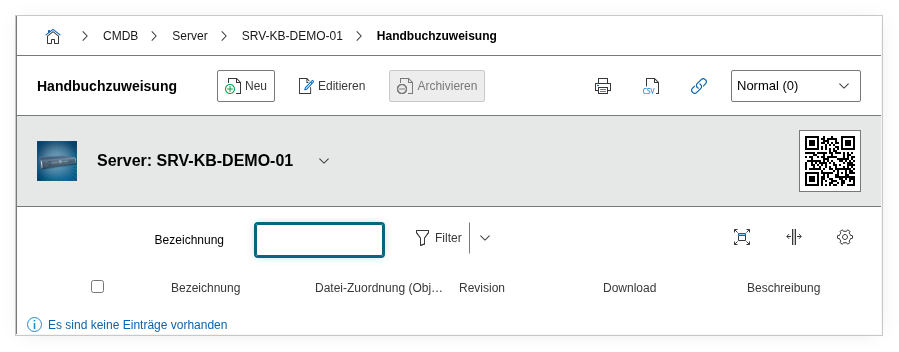
Fields#
Title#
The title of the manual entry, e.g. Dell PowerEdge R750 Manufacturer Manual or SAP HANA Operating Instructions. This value appears in the list view and helps with quick orientation when multiple manuals are assigned.
Manual File#
Link to a file object in i-doit that contains the actual manual file. The file object must have been created beforehand and the file (PDF, DOCX, etc.) uploaded there. You select the appropriate file object using the object browser. The advantage of this architecture: the same manual can be assigned to multiple objects -- e.g. a switch manual to all 20 switches of the same model.
Description#
Free text for additional information: version of the manual, language, scope of validity, date of last update, or notes such as "Chapter 5 contains the firmware update instructions".
Technical Reference#
| Property | Value |
|---|---|
| Category Constant | C__CATG__MANUAL |
| Type | Global category |
| Multi-Value | Yes |
| Assigned to | Application, Blade Server, Cable, Cell Phone Contract, Client, Enclosure, License, Monitor, etc. |
Fields (API Reference)#
| Field | API Key | Type |
|---|---|---|
| Title | title | Text |
| Manual File | manual | Object browser (link) |
| Description | description | Text field (multi-line) |
API Examples#
Create Entry#
1 2 3 4 5 6 7 8 9 10 11 12 13 14 15 | |
Read Entries#
1 2 3 4 5 6 7 8 9 10 | |
Update Entry#
1 2 3 4 5 6 7 8 9 10 11 12 13 14 15 | |