Category: Memory#
The Memory category documents the installed RAM modules of an object. It is a multi-value category -- any number of entries can be created per object, e.g. when a server is equipped with multiple different DIMM modules. The total capacity of all entries is automatically calculated by i-doit -- you can see at a glance how much RAM is installed in total.
JDisc Discovery populates this category automatically
During JDisc import, the quantity, capacity, manufacturer, and memory type of detected modules are directly imported. In most environments, this category does not need to be manually maintained -- the first scan delivers a complete picture of the memory configuration.
Usage#
Typical use cases:
- Complete the hardware inventory: Record manufacturer, module designation, memory type, and capacity of each RAM module. Together with the categories CPU, Drive, and Model, a complete hardware profile is created.
- Capacity planning: Using the Report Manager, you can specifically evaluate which servers have less than a certain RAM capacity installed -- e.g. "all servers with less than 64 GB RAM". This is the starting point for upgrade projects and planning new systems. In virtualization environments, available RAM is often the limiting factor for the number of VMs.
- Document memory upgrades: When replacing or expanding RAM modules, archive the old entry and create a new one. The change history is preserved seamlessly -- for four new modules, it is sufficient to increase the quantity in the existing entry or create a second entry for the new module type.
- Weight planning and rack load: Fully equipped servers are heavier than partially equipped ones. Anyone who knows the memory configuration can, together with the Form Factor category, estimate the weight per device more realistically -- relevant for the load capacity of racks and raised floors.
- Check standardization: By evaluating memory types and manufacturers, you can quickly determine whether the deployed hardware meets company standards. Mixed configurations (e.g. DDR4 alongside DDR5) stand out immediately in reports.
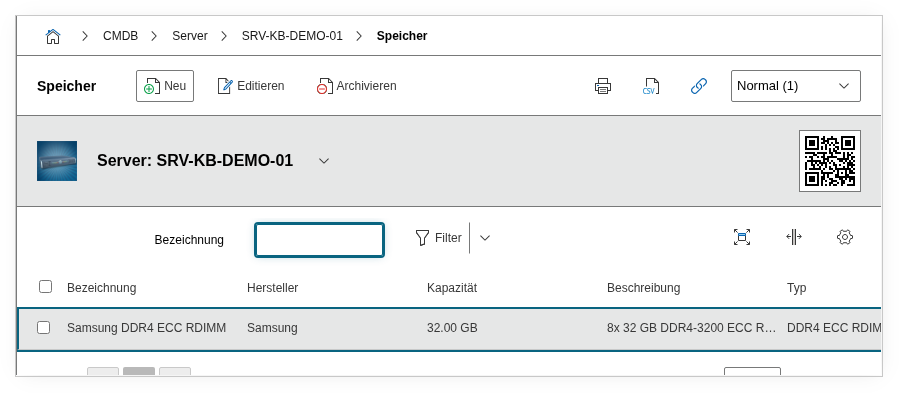
Fields#
Quantity#
The number of identical memory modules that this entry describes. Example: 4 for four identical 32 GB DIMMs. The total capacity is automatically calculated from the quantity and capacity per module. During an upgrade, you can either increase the quantity in the existing entry (for identical modules) or create a new entry for the additional module type.
Module Designation#
The name or product designation of the memory module, e.g. Samsung M393A4K40EB3-CWE or Kingston KSM32RD4/32HDR. This value appears in the category list view and in reports. Dialog+ field -- custom values can be added as needed. During JDisc import, the module designation is directly taken from the hardware data.
Manufacturer#
The manufacturer of the memory module, typically Samsung, Kingston, Micron, or SK Hynix. Dialog+ field -- custom values can be added as needed. Using the Report Manager, you can evaluate which manufacturers are present in the environment -- helpful for standardization and reordering.
Memory Type#
The technical specification of the memory, e.g. DDR4 ECC Registered, DDR5, or DDR4 SODIMM. This field is crucial for compatibility checks: not every mainboard supports every memory type, and mixing DDR4 and DDR5 is physically impossible. Dialog+ field -- custom values can be added as needed. In reports, this field helps identify devices with outdated memory standards.
Total Capacity#
The total capacity of all modules in this entry. Automatically calculated by i-doit from Quantity and Capacity (Quantity x Capacity). For 4 modules of 32 GB each, the total capacity is 128 GB. This field is not manually editable -- it updates automatically when quantity or capacity are changed. For capacity planning, this value is the central starting point: a report "all servers with total capacity < 64 GB" immediately delivers the candidates for an upgrade.
Capacity#
The capacity of a single memory module as a decimal number, e.g. 32 for a 32 GB DIMM. The associated unit is specified in the Unit field. Make sure to enter the capacity per module here, not the total capacity -- i-doit calculates that automatically.
Unit#
The unit of measurement for the capacity: MB, GB, or TB. For current server hardware, GB is the standard value. It is important to remain consistent within the CMDB -- if some entries are recorded in MB and others in GB, reports become inaccurate.
Description#
Free text for additional details: speed (e.g. 3200 MHz), rank configuration (single/dual/quad rank), slot assignment (e.g. "A1-A4 populated, B1-B4 free"), ECC capability, or configuration specifics. The slot assignment is particularly valuable when planning an upgrade -- it immediately shows whether free slots are available.
Technical Reference#
| Property | Value |
|---|---|
| Category Constant | C__CATG__MEMORY |
| Type | Global category |
| Multi-Value | Yes |
| Assigned to | Server, Client, Blade Server, etc. |
Fields (API Reference)#
| Field | API Key | Type |
|---|---|---|
| Quantity | quantity | Integer |
| Module Designation | title | Dialog+ (extensible selection) |
| Manufacturer | manufacturer | Dialog+ (extensible selection) |
| Memory Type | type | Dialog+ (extensible selection) |
| Total Capacity | total_capacity | Decimal |
| Capacity | capacity | Decimal |
| Unit | unit | Dialog (selection) |
| Description | description | Text field (multi-line) |
API Examples#
Create Entry#
1 2 3 4 5 6 7 8 9 10 11 12 13 14 15 16 17 18 19 | |
Read Entries#
1 2 3 4 5 6 7 8 9 10 | |
Update Entry#
1 2 3 4 5 6 7 8 9 10 11 12 13 14 15 | |