Category: Model#
The Model category records the hardware identity of an object: manufacturer, model designation, serial number, and service tag. It is a single-value category -- each object has exactly one model entry. Together with the Form Factor category, it provides a complete hardware profile: Model supplies the identity (what is it?), Form Factor supplies the physical dimensions (how large and heavy is it?).
JDisc Discovery populates this category automatically
During JDisc import, manufacturer, model, serial number, and service tag are taken directly from SNMP/WMI data. In most environments, this category does not need to be manually maintained -- it is automatically populated during the first scan and updated with each subsequent scan.
Usage#
Typical use cases:
- Hardware inventory: Manufacturer and model, together with the serial number, form the unique identification of a device. This data is frequently needed for warranty inquiries with the manufacturer -- without a serial number or service tag, no support ticket can be opened.
- Service tag for manufacturer support: The service tag is the direct key to the Dell Support Portal for Dell devices: enter the tag and immediately retrieve warranty status, drivers, and configuration details. At HP, the equivalent is "Product Number / Serial"; at Lenovo, "Machine Type / Serial". Anyone who maintains this value in i-doit saves valuable minutes in an emergency.
- Asset tracking and procurement: Via the product ID, devices can be assigned to a specific order position or framework agreement. During a hardware refresh, a report immediately shows how many devices of a specific model are in use -- helpful for volume discounts and replacement planning.
- Firmware management: Document the current BIOS and firmware version. Using the Report Manager, you can specifically identify devices whose firmware level is below a certain version -- indispensable for security vulnerabilities that require a BIOS update, or for VMware compatibility checks.
- Complete hardware profile: Model + CPU + Memory + Form Factor together form the complete hardware documentation of a device. Only when all four categories are maintained is the device fully inventoried.
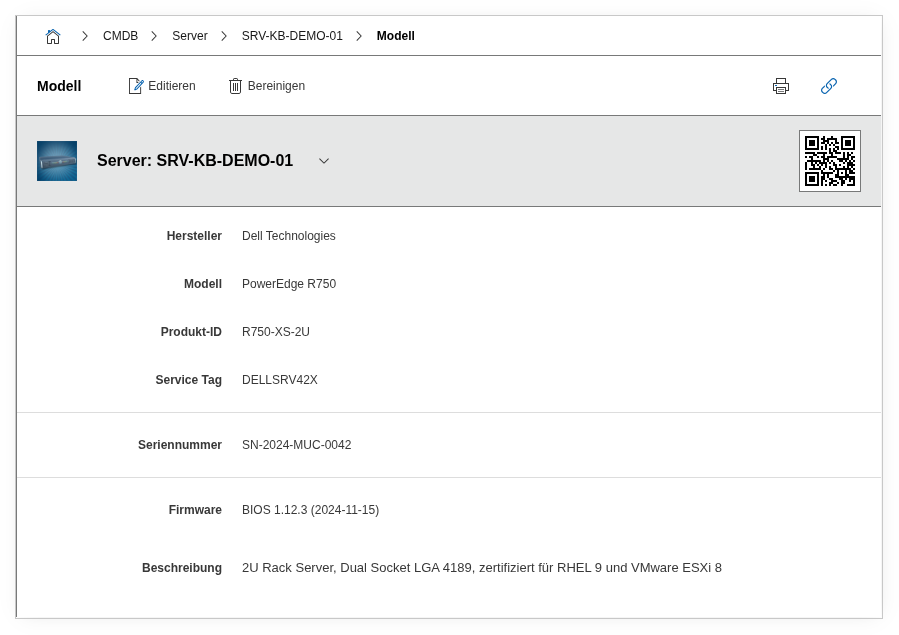
Fields#
Manufacturer#
The hardware manufacturer, e.g. Dell Technologies, Hewlett Packard Enterprise, Lenovo. Dialog+ field -- custom values are automatically created on input. During JDisc import, the manufacturer is taken from the SNMP/WMI data. Using the Report Manager, you can quickly evaluate the manufacturer distribution in the organization -- relevant for framework agreements and strategic procurement decisions.
Model#
The model designation, e.g. PowerEdge R750, ProLiant DL360 Gen11, ThinkSystem SR650 V3. Also a Dialog+ field. In combination with the manufacturer, this yields the unique device designation. During a hardware refresh, a report based on this field immediately shows which model generations are still in use and where replacement is due.
Product ID#
The manufacturer's internal product number, e.g. R750-XS-2U. Helpful for procurement and for matching with orders or framework agreements. Anyone who consistently maintains this field can immediately name the exact configuration variant when reordering -- without having to search through old orders first.
Service Tag#
The manufacturer-assigned identifier for support and warranty. For Dell, this is the 7-character service tag (e.g. DELLSRV42X), which can be entered directly on the Dell support page to retrieve warranty status, driver downloads, and original configuration. For HP and Lenovo, the equivalent is the combination of product number and serial number. Without this value, every support request takes longer, because the manufacturer must first manually identify the device.
Serial Number#
The serial number of the device, typically found on a label on the chassis or stored in the BIOS. It is automatically read from WMI/SNMP during JDisc import. Indispensable for inventory purposes, insurance claims, and assignment during repairs. In combination with the service tag, it provides seamless device identification throughout the entire lifecycle.
Firmware#
The currently installed firmware version. Both the BIOS version and firmware of additional components (e.g. iDRAC, iLO, BMC) can be documented here. Example: BIOS 1.12.3 (2024-11-15). Using the Report Manager, you can specifically identify devices with outdated firmware -- e.g. all servers with a BIOS version below a certain patch level. This is particularly important for known security vulnerabilities (CVEs) that require a firmware update.
Description#
Free text for supplementary details: equipment variant, configuration specifics, certifications (e.g. "certified for RHEL 9 and VMware ESXi 8"), warranty end date, or notes on the maintenance contract.
Technical Reference#
| Property | Value |
|---|---|
| Category Constant | C__CATG__MODEL |
| Type | Global category |
| Multi-Value | No |
| Assigned to | All hardware-related object types (Server, Client, Switch, Router, etc.) |
Fields (API Reference)#
| Field | API Key | Type |
|---|---|---|
| Manufacturer | manufacturer | Dialog+ (extensible selection) |
| Model | title | Dialog+ (extensible selection) |
| Product ID | productid | Text |
| Service Tag | service_tag | Text |
| Serial Number | serial | Text |
| Firmware | firmware | Text |
| Description | description | Text field (multi-line) |
API Examples#
Create Entry#
1 2 3 4 5 6 7 8 9 10 11 12 13 14 15 16 17 18 19 | |
Read Entries#
1 2 3 4 5 6 7 8 9 10 | |
Update Entry#
1 2 3 4 5 6 7 8 9 10 11 12 13 14 | |