Category: Network Listener (Overview)#
The Network Listener (Overview) is a folder category that consolidates all network listeners configured on an object and presents them as an overall overview. It does not contain any data of its own but aggregates the entries from the subcategory Listener into a shared list view.
Folder category vs. detail category
This category functions as an aggregate view: You can see at a glance all services listening on the object -- including protocol, port range, and bound IP address. To edit or create an individual listener entry, switch to the subcategory Listener. The fields are identical because the folder category technically uses the same data source.
Usage#
Typical use cases:
- Quick overview of open services: When opening a server object, this overview immediately shows which ports and protocols are active -- without needing to click through every listener individually. For a web server, you can see at a glance that port 80 (HTTP), port 443 (HTTPS), and perhaps port 22 (SSH) are open.
- Link target for network connections: When creating an outgoing connection in the Network Connections category of another object, you select the target object via the object browser. i-doit automatically filters for objects that have entries in this folder category -- only objects with at least one listener appear as valid targets.
- Security audits and compliance: Through the Report Manager, you can list all servers with their open ports. This allows you to quickly identify whether a system exposes unexpected services that need to be closed or documented.
- Interaction with applications: Through the Opened by application field in the individual listener entries, a link to the software landscape is created. This allows tracing which application occupies which port -- crucial for change management and incident analysis.
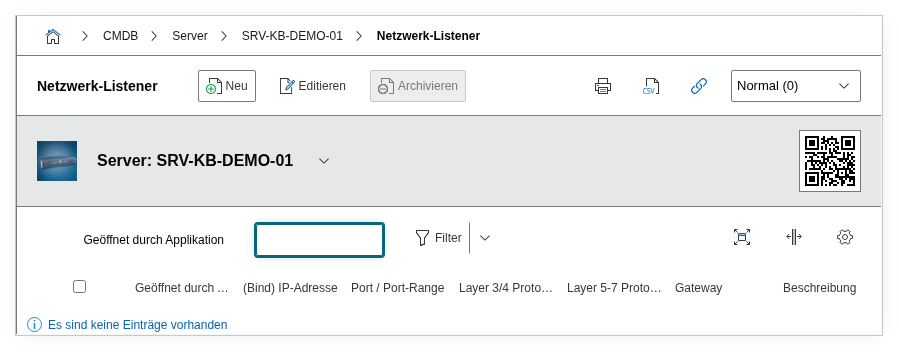
Fields#
Since this is a folder category, it shares its fields with the subcategory Listener. The fields are described in detail in the listener's documentation. Here is a brief overview:
Layer 3/4 protocol#
The transport protocol of the connection -- typically TCP or UDP. Dialog+ field that can be extended with custom values (e.g. SCTP for telecommunications environments).
Layer 5-7 protocol#
The application protocol, e.g. HTTP, HTTPS, SSH, SMTP, or DNS. This field gives the raw port entry semantic meaning and is indispensable for reports and filtering.
(Bind) IP address#
The IP address that the service is bound to. Only IP addresses already maintained in the Host Address category of the object are offered here. A listener bound to 0.0.0.0 accepts connections on all interfaces.
Port range (from/to)#
The port or port range that the service listens on. For a single port, both values are identical (e.g. 443 / 443). Port ranges are common for applications like FTP passive mode or RPC services.
Opened by application#
Link to an application object in i-doit that creates this listener. This makes visible which software is responsible for an open port.
Gateway#
Link to a firewall or router object through which traffic to this listener is routed. Relevant for documenting firewall rules and network segmentation.
Description#
Free text for notes such as firewall rule IDs, ticket numbers from the approval, or special configuration features.
Technical Reference#
| Property | Value |
|---|---|
| Category Constant | C__CATG__NET_CONNECTIONS_FOLDER |
| Type | Global category (folder) |
| Multi-Value | Yes |
| Assigned to | Client, Server, Virtual Server |
Fields (API Reference)#
| Field | API Key | Type |
|---|---|---|
| Layer 3/4 protocol | protocol | Dialog+ (extensible selection) |
| Layer 5-7 protocol | protocol_layer_5 | Dialog+ (extensible selection) |
| (Bind) IP address | ip_address | Dialog (selection) |
| Port range (from) | port_from | Integer |
| Port range (to) | port_to | Integer |
| Opened by application | opened_by | Dialog (selection) |
| Gateway | gateway | Object browser (link) |
| Description | description | Text field (multi-line) |
API Examples#
Create Entry#
1 2 3 4 5 6 7 8 9 10 11 12 13 14 15 16 17 18 19 | |
Read Entries#
1 2 3 4 5 6 7 8 9 10 | |
Update Entry#
1 2 3 4 5 6 7 8 9 10 11 12 13 14 15 | |