Category: Network Connections#
The Network Connections category documents the outgoing network connections of an object to other objects. It is a multi-value category -- any number of connections can be created to represent all dependencies on external services.
Note the direction: Connector vs. Listener
This category always describes the outgoing side of a connection: From which object does the connection originate, and to which listener on a target object is it established? The opposite side -- i.e., which ports an object itself opens -- is documented in the Listener category. Together, network connections and listeners form a complete picture of the communication relationships in your infrastructure.
Usage#
Typical use cases:
- Mapping application dependencies: An application server connects to a database server on port 3306 (MySQL) and to a Redis cache on port 6379. By creating these connections, it becomes visible which systems depend on each other -- crucial for impact analyses during maintenance or outages.
- Documenting firewall rules: Each network connection can be linked to a gateway object (firewall). This creates a mapping of which firewall rules are responsible for which communication relationship. When decommissioning a server, you can use a report to determine which firewall rules can also be removed.
- Change management and impact analysis: Before a target server is maintained or migrated, a look at the incoming connections (via the Listener side) and the outgoing connections (via this category) shows which other systems are affected. This reduces the risk of unexpected outages.
- Network visualization: The maintained connection data can be used in the object view and in reports to generate communication matrices or dependency graphs.
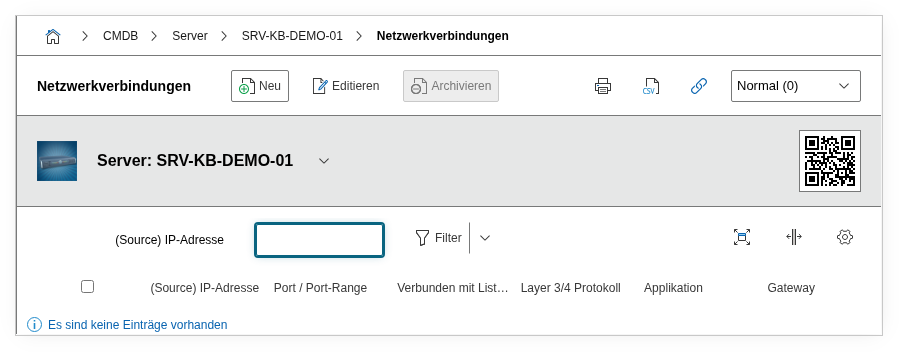
Fields#
(Source) IP address#
The IP address of the current object from which the connection originates. Only IP addresses that are maintained in the Host Address category of the object are offered here. For servers with multiple network interfaces, it is important to select the correct source IP, as firewall rules often work on a source-IP basis.
Port range (from/to)#
The source port range on the local object. For most outgoing connections, the operating system uses a dynamic port from the ephemeral range (typically 1024--65535). An explicit specification is mainly useful when source NAT rules or specific firewall policies require a fixed source port range.
Listener#
The specific link to the listener entry on the target object. This field is mandatory and forms the core of the connection relationship: It defines to which port and which protocol on the target the connection is established. The available listeners are dynamically loaded from the selected target object -- only ports that are created in the Listener category there are available for selection.
Listener must exist first
Before you can create a network connection, at least one listener entry must be available on the target object. If the Listener category of the target is empty, no connection target is available. Therefore, always create the listener first before configuring the connections.
Connected to#
The target object to which the connection is established. The object browser automatically filters for objects that have at least one entry in the Network Listener (Overview) category. This ensures that only objects with defined services can be selected as connection targets.
Gateway#
Link to a firewall or router object through which the connection is routed. This field is particularly valuable for documenting firewall rules: Together with source IP, target listener, and gateway, this creates a complete data record that corresponds to a firewall rule.
Description#
Free text for additional information: firewall rule number, ticket reference for the network share, encryption requirements (e.g. "TLS 1.3 required"), or notes on authentication.
Technical Reference#
| Property | Value |
|---|---|
| Category Constant | C__CATG__NET_CONNECTOR |
| Type | Global category |
| Multi-Value | Yes |
| Assigned to | Client, Server, Virtual Server |
Fields (API Reference)#
| Field | API Key | Type |
|---|---|---|
| (Source) IP address | ip_address | Dialog (selection) |
| Port range (from) | port_from | Integer |
| Port range (to) | port_to | Integer |
| Listener | connected_listener | Dialog (selection) -- mandatory field |
| Connected to | connected_to | Object browser (link) -- mandatory field |
| Gateway | gateway | Object browser (link) |
| Description | description | Text field (multi-line) |
API Examples#
Create Entry#
1 2 3 4 5 6 7 8 9 10 11 12 13 14 15 16 17 18 19 | |
Read Entries#
1 2 3 4 5 6 7 8 9 10 | |
Update Entry#
1 2 3 4 5 6 7 8 9 10 11 12 13 14 15 | |