Category: Network Interface#
The Network Interface category documents the physical network adapters of an object. It is a multi-value category -- any number of interfaces can be recorded, e.g. onboard NICs, PCIe expansion cards, or Fibre Channel HBAs.
Interface vs. Port -- the crucial distinction
In i-doit, there is a distinction between Interface (hardware) and Port (logical connection). The interface represents the physical network adapter -- with manufacturer, model, and serial number. The port represents an individual connection on that card -- with MAC address, speed, VLAN assignment, and cabling. A 4-port NIC thus creates one interface entry and four port entries. This separation reflects reality: When swapping hardware, the interface is replaced, and the port configuration (VLANs, IP addresses) must then be restored on the new card.
Usage#
Typical use cases:
- Hardware documentation of network adapters: Record the manufacturer, model, and serial number of every installed NIC. Together with the Port and Host Address categories, this creates a complete network documentation chain from the physical card through the logical port to the IP address.
- Firmware management: The firmware field documents the current status of every network adapter. Using reports, you can determine which interfaces are still running on an older firmware version and require an update -- especially important for security patches.
- Spare parts and RMA management: The serial number is the key for warranty claims and RMA processes with the manufacturer. Instead of reading the number from the label on site, the support team can find it directly in the CMDB.
- Slot documentation and hardware replacement: The slot number shows which PCIe slot the card is in. When replacing a defective NIC, the technician immediately knows which slot to address. For servers with many expansion cards, this saves considerable time.
- Network capacity planning: Using reports, you can evaluate which servers use which NIC models. When an upgrade from 10G to 25G is planned, a report immediately shows all affected interfaces and the associated servers.
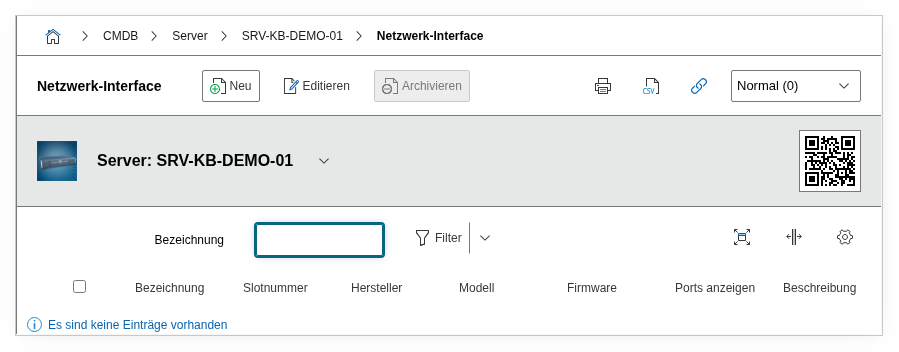
Fields#
Title#
The name of the network interface, e.g. eno1, enp3s0f0, Intel X710-DA2, or Onboard NIC 1. This value appears in the list view and is used as a reference when ports are assigned to this interface. Choose a naming convention that is unambiguous for both administrators and on-site technicians.
Manufacturer#
The manufacturer of the network adapter, e.g. Intel, Broadcom, Mellanox/NVIDIA, or Chelsio. Dialog+ field -- custom values can be added. The manufacturer is the most important filter for driver and firmware updates, as these are distributed on a vendor-specific basis.
Model#
The exact model designation, e.g. X710-DA2, BCM57416, ConnectX-6 Dx, or E810-XXVDA4. Dialog+ field. In combination with the manufacturer, the model enables unique identification for spare parts procurement, compatibility checks (firmware, driver, hypervisor HCL), and standardization reports.
Serial number#
The unique serial number of the network adapter, e.g. MYSLR1234567. Required for RMA cases and asset tracking. For onboard NICs, a separate serial number is often not available -- the field can remain empty in that case.
Slot number#
The physical slot of the card, e.g. PCIe Slot 2, Mezzanine Slot 1 (for blade servers), or Onboard. This information is indispensable during on-site hardware work: The technician finds the right card without guesswork. For blade servers in a blade chassis, the slot assignment is particularly important, as the mezzanine slots determine the fabric connection.
Firmware#
The current firmware version, e.g. 22.5.7 or 4.40.0553. NIC firmware updates are more frequent than one might think -- they fix stability issues, close security vulnerabilities, and extend compatibility. By documenting this in the CMDB, you can plan and track the rollout of firmware updates in a targeted manner.
Description#
Free text for anything that does not fit into the structured fields: number of ports on the card, supported speeds (1G/10G/25G/100G), special capabilities (SR-IOV, RDMA, iSCSI offload, DPDK support), driver version and type, or notes on the physical cabling.
Technical Reference#
| Property | Value |
|---|---|
| Category Constant | C__CATG__NETWORK_INTERFACE |
| Type | Global category |
| Multi-Value | Yes |
| Assigned to | Server, Blade Server, Blade Chassis, Client, PDU, Printer, Router, Cell Phone Contract |
Fields (API Reference)#
| Field | API Key | Type |
|---|---|---|
| Title | title | Text |
| Manufacturer | manufacturer | Dialog+ (extensible selection) |
| Model | model | Dialog+ (extensible selection) |
| Serial number | serial | Text |
| Slot number | slot | Text |
| Firmware | firmware | Text |
| Description | description | Text field (multi-line) |
API Examples#
Create Entry#
1 2 3 4 5 6 7 8 9 10 11 12 13 14 15 16 17 18 19 | |
Read Entries#
1 2 3 4 5 6 7 8 9 10 | |
Update Entry#
1 2 3 4 5 6 7 8 9 10 11 12 13 14 15 | |