Category: Logical Ports#
The Logical Ports category documents the virtual network interfaces of an object — all interfaces that do not directly correspond to a physical socket. It is a multi-value category and the logical counterpart to the category Port, which represents physical network connections.
Physical ports vs. logical ports
The category Port documents the physical network sockets of a device (e.g. eth0, Gi0/1). Logical ports in contrast are virtual constructs that build on physical ports: VLAN interfaces, bond interfaces, bridges, LAGs or loopback interfaces. A logical port often has its own MAC address and its own IP addresses, but only exists in the software configuration of the operating system or the network component.
Usage#
Typical use cases:
- VLAN documentation: On a switch or router, a logical interface is created per VLAN (e.g.
vlan100,irb.200). Via the field Network(s), the logical port is assigned to the associated Layer 2 network. This creates a complete mapping of which VLAN is configured on which device -- crucial for network planning and troubleshooting. - Link aggregation and bonding: When two or more physical ports are combined into a bond or an LACP group, the logical port represents the resulting interface. Via the field Port assignment, the participating physical ports are referenced. This makes it traceable at all times which physical links form a bond.
- Bridge interfaces: On virtualization hosts, bridge interfaces are frequently created through which VMs are connected to the physical network. The logical port documents the bridge (e.g.
br0,virbr0), and the port assignment shows which physical port lies underneath. - Loopback and management interfaces: Routers and firewalls use loopback interfaces (
lo0,Loopback0) for management access and routing protocols. These can be documented as logical ports with their own IP address. - Network inventory via JDisc or i-doit Discovery: Automatic scans capture logical interfaces and enter them directly into this category. Manual maintenance is eliminated in many cases.
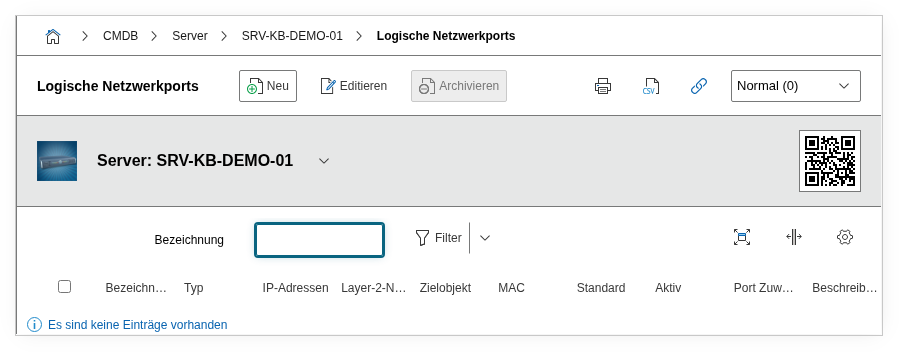
Fields#
Title#
The name of the logical interface as it is configured on the device: bond0, vlan100, br-lan, Loopback0, Port-Channel1 etc. This value appears in the list view and in reports and should exactly match the configuration on the device to enable a unique mapping.
Network(s)#
Link to one or more Layer 2 network objects (type "Layer 2 Network"). For VLAN interfaces this is the central assignment: The logical interface vlan100 is linked with the Layer 2 network object "VLAN 100 -- Management". Multiple networks can be assigned, e.g. for trunk interfaces that carry multiple VLANs.
MAC#
The MAC address of the logical interface. For bond interfaces this is typically the MAC address of the first slave port. For VLAN interfaces it usually inherits the MAC of the physical parent port. The MAC address is relevant for network analysis and Layer 2 troubleshooting.
Type#
The type of the logical interface, e.g. Bond, Bridge, VLAN, Loopback or LAG. Dialog+ field -- custom types can be added as needed. This value enables targeted filtering in reports: For example, you can list all bond interfaces or all VLAN interfaces in the network.
Port assignment#
The assignment of the physical ports that underlie this logical port. For a bond interface, the participating physical ports (e.g. eth0, eth1) are linked here. For a VLAN interface, this is the physical port on which the VLAN tagging takes place. This link bridges the gap between logical and physical network documentation.
Parent port#
Reference to a parent logical port. This enables the mapping of hierarchical structures -- e.g. a VLAN interface that sits on top of a bond interface: bond0.100 has bond0 as its parent port. Without this hierarchy, the actual network topology could not be correctly represented.
default#
The network standard of the logical interface, e.g. 802.1Q (VLAN tagging), 802.3ad (LACP) or 802.1D (bridging). Dialog+ field for custom additions. The standard indicates which protocol is behind the logical interface.
Active#
Indicates whether the logical interface is currently active (Yes) or deactivated (No). Deactivated interfaces remain in the documentation but are marked as inactive -- useful for tracking temporarily decommissioned VLANs or bonds.
Host address#
The IP addresses assigned to the logical port. IP addresses from the Host Address category of the object are linked here. A logical port can carry multiple IP addresses -- e.g. for anycast configurations or secondary addresses.
Connected to connector#
Link to a logical port on another object -- i.e. the logical remote end of a connection. This enables the documentation of point-to-point connections at the logical level, e.g. between two switches that communicate via a VLAN trunk interface.
Description#
Free text for additional details: LACP mode (active/passive), hash policy of the bond (layer2, layer3+4), VLAN ID if not included in the title, STP configuration or notes on usage in the virtualization environment.
Technical Reference#
| Property | Value |
|---|---|
| Category Constant | C__CATG__NETWORK_LOG_PORT |
| Type | Global category |
| Multi-Value | Yes |
| Assigned to | Blade Chassis, Blade Server, Client, PDU, Printer, Router, Server, Switch etc. |
Fields (API Reference)#
| Field | API Key | Type |
|---|---|---|
| Title | title | Text |
| Network(s) | net | n2m (multiple link) |
| MAC | mac | Text |
| Type | port_type | Dialog+ (extensible selection) |
| Port assignment | ports | dialog_list |
| Parent port | parent | Dialog (selection) |
| default | standard | Dialog+ (extensible selection) |
| Active | active | Dialog (selection: Yes/No) |
| Host address | addresses | dialog_list |
| Connected to connector | assigned_connector | Object browser (link) |
| Description | description | Text field (multi-line) |
API Examples#
Create Entry#
1 2 3 4 5 6 7 8 9 10 11 12 13 14 15 16 17 18 | |
Read Entries#
1 2 3 4 5 6 7 8 9 10 | |
Update Entry#
1 2 3 4 5 6 7 8 9 10 11 12 13 14 15 | |