Category: Port#
The Port category documents the physical and logical network ports of an object. It is a multi-value category -- any number of entries can be created per object, e.g. for a switch with 48 Ethernet ports or a server with multiple network adapters.
Ports are the bridge between logical and physical network documentation: On the logical side, they link via the Host address category to IP addresses and subnets; on the physical side, they connect via the field Connected to and the Connection category to the cabling infrastructure. Without a well-maintained Port category, the crucial building block to answer the question "Which server depends physically on which switch port and in which VLAN?" is missing.
Network segmentation and security audits
The VLAN assignment on ports is not merely a technical detail -- it is the basis for network segmentation audits. Auditors verify whether production and development systems actually reside in separate VLANs. When the assignments are maintained in i-doit, this question can be answered with a report in seconds instead of manually checking every switch.
Usage#
Typical use cases:
- Network documentation: Record every port with type, speed, MAC address, and standard. Together with the Interface and Host address categories, a complete network profile of the object is created.
- Cabling and patching: Using the Connected to and Cable fields, the physical connection between ports and patch panels can be seamlessly documented -- from the server port through the patch panel all the way to the switch. The
assigned_connectorfield links directly to the patching infrastructure: patch panels, wall outlets, and distribution cabinets are part of a continuous cable chain. - VLAN assignment: Ports can be assigned to Layer 2 networks. Trunk ports receive multiple VLANs, access ports a single default VLAN. This documents the logical network segmentation -- a prerequisite for well-founded segmentation reports and compliance evidence.
- Troubleshooting speed/duplex mismatches: Speed and duplex mode are often underestimated but are a classic source of errors: one port on 100 Mbit/s half-duplex, the remote end on autonegotiation -- the result is packet loss and poor performance. When these values are documented in i-doit, the error can be identified within minutes instead of spending hours troubleshooting on the switch.
- MAC address tracking: The documented MAC address enables tracking of unknown or unauthorized devices on the network. A report on all MAC addresses compared with the switch output immediately shows whether an unauthorized device has been connected -- essential for network security.
- Capacity planning: Using the Report Manager, you can evaluate which ports are active, which speeds are in use, and where free capacity remains. A report "Switches with less than 10% free ports" provides early warning of bottlenecks.
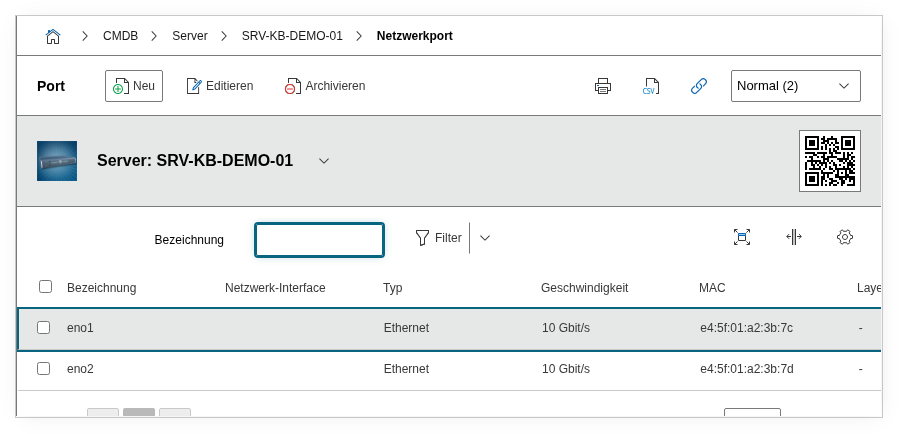
Fields#
Title#
The name of the port, e.g. eth0, GigabitEthernet0/1 or ens192. This value appears in the category list view and in reports.
Type#
The port type, e.g. Ethernet, FC (Fibre Channel) or 10GBase-T. Dialog+ field -- custom values can be added as needed.
Mode#
The operating mode of the port: Access (single VLAN) or Trunk (multiple VLANs). Relevant for VLAN documentation and the correct assignment of Layer 2 networks.
Plug#
The physical plug type, e.g. RJ-45, SFP, SFP+ or LC. Dialog+ field for documenting the physical connection type.
Autonegotiation#
Indicates whether the port negotiates speed and duplex automatically with the remote end (Yes) or whether fixed values are configured (No).
Duplex#
The duplex mode: Full (simultaneous send and receive) or Half. For modern Gigabit connections, full-duplex is standard.
Speed and Unit#
The port speed as a decimal value. The unit is specified separately as Mbit/s or Gbit/s, e.g. 1 + Gbit/s for a Gigabit port.
default#
The network standard, e.g. 1000BASE-T, 10GBASE-SR or 100BASE-TX. Dialog+ field -- custom values can be added.
MAC address#
The MAC address of the port in the format AA:BB:CC:DD:EE:FF. Important for unique identification at Layer 2.
MTU#
The Maximum Transmission Unit in bytes, e.g. 1500 (standard Ethernet) or 9000 (Jumbo Frames).
Connected to#
Using the object browser, the remote end is selected -- another port or a connection on a patch panel. This creates the physical connection chain.
Cable#
Link to a cable object. Enables the documentation of the used cables (type, length, title) as an independent CMDB object.
Active#
Indicates whether the port is active (Yes) or disabled (No). Useful for capacity planning and identifying unused ports.
Host address#
Assigned IP addresses from the Host address category. Links the port with its logical addressing.
Layer 2 network assignment#
VLAN assignment of the port. For trunk ports, multiple Layer 2 networks can be assigned. The VLANs must have been created beforehand as separate objects of type Layer 2 Network.
Default VLAN#
The native VLAN or default VLAN of the port. For access ports this is the only VLAN; for trunk ports it is the untagged VLAN.
Description#
Free text for additional details: configuration notes, port security settings, special features, or references to external documentation.
Internal link fields
The fields connector, connector_sibling, relation_direction, interface and hba are internal fields that map links to connectors, interfaces, and HBA controllers. They are automatically managed by i-doit and typically do not need to be manually maintained.
Technical Reference#
| Property | Value |
|---|---|
| Category Constant | C__CATG__NETWORK_PORT |
| Type | Global category |
| Multi-Value | Yes |
| Assigned to | Server, Client, Router, Switch, Blade Server etc. |
Fields (API Reference)#
| Field | API Key | Type |
|---|---|---|
| Title | title | Text |
| Typ | port_type | Dialog+ (extensible selection) |
| Mode | port_mode | Dialog+ (extensible selection) |
| Plug | plug_type | Dialog+ (extensible selection) |
| Autonegotiation | negotiation | Dialog (selection) |
| Duplex | duplex | Dialog (selection) |
| Speed | speed | Decimal |
| Speed-Unit | speed_type | Dialog (selection) |
| default | standard | Dialog+ (extensible selection) |
| MAC address | mac | Text |
| MTU | mtu | Text |
| Connected to | assigned_connector | Object browser (link) |
| Cable | cable | Object browser (link) |
| Active | active | Dialog (selection) |
| Host address | addresses | Dialog list |
| Layer 2 network assignment | layer2_assignment | n2m (multiple assignment) |
| Default VLAN | default_vlan | Dialog (selection) |
| Description | description | Text field (multi-line) |
API Examples#
Create Entry#
1 2 3 4 5 6 7 8 9 10 11 12 13 14 15 16 17 18 19 20 21 22 23 24 25 | |
Read Entries#
1 2 3 4 5 6 7 8 9 10 | |
Update Entry#
1 2 3 4 5 6 7 8 9 10 11 12 13 14 15 16 17 18 | |