Category: Network#
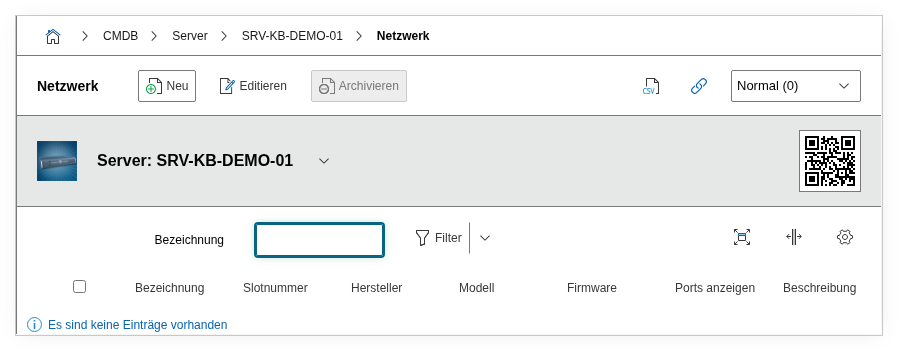
The Network category documents the physical network adapters (NICs) of an object at the hardware level. It is a multi-value category -- any number of network adapters can be recorded, e.g. two onboard NICs and an additional PCIe network adapter.
Network vs. Port vs. Host Address
The Network category describes the physical hardware -- the network adapter itself with manufacturer, model, and serial number. The Port category documents the logical connectors of that card (speed, duplex, VLAN, MAC address). The Host Address category records the IP configuration of individual ports. These three categories together form the complete network documentation of an object: Hardware > Logical Port > IP Address.
Usage#
Typical use cases:
- Hardware inventory of network adapters: Record the manufacturer and model of every installed NIC. This is particularly important for driver management and firmware updates: A report can list all servers with a specific NIC (e.g.
Broadcom BCM57414) when a critical firmware update is pending. - Slot assignment: The Slot Number field documents which PCIe slot the card is in. During a hardware swap, the technician immediately knows which slot to open -- without first opening the server to look.
- Serial number tracking: The NIC serial number is required for RMA cases (Return Merchandise Authorization) and warranty processing. Instead of reading the serial number from the label on site, the support team can find it directly in the CMDB.
- Firmware documentation: The Firmware field records the current firmware version. In combination with reports, you can verify which NICs are still running on a deprecated firmware version and require an update.
Fields#
Title#
The name of the network adapter, e.g. eth0, eno1, or Intel I350-T4. This field appears in the list view and serves for quick identification. Use the operating system name (e.g. eno1) or the model name -- depending on what is more common in your organization.
Manufacturer#
The manufacturer of the network adapter, e.g. Intel, Broadcom, Mellanox, or Realtek. Dialog+ field -- custom values can be added as needed. This value is crucial for driver and firmware management, as updates are provided on a vendor-specific basis.
Model#
The exact model designation of the NIC, e.g. I350-T4, BCM57414, or ConnectX-6. Dialog+ field. In combination with the manufacturer, this provides a unique identification of the hardware required for compatibility checks and spare parts procurement.
Serial number#
The unique serial number of the network adapter. Required for warranty claims, RMA processes, and asset tracking. For onboard NICs, a separate serial number is often not available -- in that case, the field can remain empty or reference the mainboard serial number.
Slot number#
The physical slot in which the card is installed, e.g. PCIe Slot 3 or Onboard. This information considerably speeds up on-site hardware work: The technician immediately knows which slot to address without having to open the chassis and search.
Firmware#
The current firmware version of the network adapter, e.g. 20.5.13 or 14.32.20.04. NIC firmware updates frequently fix stability issues or security vulnerabilities. By documenting this in the CMDB, you can quickly determine via a report which cards still require an update.
Description#
Free text for additional details: number of ports, supported speeds (1G/10G/25G), special capabilities (SR-IOV, RDMA, iSCSI offload), driver version, or configuration notes.
Technical Reference#
| Property | Value |
|---|---|
| Category Constant | C__CATG__NETWORK |
| Type | Global category |
| Multi-Value | Yes |
| Assigned to | Server, Blade Server, Blade Chassis, Client, PDU, Printer, Router, Cell Phone Contract |
Fields (API Reference)#
| Field | API Key | Type |
|---|---|---|
| Title | title | Text |
| Manufacturer | manufacturer | Dialog+ (extensible selection) |
| Model | model | Dialog+ (extensible selection) |
| Serial number | serial | Text |
| Slot number | slot | Text |
| Firmware | firmware | Text |
| Description | description | Text field (multi-line) |
API Examples#
Create Entry#
1 2 3 4 5 6 7 8 9 10 11 12 13 14 15 16 17 18 19 | |
Read Entries#
1 2 3 4 5 6 7 8 9 10 | |
Update Entry#
1 2 3 4 5 6 7 8 9 10 11 12 13 14 15 | |