Category: Locally Assigned Objects#
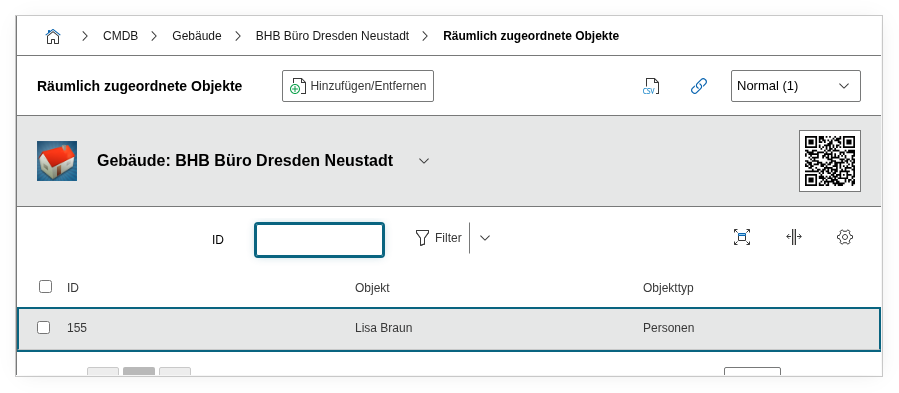
The Locally Assigned Objects category shows all objects that are physically assigned to this location. It is the reverse view of the Location category and is automatically populated by i-doit -- manual entries are not intended.
Location shows WHERE, this category shows WHAT
The Location category answers the question "Where is this object located?" -- it points to the parent location object (building, room, rack). The Locally Assigned Objects category answers the reverse question: "What is located at this location?" It lists all objects whose Location category references the current object. Together, both categories represent the complete location hierarchy in i-doit.
Usage#
Typical use cases:
- Room inventory at a glance: When you open a room, this category shows all racks, printers, clients, and other objects assigned to that room. This gives you a complete inventory of the physical location without any manual effort.
- Rack occupancy: For a rack object, the category lists all servers, switches, patch panels, and other devices installed in the rack. In combination with the rack view (based on the Form Factor category), this provides a complete picture of the rack occupancy.
- Building overview: At the building level, the category shows all rooms, floors, and other sub-objects. This allows you to navigate the entire location hierarchy top-down: Building > Room > Rack > Server.
- Relocation planning and decommissioning: Before a location change or the clearing of a room, the category immediately shows which objects are affected. A report on this category provides the complete relocation list.
- Blade chassis population: For blade chassis objects, the installed blade servers are listed here -- analogous to the physical population of the chassis.
Read-only category
This category is not directly edited. The assignment is made exclusively via the Location category of the respective child object. If you want to remove a server from the list, you need to change its Location category -- not this category. This ensures that the location hierarchy remains consistent.
Fields#
Object#
Displays the linked objects that are assigned to this location. This is a reverse link: i-doit automatically finds all objects whose Location category references the current object and lists them here. The display includes the object title and the object type. Clicking an entry navigates to the respective object.
Since the assignment is controlled through the Location category of the child objects, this field is effectively read-only. A change to the assignment is always made on the child object itself.
Technical Reference#
| Property | Value |
|---|---|
| Category Constant | C__CATG__OBJECT |
| Type | Global category (reverse category) |
| Multi-Value | Yes (automatically populated) |
| Assigned to | Blade Chassis, Building, Enclosure, Room etc. |
Fields (API Reference)#
| Field | API Key | Type |
|---|---|---|
| Object | assigned_object | Object browser (link, reverse) |
API Examples#
Read Entries#
The primary API usage of this category is reading -- to query all objects located at a given location:
1 2 3 4 5 6 7 8 9 10 | |
Create Entry#
To assign an object to a location, you create the entry via the Location category (C__CATG__LOCATION) of the child object -- not through this category. However, it is technically also possible to set the assignment directly via the API:
1 2 3 4 5 6 7 8 9 10 11 12 13 | |
Recommended approach via the Location category
For consistent results, it is recommended to make the assignment via C__CATG__LOCATION on the child object. This way, all dependent fields (slot, GPS coordinates, rack position) are automatically set correctly.