Category: Operating System#
The Operating System category documents the installed operating systems of an object. It is a multi-value category -- any number of entries can be created per object, e.g. for dual-boot systems with two operating systems installed in parallel.
Operating system as a separate object -- a common pitfall
The operating system itself must first be created as a separate object of the type Operating System in i-doit. Only then can it be selected in this category via the object browser. This is one of the most common pitfalls for new users: Anyone who tries to enter the OS name as free text will find no suitable field. Therefore, first create an object such as "Windows Server 2022" or "RHEL 9" before populating the Operating System category on a server.
Usage#
Typical use cases:
- Software inventory: Document which operating system is installed on which server, client, or virtual machine. Together with the Software Assignment category, this creates a complete software profile.
- Patch compliance: The version number is the key for patch compliance reports. A report such as "All Windows servers that are not yet on version 23H2" immediately shows where action is needed. In combination with the notification system, the responsible administrators (from the Contact assignment) can be automatically informed.
- License management: Through the "Assigned license" field, each installed operating system is linked to the matching license object. The Report Manager then shows which licenses are assigned, where gaps exist, and whether the number of used licenses exceeds the quota. Without this link, the license overview remains incomplete.
- Lifecycle tracking: The installation date shows how long a system has been running. In combination with the end-of-life dates of the operating system, you can identify systems that need an upgrade or a fresh installation -- before manufacturer support expires.
- Compliance: Evaluations through the Report Manager make it visible which systems are using outdated or unapproved operating system versions. In regulated environments (ISO 27001, BSI IT-Grundschutz), this is essential evidence.
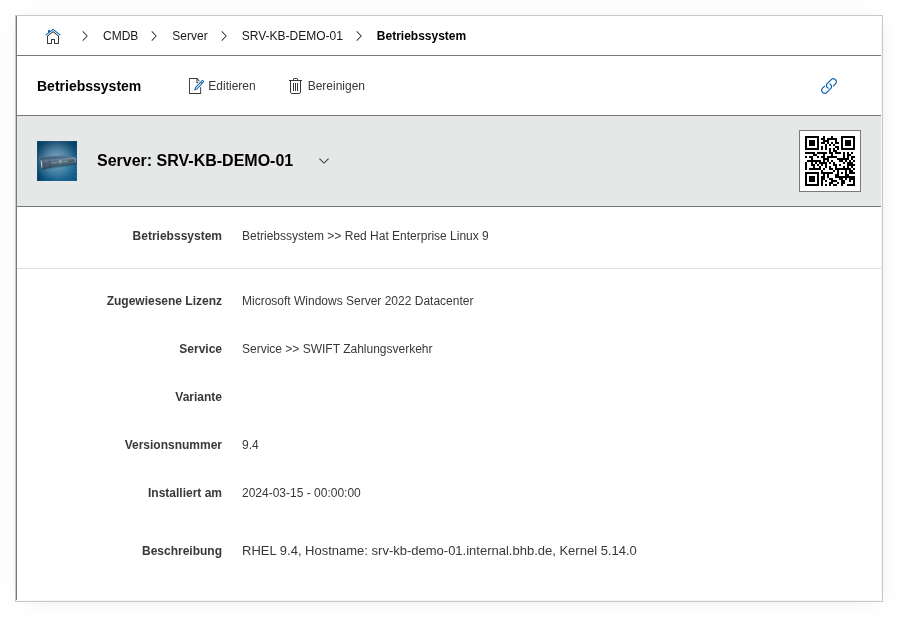
Fields#
Operating system#
The operating system object that is installed on this system, e.g. RHEL 9.4, Windows Server 2022, or Ubuntu 24.04 LTS. An existing object of the type Operating System is selected via the object browser. This field establishes the central link between the documented system and the OS object.
Type#
The type of software assignment. For operating systems, the value Operating system is preset. This field distinguishes the entry from regular software assignments.
Priority#
Determines whether this is the primary or a secondary operating system. For dual-boot systems, the default OS receives the priority Primary, while additional installations receive Secondary.
Assigned license#
The license assigned to this operating system, e.g. a Windows Server license object. The matching license object is linked via the object browser. This link is the bridge to the license management system in i-doit: Only when the license is assigned here does the system appear in license overviews and compliance evaluations. A report such as "All servers without an assigned OS license" immediately uncovers gaps.
Variant#
The edition or variant of the operating system, e.g. default, Datacenter, Enterprise, or Desktop. Enables finer differentiation within the same operating system version.
Version number#
The specific version number of the installed operating system, e.g. 9.4, 22H2, or 24.04. Dialog+ field -- custom values can be added as needed. This field is the basis for patch compliance reports. Maintain it consistently with every update so that reports like "All systems with a version lower than X" deliver reliable results.
Used databases#
Database objects that run on this system and should be linked to the operating system. One or more database objects can be assigned via the object browser.
Assigned IT service#
The IT service that this system is assigned to. Enables a direct link between the operating system entry and a service object -- helpful for the service catalog and impact analyses.
installation date#
The date on which the operating system was installed. This field shows how long a system has been in operation -- an important piece of information for lifecycle planning and capacity decisions. A server that has been running for five years without a fresh installation deserves more attention than one that was recently set up. In reports, you can use this to track and plan migration waves.
Description#
Free text for additional details: patch level, build number, special features of the installation, notes on planned upgrades, or other remarks.
Technical Reference#
| Property | Value |
|---|---|
| Category Constant | C__CATG__OPERATING_SYSTEM |
| Type | Global category |
| Multi-Value | Yes |
| Assigned to | Server, Client, Blade Server, Router, Switch, Virtual Server etc. |
Fields (API Reference)#
| Field | API Key | Type |
|---|---|---|
| Operating system | application | Object browser (link) |
| Type | application_type | Dialog (selection) |
| Priority | application_priority | Dialog (selection) |
| Assigned license | assigned_license | Object browser (link) |
| Variant | assigned_variant | Dialog (selection) |
| Version number | assigned_version | Dialog+ (extensible selection) |
| Used databases | assigned_databases | Object browser (link) |
| Assigned IT service | assigned_it_service | Object browser (link) |
| installation date | installDate | Date/Time |
| Description | description | Text field (multi-line) |
API Examples#
Create Entry#
1 2 3 4 5 6 7 8 9 10 11 12 13 14 15 16 17 18 19 20 | |
Read Entries#
1 2 3 4 5 6 7 8 9 10 | |
Update Entry#
1 2 3 4 5 6 7 8 9 10 11 12 13 14 15 | |