Category: Status Planning#
The Status Planning category enables you to plan CMDB status transitions in advance and assign them a validity period. It is a multi-value category -- multiple planned status transitions can be created per object, e.g. "In Operation" from a certain date, then "Out of Operation" at a later point.
Interaction with the CMDB status in General
The actual CMDB status of an object is maintained in the General category and takes effect immediately. The Status Planning does not automatically change the current status -- it documents the planned state transitions. Whether the transition is then carried out manually or via script is the administrator's responsibility. The category thus primarily serves as a planning and communication tool.
Why This Category Matters#
In practice, status changes are rarely decided spontaneously. A server is not simply shut down -- there is a change process, a planned maintenance window, a migration phase. The Status Planning represents exactly this lead time. It answers the question: "What should happen to this object and when?" -- and makes this information visible to all stakeholders without falsifying the current operational status.
Usage#
Typical use cases:
- Planned decommissioning: A server reaches end-of-life. In the Status Planning, it is recorded that the status should change to "Out of Operation" on June 30. Reports and dashboards can evaluate this date and warn in advance.
- Migration planning: During a data center migration, the category documents when each object receives the status "In Migration" and when it goes back to "In Operation" at the new location. This creates a complete migration schedule directly in the CMDB.
- Commissioning new hardware: New devices are created as "Planned." The Status Planning shows the intended go-live date -- helpful for procurement, the network team, and the service desk.
- Audit evidence: The Status Planning provides a documented timestamp for planned changes. During audits, you can demonstrate that status transitions were controlled and did not happen ad hoc.
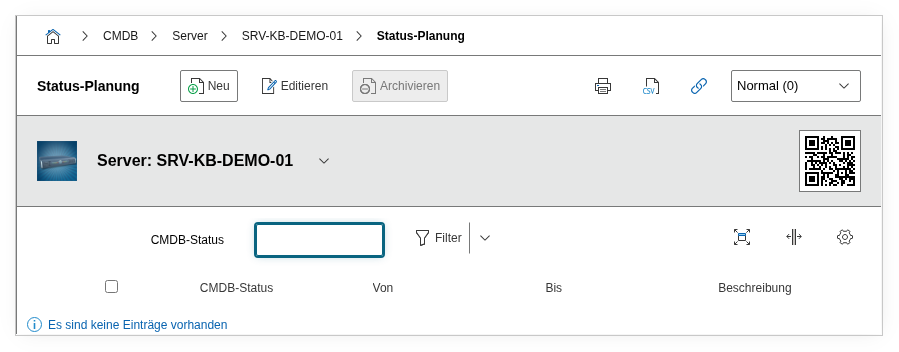
Fields#
CMDB status#
The planned target status that the object should receive at the specified time. The selection corresponds to the CMDB status values configured in i-doit (e.g. "Planned," "Ordered," "In Operation," "Out of Operation," "In Repair," etc.). This is a dialog field -- the available values are defined through the CMDB status administration.
Validity period from#
The start date from which the planned status should apply. This field answers the question: "From when should the status change take effect?" -- and is therefore the crucial value for reports that evaluate upcoming changes.
Validity period to#
The optionally end date of the planned status. If an end date is specified, the entry describes a limited phase -- e.g. a maintenance period of three days. If the field remains empty, the planned status applies indefinitely.
Description#
Free text for context and justification: Why is the status being changed? Which change or project is behind it? Are there dependencies on other objects? This information is crucial for team communication and later traceability.
Technical Reference#
| Property | Value |
|---|---|
| Category Constant | C__CATG__PLANNING |
| Type | Global category |
| Multi-Value | Yes |
| Assigned to | All object types |
Fields (API Reference)#
| Field | API Key | Type |
|---|---|---|
| CMDB status | cmdb_status | Dialog (selection) |
| Validity period from | start | Date |
| Validity period to | end | Date |
| Description | description | Text field (multi-line) |
API Examples#
Create Entry#
1 2 3 4 5 6 7 8 9 10 11 12 13 14 15 16 | |
Read Entries#
1 2 3 4 5 6 7 8 9 10 | |
Update Entry#
1 2 3 4 5 6 7 8 9 10 11 12 13 14 15 | |