Category: Power Consumer#
The Power Consumer category documents the power supplies of an object and their electrical characteristics. It is a multi-value category -- any number of entries can be created per object, e.g. for servers with two redundant power supplies or blade chassis with multiple power feeds.
The watt values documented here are the foundation for all data center capacity reports: total power consumption per rack, per row, per room, per location. Without a maintained Power Consumer category, the question "Can another server fit in this rack without overloading the power supply?" remains unanswered. In combination with the Connector category, a complete power topology also emerges: From the feed point through the PDU to the individual power supply, every connection is traceable.
BTU and cooling planning
The BTU value is often neglected but is the central metric for cooling dimensioning. Rule of thumb: 1 Watt = 3.412 BTU/h. A rack with 10 kW total load generates approximately 34,120 BTU/h of waste heat. If the cooling is only rated for 30,000 BTU/h, overheating is imminent. Reports that aggregate the BTU value per room are a direct tool for facility management.
Usage#
Typical use cases:
- Capacity planning in the data center: Record the voltage, power consumption, and amperage of every power supply. Using the Report Manager, you can aggregate the total load per rack, row, or room -- the basis for reliable power supply capacity planning. A report such as "Racks with more than X kW total load" identifies overload candidates before the circuit breaker trips.
- UPS dimensioning: The sum of all documented watt values shows what UPS capacity is needed for a supply zone. When new devices are being planned, you can recognize early whether the available UPS power is still sufficient.
- Heat load and cooling planning: The BTU field records the heat output in BTU/h. This value feeds directly into the dimensioning of cooling systems -- indispensable when planning new rack occupancies or entire data center rooms.
- Redundancy documentation: Through separate entries for each power supply (e.g. "Power supply 1 -- Feed A" and "Power supply 2 -- Feed B"), the redundancy architecture becomes visible. The link via the Target object field shows which PDU or power rail each power supply is connected to. This allows you to verify at a glance whether both power supplies actually depend on different feeds -- a common source of error in supposedly redundant power configurations.
- Link to the Connector category: The
assigned_connectorfield links the power consumer to a specific connector on the PDU (Connector category). This documents not only that a server draws power, but also from which port on which PDU. When a PDU fails, one click shows which servers are affected.
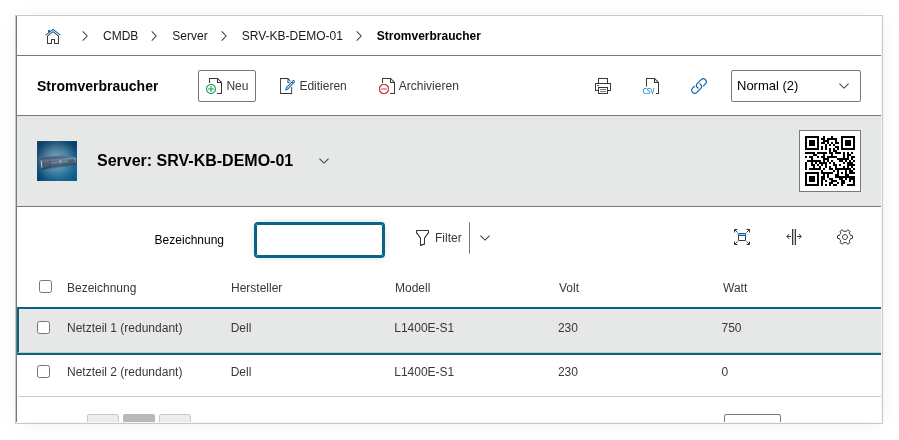
Fields#
Title#
The name of the power supply entry, e.g. Power Supply 1 (redundant) or PSU A -- Feed Left. This value appears in the category list view and in reports. A descriptive title makes assignment easier, especially for devices with multiple power supplies.
Active#
Indicates whether the power consumer is currently active. Dialog field with the values Yes and No. Inactive entries can mark removed power supplies or those held in reserve.
Manufacturer#
The manufacturer of the power supply, e.g. Dell, HP, or Emerson. Dialog+ field -- custom values can be added as needed. For integrated power supplies, the server manufacturer is often entered.
Model#
The model designation of the power supply, e.g. L1400E-S1 or DPS-750AB-3. Dialog+ field with extensible selection. The exact model number is crucial for spare parts procurement and warranty cases.
Volt#
The input voltage in volts. In Europe, the standard value is 230; in North America, 120. For devices with wide-range power supplies (100--240 V), the actual voltage at the location is documented.
Watt#
The power consumption in watts. This value is the central metric for capacity planning: It determines how much electrical power the device draws from the supply. The maximum rated power as per the nameplate is typically documented.
Ampere#
The current draw in amperes. This value is physically derived from watts and volts but is documented separately to verify the circuit protection -- a 16 A circuit must not be loaded with more than 16 A.
BTU#
The heat output in BTU/h (British Thermal Units per hour). Text field, as the value is often imported from manufacturer data sheets. Rule of thumb: 1 Watt = 3.412 BTU/h. This value is the basis for dimensioning the cooling in the data center.
Target object#
Link via the object browser to the power connection that the power supply is physically connected to -- typically a connector on a PDU (Power Distribution Unit) or a power rail. Through this link, you can trace the entire power cabling from the feed point to the end consumer.
Description#
Free text for additional details: efficiency class (80 PLUS Gold/Platinum), firmware version, maintenance interval, special cabling features, or notes on the redundancy configuration.
Internal fields
The fields connector and connector_sibling are internal integer fields that i-doit uses for managing physical connector relationships. They are automatically populated and should not be set manually via the API.
Technical Reference#
| Property | Value |
|---|---|
| Category Constant | C__CATG__POWER_CONSUMER |
| Type | Global category |
| Multi-Value | Yes |
| Assigned to | Server, Client, Blade Server, Blade Chassis, Enclosure, Monitor, Printer, Router etc. |
Fields (API Reference)#
| Field | API Key | Type |
|---|---|---|
| Title | title | Text |
| Active | active | Dialog (selection) |
| Manufacturer | manufacturer | Dialog+ (extensible selection) |
| Model | model | Dialog+ (extensible selection) |
| Volt | volt | Decimal |
| Watt | watt | Decimal |
| Ampere | ampere | Decimal |
| BTU | btu | Text |
| Target object | assigned_connector | Object browser (link) |
| Description | description | Text field (multi-line) |
API Examples#
Create Entry#
1 2 3 4 5 6 7 8 9 10 11 12 13 14 15 16 17 18 19 20 21 | |
Read Entries#
1 2 3 4 5 6 7 8 9 10 | |
Update Entry#
1 2 3 4 5 6 7 8 9 10 11 12 13 14 15 | |