Category: Relation#
The Relation category displays all relationships of an object in a tabular overview. It is a multi-value category, as an individual object can have dozens or hundreds of relationships -- from network connections to software assignments to location links.
Predominantly a read view
Most relationships are created implicitly when links are established in other categories -- for example, when a cable is connected in the Port category or a responsible person is entered in the Contact assignment. The Relation category collects all these links in one place. Manual relationships can also be created here, but in practice this is rarely necessary.
Why This Category Matters#
i-doit is a relational CMDB -- its true value lies not in the individual objects, but in the relationships between them. The Relation category makes this web of relationships visible and navigable. It answers questions such as: "What does this server depend on?", "Which objects are affected when this switch fails?", or "Which persons are assigned to this service?". Without this overview, you would have to search through every individual category of an object to understand its dependencies.
Usage#
Typical use cases:
- Impact analysis: Before a server is shut down or a switch is patched, the Relation category shows all dependent objects. This prevents unexpected outages and is a prerequisite for well-founded change management.
- Dependency visualization in the CMDB Explorer: The Relation category provides the data basis for the CMDB Explorer, which displays the relationships as an interactive graph. From the tabular overview in this category to the visual display in the Explorer is just one click.
- Troubleshooting and root cause analysis: During an incident, the Relation category shows which infrastructure components (switches, routers, storage) are connected to the affected object -- and steers the analysis in the right direction.
- Service modeling: IT services in i-doit consist of relationships between service components. The Relation category shows which objects belong to a service and how they are weighted -- crucial for SLA evaluations.
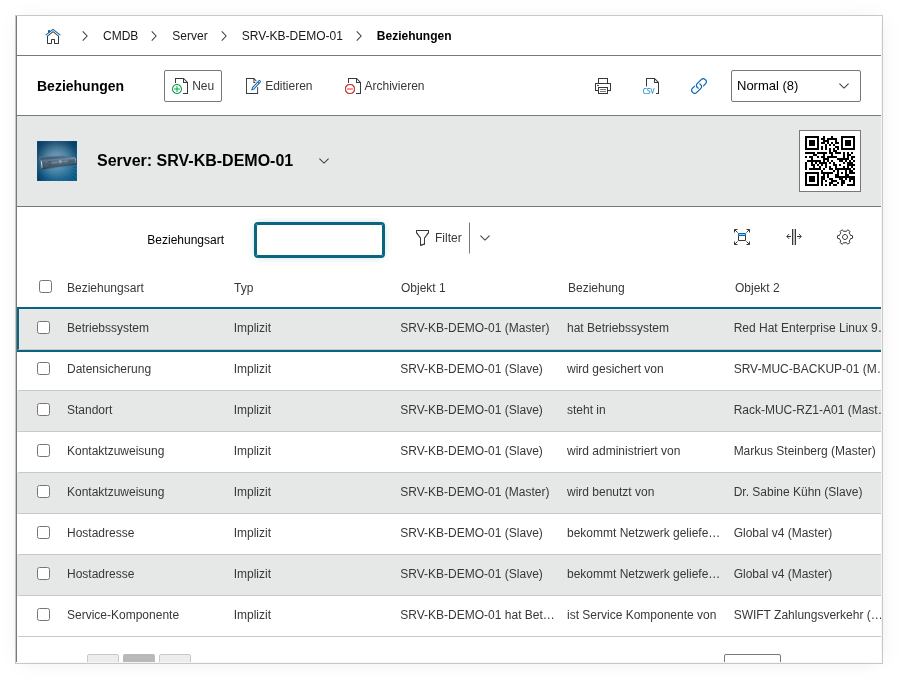
Fields#
Relation object (Master)#
The object on the "giving" side of the relationship. In a relationship "Server is member of Cluster," the server would be the master object. Which object is master and which is slave depends on the relationship type and influences the direction in the CMDB Explorer.
Relation object (Slave)#
The object on the "receiving" side of the relationship. In the example above, the cluster would be the slave object. The distinction between master and slave determines the dependency direction and thus the result of the impact analysis.
Relationship type#
The type of relationship, e.g. "is member of," "is location of," "is connected to," or "is assigned to." i-doit comes with numerous predefined relationship types, and custom types can be added via the administration. The relationship type gives the link a semantic meaning -- it turns an abstract line in the graph into a comprehensible statement.
Weight#
The weight determines how strong the dependency between the two objects is. The default values range from "Very low" to "Very high." This weight feeds into the calculation of service availability and the display in the CMDB Explorer: The higher the weight, the greater the impact when the linked object fails.
Service#
Optionally assignment to an IT service object. If a relationship is relevant in the context of a specific service, it can be assigned to that service. This enables service-specific filtering of relationships.
Description#
Free text for additional explanations about the relationship: Why does this dependency exist? Is it temporary? Are there special considerations that must be noted during changes?
Technical Reference#
| Property | Value |
|---|---|
| Category Constant | C__CATG__RELATION |
| Type | Global category |
| Multi-Value | Yes |
| Assigned to | All object types |
Fields (API Reference)#
| Field | API Key | Type |
|---|---|---|
| Relation object (Master) | object1 | Object browser |
| Relation object (Slave) | object2 | Object browser |
| Relationship type | relation_type | Dialog+ (extensible selection) |
| Weight | weighting | Dialog (selection) |
| Service | itservice | Dialog (object reference) |
| Description | description | Text field (multi-line) |
API Examples#
Read Entries#
1 2 3 4 5 6 7 8 9 10 | |
Create Entry#
1 2 3 4 5 6 7 8 9 10 11 12 13 14 15 16 17 | |